 |
||||||||||||
|
|
Table of Contents:
|
||||||||||
|
||||||||||||
|
TWDT 1 (text) TWDT 2 (HTML) are files containing the entire issue: one in text format, one in HTML. They are provided strictly as a way to save the contents as one file for later printing in the format of your choice; there is no guarantee of working links in the HTML version. | |||
|
|||
 , http://www.linuxgazette.com/ , http://www.linuxgazette.com/This page maintained by the Editor of Linux Gazette, gazette@ssc.com
Copyright © 1996-98 Specialized Systems Consultants, Inc. | |||
|
|||
Write the Gazette at gazette@ssc.com
|
Contents: |
Answers to these questions should be sent directly to the e-mail address of the inquirer with or without a copy to gazette@ssc.com. Answers that are copied to LG will be printed in the Tips column of the next issue.
 Date: Mon, 01 Mar 1999 13:08:48 -0800
From: Abdul Rauf,
arauf@lums.edu.pk
Subject: Intel NIC
I have a problem while I am trying to implement firewall on a Linux box. Problem is that I have installed two Intel NIC's in the system and gave them two IPs with the same subnet, when I ping them from the other machines both of them reply but when I ping to each other they don't. What could be the reason? Thanks
--
Abdul Rauf
Date: Mon, 01 Mar 1999 15:44:28 -0800
From: Sudhakar Chandrasekharan,
thaths@netscape.com
Subject: DSL Access
My telephone carrier slashed the prices on DSL access http://public.pacbell.net/dedicated/dsl/dsl_basic.html. I am currently on the waiting list to get connected via DSL. The PacBell page lists the following under the "Hardware Requirements" section -
* Alcatel 1000 DSL Modem
* POTS Spliter
* Kingston KNE 40T Network Interface Card
I have a dual-boot (Debian GNU/)Linux - Win '95 machine at home. How is the support for the above hardware under Linux?
--
Sudhakar
Date: Sat, 06 Mar 1999 23:06:49 +0000
From: "graham.drake",
graham.drake@virgin.net
Subject: video card
The Linux desktops running under X do not fit my monitor, I suppose I have not got the resolution correct. I have a Compaq Presario 2110 but have not got any video card details. If anybody out there has set up on the same computer please would you send me details. Thanks,
--
Graham
Date: Fri, 05 Mar 1999 20:15:23 +0000
From: Huub van Niekerk,
niekerk@igr.nl
Subject: E-mail
I'm looking for an email program that equals Windows' Eudora. Who can do a suggestion? Thanks.
--
Huub
Date: Sat, 06 Mar 1999 02:57:15 +0000
From: DanBarnes,
DanBarnes@worldnet.att.net
Subject: Joystick Article
I've been puttering around off and on with getting a joystick working with Linux and I realize that I can't recall coming across an article anywhere on this, this might be a good article idea for Linux Gazette.
--
Dan
Date: Wed, 03 Mar 1999 16:39:55 -0600
From: Mark Forstneger,
mark@advancenet.net
Subject: new kernel
I am looking for information on what differentiates kernel 2.2.x from 2.0.x. Perhaps you could do an article on it? There were many articles on the Windows98 release and how it different from Windows95, whether one should upgrade, etc. Jump on the bandwagon. Thank you very much.
-- Mark
(Check out the article by Joseph Pranevich, "The Wonderful World of Linux 2.2." in our February issue. --Editor)
Date: Wed, 3 Mar 1999 14:31:00 -0800
From: "Michel A. Lim",
support@whl-international.com
Subject: Does Linux like WINS?
Hello all. Now that my network card is working, I am trying to connect my Linux box (Red Hat 5.2, kernel 2.0.36-0.7) to my Windows network. After some struggling, the Linux machine now appears and is accessible in the Network Neighborhoods of all my Win 9x/NT4 workstations. Furthermore, I can ping and telnet from each workstation to the Linux server by its host name (WHL31) and by its static IP address (192.168.34.6).
However, I can only ping from the Linux box to the workstations by their respective IP address. Since the workstations receive IP addresses dynamically from the DHCP service on my NT3.51 server, I cannot simply add the host names for all workstations to /etc/hosts. Therefore, my NT3.51 server (192.168.34.1) also acts as the WINS server for my network. I have configured Samba (1.9.18p10) with the following entries in /etc/smb.conf:
wins server = 192.168.34.1
name resolve order = wins hosts lmhosts bcast
but the Linux machine does not seem to be querying the WINS database.
What am I missing here? Is there another way to direct Linux to the WINS database? I was hoping to try things this way first, before trying to set up the Linux server as the WINS and/or DNS-caching server for my network.
Thank you for your attention in this matter. Any suggestions and ideas would be most welcome. However, please bear in mind that I am not very network savvy. For that matter, I'm also do not have any formal IS training.
Regards,
--
Michel A. Lim
Date: Sun, 7 Mar 1999 16:14:27 -0300
From: "AcidBrain",
AcidBrain@ThePentagon.com
Subject: Linux to Netware Problem
Hi, I liked your zine very much. I'm mailing you, because it appears that no one knows how to solve my problem ( at least here, in Brazil). The problem appears when I try to connect ( dialing ) to my ISP, that is a Novell Netware. Look at the logs.
First, I tried to connect with minicom :
CONNECT 33600/ARQ/V34/LAPM/V42BIS[ after some time: ]
Connected to NetWare CONNECT 2.0.30 Service Selector on port AIO_111913000.

Sorry, there are no services available at this time.
Ok, I thought. Minicom is not the best way to connect. So, someone said that connecting with pppd would be the solution. The result was the same. Then, I read about ezppp in one home page that said it works works with Win NT. The result was the same. My modem is an USR Sportster 33.6 - Slack 3.5 and I can connect normally in other ISPs.
Would you know the solution ? If so, please help-me. Thanks,
--
AcidBrain
(The best guide I know of for connecting to the Internet using PPP is an article by Terry Dawson "The 10-Minute Guide for Using PPP to Connect Linux to the Internet" found at http://www.linuxjournal.com/issue36/ppp.html. --Editor)
Date: Mon, 8 Mar 1999 17:45:41 -0000
From: Robert Karlsson,
rknna98@robertsfors.se
Subject: Problem with the proxy
I am running Slackware 3.4 with the kernel 2.0.36. I am trying to get my Linux to work with our schools proxy. I need some kind of proxy client that can handle SOCKS5. We tried some clients for SOCKS4 (homemade) but they don't work so it got to SOCKS5. What should I do?? I have no idea how to make it work. I don't know so much about SOCKS5 so I cant program my own program. Is there some program for SOCKS5? Please answer. (I want to throw W95 in the wall) /SiD_V
--
Robert
Date: Wed, 10 Mar 1999 20:50:03 +0000
From: Michael Wilson,
michael.wilson5@virgin.net
Subject: Dodgy Hard Drive
Before I start, excellent resource, keep up the good work... to my problem now. I have 3 HD's two on the master and slave on the primary controller and the last on the primary of the secondary controller.
The dodgy drive is a Segate Medallist ST34321A. I have included a part of the boot.msg so as you can so what I mean...
<4>PIIX4: IDE controller on PCI bus 00 dev 11
<4>PIIX4: not 100% native mode: will probe irqs later
<4>    ide0: BM-DMA at 0xf000-0xf007, BIOS settings: hda:pio, hdb:pio
<4>    ide1: BM-DMA at 0xf008-0xf00f, BIOS settings: hdc:pio, hdd:pio
<4>hda: SAMSUNG SV0644A, ATA DISK drive
<4>hdb: FUJITSU MPC3064AT, ATA DISK drive
<4>hdc: ST34321A, ATA DISK drive
<4>hdd: CR-2801TE, ATAPI CDROM drive
<4>ide0 at 0x1f0-0x1f7,0x3f6 on irq 14
<4>ide1 at 0x170-0x177,0x376 on irq 15
<6>hda: SAMSUNG SV0644A, 6105MB w/490kB Cache, CHS=778/255/63, UDMA
<6>hdb: FUJITSU MPC3064AT, 6187MB w/0kB Cache, CHS=838/240/63, UDMA
<6>hdc: ST34321A, 4103MB w/128kB Cache, CHS=8894/15/63, UDMA
<4>hdd: ATAPI 8X CDROM CD-R drive, 512kB Cache
<6>Uniform CDROM driver Revision: 2.51
<4>Partition check:
<4> hda: hda1 < hda5 hda6 hda7 hda8 > hda2
<4> hdb: hdb1 < hdb5 >
<4> hdc:hdc: set_multmode: status=0x51 { DriveReady SeekComplete Error }
<4>hdc: set_multmode: error=0x04 { DriveStatusError }
<4> [PTBL] [523/255/63] hdc1 < hdc5 >
As you can see the drive is detected as CHS 8894/15/63 I originally used this
as my primary boot drive but had to install Linux on another drive and not
mount the then hda2 hda5 etc as Linux it would corrupt the files on reboot or
shutdown with an error message such as can't find fs signature. I have
subsequently purchased a replacement primary drive and have changed the
settings in the bios to reflect LBA for the Segate so as you can see the CHS is
re-interpreted as CHS 523/255/63 but that is showing an error.
Any ideas, or the scrap heap for it ??
--
Michael
Date: Wed, 10 Mar 1999 04:47:23 +0000
From: "Rod King",
kingr@mervbak.nex.net.au
Subject: Uninstalling Software
Have you had any articles on uninstalling application software in Linux. I am having some trouble finding information on this subject. Thanks
--
Rod King
Date: Thu, 11 Mar 1999 15:35:34 +0000
From: Ben,
ben.metcalfe@ntli.net
Subject: retrieving Win9x / NT user names with Linux.
I've searched high and low for info on how to do this - something like an nbtstat on a win32 box from a UNIX server. I just need a way to allow a Linux server to retrieve the user name that a win9x / NT user is logged in to a hot-desking machine with.
So if I log in to a Win95 box as fubaruser / password, then try and open a local intranet page on the Linux server, it will allow me to log in with my own personal profile for the intranet site - and this profile will follow me from Win9x machine to Win9x machine. Because of the unclean nature of these machines, and the multiplicity of browsers in use, cookies are impractical.
help me pleeeeease?
--
Ben
Date: Wed, 24 Mar 1999 23:03:52 -0800
From: David Gardner
gardner@transport.com
Subject: Advice on Linux Internet gateway box...
I'm using an old i486-66 box (16 MB RAM, 250 MB HD) running Linux 2.0.32 kernel with Diald, pppd, routed and other assorted daemons. I also use masquerading to allow all workstations on my home network to get onto and use the Internet. It works okay but the syslogd tends to get stuck and blocks any additional dial-out sessions. Once I kill the syslogd process, everything goes fine again but ... nothing is logged. Can you make recommendations on how to solve this problem?
I'm also considering ADSL to replace my POTS connection. Do you have any specific recommendations for converting the Internet gateway system?
--
David
Date: Mon, 22 Mar 1999 11:20:04 -0000
From: Brian Lycett,
BrianLycett@Regis-intl.com
Subject: PC CHIPS Problem
I recently bought a brand spanking new PC-CHIPS motherboard, model 598, with a SiS530 onboard AGP 3D graphics card. I was quite eager to run Linux on this, but imagine my disappointment when I started X and got a corrupted, garbled screen. When I came out of X, the fonts were also all messed up.
I tried the latest XFree86 release, which is supposed to support the PC-Chips mainboard, but it still didn't work. Does anyone know of any fixes for this? The VGA uses shared system memory - could this be a problem?
This is the first problem in Linux I've come across that I can't find help for anywhere.
So if anyone out there could help me get X Windows up and running on my new box, I'd be very, very happy. Thank you.
--
Brian
Date: Sun, 21 Mar 1999 14:44:06 -0600
From: Mark Zolton,
mcz@wheat.ksu.edu
Subject: Linux, PalmIII, and Email
I just purchased a PalmIII and I am interested in using it to compose and send email. The Pilot utilities for Linux contain a pilot-mail program which is capable of retrieving email from a POP client and sending it to the PlamIII. It sends email from the PalmIII via sendmail. I have no trouble getting email from the POP client, however, I have not played around with sendmail enough to know how to set it up to send email to my service providers SMTP host. What I would really like to find is an application which would allow me to use the PalmIII's serial connection to send email to an SMTP host so I don't have to mess with sendmail. If that isn't possible, can anyone recommend a good tutorial on setting up sendmail for personal use?
--
Mark
Date: Sun, 21 Mar 1999 04:49:26 PST
From: "Ar San",
san_hk@hotmail.com
Subject: TACACS is year 2000 compliance
I would like to know that TACACS/TACACS PLUS is/are year 2000
compliance?? (NetWare Server)
Thanks!!
--
San
Date: Thu, 18 Mar 1999 21:40:52 +0100
From: "Wojtek Pêkala",
wojtekp@infonet.wroc.pl
Subject: Scanner Mustek Cp 600
The CP 600 scanners are really cheap, and that's the reason why my employer has equipped me with one. Right now the scanner is the only reason why I still have a Windows partition on my disk, as the lpt scanners lack generally support under Linux. I tried to use the Win3.1 software for the scanner under Wine but to no avail. The failure surprised me since Wine generally handles the old small W3.1 progs quite well. Here is what I got:
Unexpected Windows program segfault - opcode = 8b
Page fault in 32-bit code (0x0809ddfc).
Fault address is 0x03780345
Loading symbols: wine /usr/X11R6/lib/libSM.so.6
/usr/X11R6/lib/libICE.so.6
    /usr/lib/libMesaGL.so.3 /usr/X11R6/lib/libXpm.so.4
    /usr/X11R6/lib/libXext.so.6 /usr/X11R6/lib/libX11.so.6
    /usr/lib/libncurses.so.4 /lib/libdl.so.2 /lib/libm.so.6
/lib/libc.so.6
    /lib/ld-linux.so.2 /lib/libnss_files.so.1
    TOOLHELP SHELL COMMDLG KEYBOARD WIN87EM LEAD52 PANEL USER GDI KERNEL
    WINEPS WPROCS DISPLAY SYSTEM USER32 GDI32 KERNEL32
In 32 bit mode.
Register dump:
 CS:0023 SS:002b DS:002b ES:002b FS:03b7 GS:002b
 EIP:0809ddfc ESP:40a6f5b8 EBP:40a6f61c EFLAGS:00010246(  R- 00  I  Z-
-P1 )
 EAX:03780345 EBX:000003ff ECX:0000037c EDX:03780345
 ESI:03780345 EDI:000008d4
Stack dump:
0x40a6f5b8 (USER32..code+0x33e090):  00000000 40307818 000008d4 01c004b1
08abd96              0 00000001 00000413 00000081
0x40a6f5d8 (USER32..code+0x33e0b0):  00000413 402e2598 00000000 00000413
0000000              1 00000000 00000001 00000000
0x40a6f5f8 (USER32..code+0x33e0d0):  00000000 00000001 00000000 4031754c
40a6f62              8 080c33f8 402e2598 00000081
0x40a6f618 (USER32..code+0x33e0f0):

Backtrace:
=>0 0x0809ddfc (MENU_SetItemData+0x15c [menu.c])
  1 0x0809e6e8 (MENU_ExecFocusedItem+0x5c [menu.c])
  2 0x081c7862 (TOOLBAR_SetMaxTextRows+0x22 [toolbar.c])
  3 0x081c7d53 (TOOLBAR_LButtonDown+0x47 [toolbar.c])
  4 0x081b419a (TSXFree+0x2e)
  5 0x081b4a81 (TSXMapWindow+0x65)
  6 0x0807d3a0 (CallFrom16_p_long_tp+0x8 [callfrom16.s])
  7 0x08067e87 (BUILTIN_Init+0x6b)
...
Seems like some bug in user interface to me ? Is there any workaround ?
(I enabled the lpt's for WINE to write)
Regards
--
Date: Thu, 18 Mar 1999 06:23:44 -0800 (PST)
From: Jonathan Markevich,
jmarkevich@yahoo.com
Subject: Mac client over LocalTalk
Does anyone know if it is possible to do file sharing over a simple LocalTalk (serial) connection? I had a modem cable so I could plug into a RS232 modem, and a null modem cable. Sounds good so far...
Getting netatalk to use the serial connection instead of the Ethernet one was another issue... SuSE 5.2-6.0 doesn't include slattach and the HOWTOs claim that's what I need.
This machine is a Mac Plus and it really really needs some storage space. It would be an awesome client otherwise; I should be able to run MacTCP, Eudora and Mosaic! Except... I can't LOAD them on the machine without some sort of networking. Incompatible floppies, you know.
Any ideas? I've also read the netatalk HOWTO and it says "First you need TCP/IP running" and doesn't seem to include the thought of a SERIAL connection.
Thanks for your help!
--
Jonathan
Date: Wed, 17 Mar 1999 12:31:13 +0100
From: tuezney,
tuezney@mailserv.oma.be
Subject: opengl accelerated?
Are there already free accelerated opengl1.1 compliant drivers for e.g. riva TNT based cards for Linux? Is there anybody working on this? Xi-graphics do make them but than they are commercial!
--
tuezney
Date: Thu, 11 Mar 1999 07:46:02 -0700
From: "K.A. Steensma",
steensma@flash.net
Subject: What is a *.ajr file?
I had kind of forgotten that your message about issue #38 had come in via email. So last night (on my desktop computer), I went over to you home page and found the "Linux Gazette Downloading Information" section, pointed at the "here" in "Linux Gazette can be downloaded by clicking here" and went to download issue #38. As my pointer went over the "here", my status line (in Netscape) indicated that I would be downloading "ftp://ftp.ssc.com/pub/lg/lg-issue38.tar.gz". But when I clicked on the "here" and the dialog box game up for me to decide where I wanted to put the file, the file name was "lg-issue38_tar.arj". (I should have said earlier that I use Win98/Netscapte on my desktop.) And that is exactly what I downloaded; a "ajr" file.
Supper was on the table, so I left it as that and (later) sat in the bedroom (with my laptop that has the same combination of software) and (since I still hadn't read you issue) downloaded another copy of the issue. That copy was downloaded as a 'gz' file which I then decompressed, stored and read. It didn't come to me that (earlier) I had downloaded a 'ajr' file before. Now this morning, using the deaktop computer, I downloaded another copy and that copy was (again) a 'ajr' file.
What is a 'ajr' compressed file? Do you have any idea why (with my desktop computer) I download a 'ajr' file but with my laptop, download a 'gz' file. I really don't think that I have made some 'silly' mistake or that I have different versions of the OS or Netscape (as far as I can remember, both machines were derived from the same CD/disk file (Win98 from the CD; Netscape from a downloaded installation file).
I just started to download the base files (from the next 'here' in the web page) and the same thing happened again. The status bar for Netscape indicated that I would be accessing a 'gz' file, but the 'Download To' dialog file indicated that I would be receiving a 'ajr' file.
I've been around computers and the Internet long enough that I am considered an 'expert'. But this one kind of flips me out.
--
TIA - KAS
Date: Tue, 23 Mar 1999 23:18:25 -0000
From: "Monaghan Consultants Ltd",
alex@monaghan.co.uk
Subject: fdisk
My fdisk (Debian 1.3) does not recognize my SCSI drive correctly. I'm using a Future Domain TMC8xx card using the ST01 setting in the kernel config, this is fine on my current small SCSI drives, but I'm wanting to replace these with a couple of HP C2247's.
When running fdisk the initial message (and also at boot time) is showing >64 heads, but fdisk will only allow me to set 64 heads.
How can I create a partition to use all of the disk ?
Is this a limitation of fdisk, the kernel or the SCSI card ? Thanks
--
Alex Monaghan
Date: Mon, 22 Mar 1999 14:34:08 -0000
From: "Victor Gibson",
victor.gibson@onlinemagic.com
Subject: winmodems
Being a complete newbie where Linux is concerned and working for a company that has few Unix servers running WINS and DHCP and hosting a few websites. I was asked if I would be interested in learning Unix to cover sysadmin. I jumped at the chance, although the training is not for a few months I decided to ditch my win98 system at home and go head long into a Linux install(Red Hat 5.1)
It has taken me all weekend to get it up and running, with the X Window System configured, now this is not a long time as I like to read all the instructions, learn from past mistakes and many hair pulling moments that manuals and HOWTOs and FAQ are there for a reason. My next step along the Linux path is to get my modem working............It's a winmodem so I appear to be stuck, I do not really want to spend any more money on a modem; is there anyway I can get a winmodem (internal) to work under Linux, I read somewhere this is not possible as the CPU does most of the modem's work (driven by software.
Can anyone point me in the direction of any info on getting winmodems to work under Linux? Thanks,
--
Victor
(To my knowledge, there's no way to get a winmodem to work with Linux. Anyone out there have a different answer? --Editor)
Date: Fri, 19 Mar 1999 17:14:04 +0600
From: "sujon", sujon@ncll.com
Subject: Red Hat and sendmail
I installed Red Hat 4.2 and sendmail 8.5.Recently I upgraded to Red Hat 5.1 and
sendmail 8.9.Sendmail is working on server. But when other user (work
station/dialup line) send a mail it does not work and give a message
recipient must be change.......
Please help......................
--
Sujon
Date: Tue, 16 Mar 1999 16:26:53 -0000
From: "Matthew Pearson",
matthew.pearson@infomatrix.ltd.uk
Subject: Article ideas for you...
I've only just discovered your site, and it looks very useful.
A decent collection of how to set up and use a DAT drive with Linux would have made my life a lot easier recently. There are bits about it all over the place, but they really are all over the place.
I'd like to be able to centrally administer my Linux boxes (we now have 6 in the office). The boxes are used for file serving, mail, and anything else to software development (we've got about 10 engineers here). I know that one way of centrally administering Unix is to centralize the /usr partition and NFS mount it. It doesn't look like RPM will allow that very easily. I don't need to be able to boot via the network, but it would be useful to have a more centralized system, than a whole bunch of boxes that have to be updated with every new fix or application to be added. Do you have any ideas/inspiration on this?
--
Matt Pearson
Date: Sat, 13 Mar 1999 15:23:19 +0600
From: "sujon", sujon@ncll.com
Subject: Multi-login protect
I am looking for a software multi-login protect for (RED HAT 5.1) Thanks
--
sujon
Date: Thu, 11 Mar 1999 08:43:02 -0600
From: "Jonathan",
flymolo@eatel.net
Subject: ext2fs problems
I recently bought a copy of partition magic 4. I used it to steal more space from windows and add it to my / ext2 partition .... apparently it resized the partition but not the file system. Is there any way I can tell the file system to non-destructively rebuild itself using more space?
Date: Mon, 1 Mar 1999 12:56:46 -0000
From: "Thorp, Alexander",
athorp@lucent.com
Subject: Own domain over part-time dial-up (article, issue 36)
Interesting article. Just a couple of comments about the script:
First, the comment "for some reason this didn't work". It's not altogether clear what you expected it to do, but the exit 0 is entirely superfluous. If you hoped to exit from the entire script, this cannot be done from within a sub-shell. Is there any reason for executing such a phenomenal number of sub-shells? It is not as if you are doing the sorts of things which sub-shells make easier, such as localizing changes to the environment or to the current working directory.
If one assumes that really you wanted to exit from your script here, then you would be better off writing:
  if [ -f /var/lock/LCK..modem ] ; then
    echo "modem not available" 1>&2  # redirect stdout to stderr
    exit 1                           # error exits should not exit 0
  else
    /etc/ppp/ppp-on
    sleep 45
  fi
Second, test -e is bash-specific syntax. The habitual use of bash-specific
syntax results in scripts that are non-portable. All versions of test (and
of /bin/sh that have test as an in-built) that I know of support test -f;
this is standard syntax for this operation. For example, HP-UX /bin/sh
does, as it happens, support test -e, but on Solaris this doesn't work. For
/bin/ksh the situation is reversed, with the Solaris version accepting test
-e but the HP-UX version not. All Linux distributions come with a /bin/sh
(sometimes just a symlink to /bin/bash), so better to use /bin/sh for shell
programming, as per Unix convention, and to stick to the standard part of
the shell programming language.
It is not altogether clear whether you think that the line #!/bin/bash half way down the script as the first line of a sub-shell section will have an effect, but this could be confusing to a reader less familiar with shell programming.
--
Alex Thorp
Date: Wed, 03 Mar 1999 13:26:07 -0500
From: Siddharth Kashyap,
skashya@cs.concordia.ca
Subject: Wharf
I am using Red Hat Linux 5.2. In FVWM95 I start Wharf. From this Wharf I click at xterm icon I get a blank xterm window. This is because the person who wrote the code in the file fvem2rc.modules.m4 is calling xterm as :
xterm -bg black -fg blackNow, what annoys me is how come such a big company would do something as stupid as this.
--
Siddharth Kashyap
Date: Fri, 12 Mar 1999 18:34:16 +0000BR
From: Paul Dunne,
paul@DUNNP.CIX.CO.UK
Subject: Linux & the impeachment -- is there a link I'm missing?
Sorry to gripe, but just browsing through the Linux Gazette mail bag, and... what are all those letters about the US President and his, er, "recent problems" doing there? The title is `Linux Gazette', right? Please, let's keep this sort of irrelevant material out of LG.
--
Paul
(Sorry Paul -- they are there because I wrote about it in the "Not Linux" section and felt they had a right to reply to my remarks. Guess I should have put the responses in the "Not Linux" section too. Just didn't think of it at the time. --Editor)
Date: Fri, 19 Mar 1999 09:11:55 -0600
From: "Louis C. Lohman",
llohman@kissane.com
Subject: KDE - so what?
Am I just being obtuse, or does KDE feel like a heavy, bloated, resource-intensive desktop environment? If that's what I wanted, I would stay with M(I'm sorry, I can't say the word)t. Features and benefits be damned, FVWM2 comes real close to the type of responsiveness I feel should be expected of the desktop ... KDE doesn't even come close.
And WHY hasn't anyone else complained? At least, not in a forum that I've been aware of. Is it that everyone is so enamored of the acceptance that Linux has been getting that they are afraid to rock the boat?
On the other hand, I suppose that we (the Linux user community) feel like we can pass this KDE thing off as a ready replacement for W(I'm sorry, but I can't say that word, either)s, given that it is so slow and bloated that W(you know)s users will feel right at home.
Yeah, that's the ticket, we'll make 'em feel right at home.
--
Lou Lohman
![[ TABLE OF
CONTENTS ]](../gx/indexnew.gif)
![[ FRONT
PAGE ]](../gx/homenew.gif)

|
Contents: |
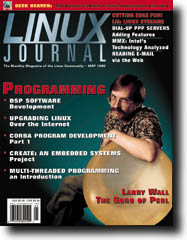
 May 1999 Linux Journal
The May issue of Linux Journal will be hitting the newsstands April 12. This issue focuses on Programming with an interview with Larry Wall, the guru of Perl. Linux Journal now has articles that appear "Strictly On-Line". Check out the Table of Contents at http://www.linuxjournal.com/issue61/index.html for articles in this issue as well as links to the on-line articles. To subscribe to Linux Journal, go to http://www.linuxjournal.com/ljsubsorder.html.
Linux Without Borders
Date: Thu, 4 Mar 1999 08:48:20 -0500 (EST)
Linux Without Borders is an
E-list dedicated to discussion and implementation of the
vision that in countries whose citizens are not yet rich enough
to own Personal Computers(PCs), computers must be *shared*; and
that the way to enable sharing while preserving individual
privacy is to install Linux, a multi-user, multi-tasking
operating system, on PCs owned cooperatively, or by businesses.
This will enable citizens to establish their own accounts on a commonly owned, or rented, computer, where they can do all the things that citizens of wealthier countries can do: write, do accounts, and -- perhaps most important -- use "their" computer to communicate with other people, in their own country and throughout the world.
To subscribe, send E-mail to: Majordomo@tux.org with the following line in the body of the message:
subscribe linux-without-bordersFor more information:
Tech Talk
The Chicago Tech Talk radio show, "The Linux Show", will be celebrating UNIX's 30th birthday with a special show on April 6 at 8PM CST. Host Jeff Gearhart will be interviewing Peter Salus. Listen in on-line at http://www.ttalk.com/shows/thelinuxshow/thelinuxshow.shtml.
Silicon Graphics Positions Available
Date: Fri, 26 Mar 1999 16:37:20 -0800
Silicon Graphics, Inc. is a leading supplier of visual computing and
high-performance systems. The company offers the broadest range of products
in the industry - from low-end desktop workstations to servers and high-end
supercomputers. Silicon Graphics and its subsidiaries have offices
throughout the world and corporate headquarters in Mountain View,
California.
Silicon Graphics has several key teams doing Linux development here in the bay area, and looking for experienced engineers to join.
The Linux Kernel Development team is defining and developing operating systems for SGI open source platforms, evolving the Linux technology to address SGI's key markets.
The Linux Platform Development team is putting Linux on our next-generation scalable multiprocessor servers. This work involves the Intel IA64 processor, and high performance scalable I/O subsystems.
The Storage Team will be taking the best File System SGI has to offer and moving that to the Linux community. They will also be moving our clustered File System technology based on XFS to Linux.
For more information: Carol Stanford, stanford@engr.sgi.com
Linux Links
LINUXCANADA.NET, The Future of Linux in Canada: http://www.linuxcanada.net/
Give your opinion on Linux Certification: http://www.linuxcertification.org/
Centuries 5,4,3,2,1,0 + Circadian Theory of Learning: http://people.tamu.edu/~carlson/bryson.html
The LINUX Forum: http://www.mediadrone.com/linux/
Index of Alternative Operating Systems, Linux news page: http://www.indexos.com/OS/Operating_Systems/UNIX/Linux/News/
The UNIX Guru Universe: http://www.ugu.com/
The LinuxStart.Com Project: http://www.LinuxStart.Com/
Marc Merlin's LinuxWorld Expo Page: http://marc.merlins.org/linux/lwce_winter99/
O'Reilly Summit Highlights Business Case for Open Source: Press Release
Investors in Red Hat: Press Release
NetBeans Ships One of the First Cross-Platform IDEs to Support Java 2
Prague, Czech Republic, March 2, 1999 - NetBeans today launched DeveloperX2 2.1, one of the first full-featured Integrated Development Environments (IDEs) to support and run on Sun Microsystems, Inc.'s Java 2(tm) platform. DeveloperX2 2.1 enables software developers to build sophisticated Java Foundation Classes (JFC) GUIs, compile, and debug applications on the platform of their choice. NetBeans also simultaneously launched a concurrent version, Developer 2.1, which supports Swing 1.1 and Java Development Kit(tm) (JDK) 1.1.
NetBeans Developer combines support for all stages of application development including visual design, coding, compiling, and debugging in a comprehensive visual programming package. It is available in two versions which run on all platforms that support JDK 1.1 and 1.2, respectively, including Windows 95/98/NT, Linux, Solaris(tm), HP-UX, OS/2, AIX, SGI Irix, and others. The IDE is based on JFC and JavaBeans Components, and all parts of the IDE are actually themselves JavaBeans. The result is an IDE where the user can fully customize the interface, modify component behavior and easily add new components.
NetBeans Enterprise will allow teams of developers to build full-scale distributed Java technology-based applications. In addition to the features of Developer, Enterprise will feature several additional modules: Version control systems support (integration with multiple vendors); database connectivity - JDBC; Enterprise JavaBeans support - EJB; distributed computing support - RMI and CORBA; and directory services - JNDI.
For more information:
http://www.netbeans.com/
Programming Web Graphics With Open Source Software
Date: Fri, 5 Mar 1999 10:13:39 -0800 (PST) Sebastopol, CA--Many people assume that creating web graphics requires graphics editors like Adobe Photoshop or Paint Shop Pro. But with Open Source software like Perl and GNU Image Manipulation Program (GIMP) you have the power to dynamically generate graphics based on user input and activity, easily manipulate graphics content, and optimize graphics for compression and quality.
Programming Web Graphics with Perl & GNU Software
By Shawn P. Wallace
1-56592-478-9, 470 pages, $29.95 (US$)
It's a little-documented field, and the valuable free libraries and tools available on the Internet are little publicized. From access counters and log-report graphs to scientific plots and on-the-fly animated GIFS, graphics scripting is within the grasp of most web scripters. "Programming Web Graphics with Perl & GNU Software" was written to provide a practical resource for intermediate and advanced web programmers who want to use CGI Scripts to generate dynamic graphic content.
For more information: http://www.oreilly.com/catalog/prowg/
Kudos to Trident
Date: Fri, 26 Feb 1999 16:20:15 -0500
I'm writing you to let you know of a recent hardware company's
exceptional support to the GNU/Linux community and the GPL.
The Advanced Linux Sound Architecture project ( http://alsa.jcu.cz/) is a project designed to build an architecture for pro-quality sound and MIDI applications, from low-level drivers for sound and MIDI hardware to high level libraries and sequencers. The project is committed to releasing all work under the GPL.
As you may know, many sound card manufacturers are reluctant to give any technical help, and even some of those that offer help require NDA's, which of course excludes the possibility of release source. We have blacklisted some companies (http://alsa.jcu.cz/black.html) who have either refused to release information or have decided to release binary-only drivers, which ALSA will not use.
Trident (http://www.tridentmicro.com/) recently contacted the ALSA developer mailing list, having written their own drivers for their 4D Wave chipset for ALSA, and offering the source for the drivers. They graciously allowed all of it to be put under the GPL, including technical documents.
I am hoping to drum up support for their hardware in order for the community to demonstrate how cooperation of this sort can aid sales. Maybe this will convince more companies to follow.
Their chipset is used in the following products. If GNU/Linux users are looking towards purchasing a sound card, perhaps they would consider some of the following, since these cards are well-supported under ALSA.
Company     Product Name
=======================================
Best Union  Miss Melody 4DWave PCI
HIS         4DWave PCI
Warpspeed   ONSpeed 4DWave PCI
AzTech      PCI 64-Q3D
Addonics    SoundVision (model SV 750)
CHIC        True Sound 4Dwave
Shark       Predator4D-PCI
Jaton       SonicWave 4D
Paradise    WaveAudio Interactive (Model AWT4DX)
Promedia    Opera CyberPCI-64
Stark       PCI
You can read more about ALSA and the call to sound card manufacturers at http://alsa.jcu.cz/call.html For more information:
Linux services new from VC3
COLUMBIA, SC March 15, 1999: VC3, Inc. announced today that the company will begin offering Linux services to corporations regionally. The announcement comes at a time when the Linux operating system, a UNIX-like operating system available at no charge to businesses, is gaining momentum as a cost-effective system of choice for running many business applications.
VC3 will provide Linux setup, configuration, and ongoing administration services for both mid-size and large companies in the Southeast. In addition, VC3 will support all Linux distributors that build their own versions of the Linux operating system, including Red Hat Software, Caldera Systems, and SuSE. This will enable VC3 to service and support all "flavors" of Linux.
VC3 will provide the Linux operating software as well as set up, configure, and administer the operating system for large and mid-size corporations. Installation requires about a half-day to one day. Installation and configuration prices vary from $200 to $5,000 depending on the project scope and number of servers.
For more information: http://www.vc3.com/
JES Linux Class
Date: Tue, 02 Mar 1999 12:43:38 -0800
Newport Beach, CA JES & Associates, Inc. is once again
stepping to the forefront to meet industry demands in
announcing a new course, 200L Linux Fundamentals. Designed
for newcomers to Linux, the three-day course will have its
debut run beginning April 5, 1999.
For more information:
http://www.jes.com/
Applix Launches Open Source Initiative With Applix SHELF
WESTBORO, Mass.--(BUSINESS WIRE)--March 2, 1999--Applix, Inc. (NASDAQ: APLX) a leader in decision support applications for Linux and Unix workstations, today launched its first Open Source initiative with Applix SHELF, an embeddable, full-featured programming language. With SHELF, application developers will be able to increase customization and extensibility of their applications by embedding Applixware language in their products.
Both Applixware and Applix SHELF are available for all major distributions of Linux, including Red Hat, SuSE, Caldera, and Slackware. They are also available for Sun, IBM, Compaq, and Hewlett Packard Workstations, as well as for Microsoft Windows 98 and NT. Applix SHELF is being released under the GNU Library Public License (LPGL), as defined by the Free Software Foundation, Cambridge, MA. Under LPGL, Applix SHELF is freely usable in either the original or modified form. It is available now for free download at Applix's new Open Source-oriented website.
For more information:
Applix, Inc., http://www.applixware.org
esh -- A New UNIX Shell
esh is a new shell for Unix, written completely from scratch. It is very small, both in number of lines of source code and in memory consumption. The whole shell is about 5000 lines of C source code, and occupies about twice as little memory as bash in some cases.
However, esh is also extremely flexible, with a real programming language at the core. The syntax is a simplified form of Scheme.
For more information:
Ivan Tkatchev, http://esh.netpedia.net
Debian GNU/Linux 2.1 'Slink' released
Date: Wed, 10 Mar 1999 12:06:46 -0500
Debian GNU/Linux 2.1 'Slink' has officially been released on March 9, 1999
for the SPARC, Intel x86, Alpha, and Motorola 680x0 architectures. Release
notes, installation instructions, and other information is available at
http://www.debian.org/releases/slink/
Debian GNU/Linux 2.1 contains over 2250 precompiled binary packages contributed from over 400 developers, including all of the favorites: web servers, GIMP, gcc, egcs, XFree86, SQL servers and many other tools and utilities.
Debian's new powerful package manager 'apt' allows for easy installation, maintenance and updating of packages including sophisticated handling of dependencies and configurations. Packages from other distributions can easily be installed using the 'alien' utility.
For more information:
Debian Press Contact, press@debian.org
Debian homepage: http://www.debian.org/
PROFUSO Mail Gateway
Date: Wed, 10 Mar 1999 13:00:24 +0000 (/etc/localtime)
PROFUSO proudly announces version 1.0 of PROFUSO Mail Gateway
"Personal Edition", the freely available personal email to WWW
gateway.
We can make this powerful software available for free because the development of Personal Edition is supported by its commercial edition (PROFUSO Mail Gateway Server Edition), that is multiuser and lets you create web based e-mail services (like H*tmail).
PROFUSO Mail Gateway is a server software for the Linux operating system that allows to send and receive e-mail using only a web browser. PROFUSO Mail Gateway extends all the functionality of e- mail, including multimedia and attachments, over the WWW. When installed on your Linux web server, all you need for e-mail is your favourite browser.
PROFUSO Mail Gateway is available in two versions: "Personal Edi- tion", that is single user and freely available from our WWW site and "Server Edition", that is commercial and multiuser and lets you create your own free web e-mail service in minutes.
You can download your free copy or obtain more information on the Server Edition at our site:
http://www.profuso.com/products.html
For more information:
Giuseppe Zanetti,
beppe@profuso.com
WebEvent! Web-based calendar software
Date: Thu, 25 Mar 1999 01:15:42 -0500
Please add WebEvent, our web-based calendar and scheduling software
to your list of Internet applications. WebEvent has been available
for Linux since 1995 and the commercial version has been around for
over a year and a half.
WebEvent is an interactive web-based calendar that allows you to view and modify calendar-type events from any computer that can run a web browser. Features include multiple views and formats, event types, repeating events, event reminders, searchable calendars, meta-calendars, conflict resolution, source coude, and an easy to use web-based interface.
For more information: http://www.MatadorDesign.com/
SuperAnt CD-ROM with Mini-Distributions
Date: Wed, 24 Mar 1999 17:56:19 -0800
SuperAnt is announcing that effective immediately,
they will be making available a Mini Linux Distribution CD-ROM.
The Mini Distribution CD-ROM contains small rescue releases of Linux
and packaged Linux systems that require only diskettes to boot from.
Some contain XFree for Linux, allowing graphics use on properly
configured systems. Some of the included distributions are Small Linux,
Trinux, Linux Router Project, muLinux, Toms Disk, and LEM.
The CD-ROM contains more than 600 megabytes of files.
SuperAnt is a Linux and Open Source technology provider and packager, selling and marketing business and recreation CD-ROMS on the Internet.
For more information:
http://www.superant.com/
Steven Gibson,
superant@superant.com
HELIOS products and support for Linux
March 18, 1999- CeBIT '99, Hannover, Germany, Hall 9, Booth C25- HELIOS Software GmbH announces the availability of its EtherShare 2.5, EtherShare OPI 2.0, PDF Handshake and Print Preview products for the Linux operating system on computers based on Pentium processors. HELIOS PCShare 3 will also be available for Linux later this summer.
HELIOS Software supports Linux with its file server, print server and PrePress applications on the HELIOS CD014, available in April. HELIOS CD014 includes a minimal Redhat Linux runtime to support the HELIOS software applications as well the Linux TCP/IP, NFS, FTP and Web services to serve Macintosh, Windows, UNIX and Internet clients.
For more information: info@ugraf.com, http://www.ugraf.com/
HELIOS Software Gmb, http://www.helios.com/
Communicator 4.51 now available for Linux
Date: Tue, 09 Mar 1999 08:49:20 -0800
Netscape
just released Communicator 4.51 today (Tuesday, March 9), including the
Linux version. This is the first update to Communicator 4.5 since its
release last October. It includes a Netscape branded version of AOL
Instant Messenger 2.0 (enabling group chat), Quotes Anywhere (via Smart
Browsing keywords), improved stability and in addition to several
performance enhancements, this release corrects potential security
vulnerabilities reported in recent months by independent programmers.
Communicator 4.51 is available for download via Netscape Netcenter at http://home.netscape.com/download/

 The Answer Guy

 a small question --or--
What's wrong with internal modems?
Error starting recompiling process?How Can I Delete? --or--
No rule to make target 'config' --or--
Fvwm95-Wharf --or--
a small question --or--
What's wrong with internal modems?
Error starting recompiling process?How Can I Delete? --or--
No rule to make target 'config' --or--
Fvwm95-Wharf --or--
 Another "No Login" Problem: A little tip
Multilink PPP using Linux --or--
New Linux Distribution --or--
login source code --or--
Personal LAN setup... --or--
Good morning!!! --or--
diald dials every hour... --or--
Modem Problem --or--
Plee for help
security issue, /etc/passwd --or--
Linux and Y2K
Your approach to Y2K problem --or--
Greetings from Jim Dennis
Another "No Login" Problem: A little tip
Multilink PPP using Linux --or--
New Linux Distribution --or--
login source code --or--
Personal LAN setup... --or--
Good morning!!! --or--
diald dials every hour... --or--
Modem Problem --or--
Plee for help
security issue, /etc/passwd --or--
Linux and Y2K
Your approach to Y2K problem --or--
Greetings from Jim DennisDear Bill,
Thanks for the offer letter. Of course, I'll take that promotion. I'd love a senior marketing position at Microsoft's sunny Seattle campus.
I'll be happy to help MS focus on its core competencies (making mice, joysticks, keyboards, and the exciting new "Talking Teletubby (TM)" line of toys. It's definitely the best thing since "Teddy Ruskin (TM)" and the "Cabbage Patch (TM)" dolls.
(I have some interesting strategic proposals for dealing with the Mattel and Fisher-Price problems, but we'll discuss them when you meet me at SeaTac next week. Not that they're anti-competitive or anything like that! But be sure to "secure delete" this e-mail after reading it. Too bad you don't have that new "one-time reader" code integrated into Outlook (TM) yet. We're still stuck using that old Norton code)
I agree with your assessment about software. That's definitely passe. We'll only have a couple more years before those Linux geeks completely eat our lunch. Believe me, after this prolonged undercover assignment that I've been on I know all about Linus' subversive plan. BTW, thank Paul for starting that company to hire Linus. I would have hated to go to Helsinki and attempt the infiltration during one of their winters. I'm sure he was right to put that down here in the Silicon Valley; the ploy might have been a little too transparent if we'd put it up in King county.
It's too bad that MSN has been such a flop so far. How are the AOL acquisition plans going? I still think you should set up a European shell to do that. If Daimler-Benz can buy Chrysler than I don't see why we can't have British Telecom come in and nab AOL.
Luckily MSNBC is doing pretty well, and should be ripe for the Senate elections in 2002. We definitely have to finish our diversification out of software before then, since I don't think we can string out the W2K delays much longer than that.
By the way, we should fire that red bearded freak that's been ghostwriting "The Answer Guy" for me. He's actually been HELPING our customers put Linux on OUR computers and I heard that he said some choice personal things about YOU. I even heard he got access to some of our internal memos and is planning on leaking them to "Obi Wan Raymond." (http://www.userfriendly.org/cartoons/archives/98dec/19981203.html)
After those "Halloween" fiascos I'd hate to see an "April Fool's Document...."
Using a 286 as a Serial TerminalFrom Richard Mills on Sun, 07 Mar 1999
Is there anyway to set-up a 286 ps/2 with and without a hard drive, for use as a dumb terminal over null modem? Specific program names would be great, I cant find a good terminal emulator for it. Also instructions for how to set it up on the client end would be super.
Thanks for your help.

You can still find many MS-DOS compatible programs at ftp.simtel.net --- (which is actually an alternative name to ftp.cdrom.com --- the largest archive on the net)
You can find some in /pub/simtelnet/msdos/commprog and others in /pub/simtelnet/msdos/telix/
Note that Telix, Procomm, Qmodem, Telemate and most of the good terminal emulation packages for MS-DOS were not free. They are shareware. The last time I tried to register a copy of Telix I found that the company which had aquired the rights to the package had basically no interest in the MS-DOS version. They have a Windows version which seems to be the only one they still update. Luckily we don't need updates for simple terminal emulation over null modems and simple file transfers.
Another approach would be to use the MS-DOS version of Kermit from Columbia University. This should be adequate for most simple terminal operations and it has an excellent scripting language (as does Telix).
Good luck!
What's wrong with internal modems?From Darrell Spice, Jr. on Sat, 06 Mar 1999
I was reading your response about the "winmodems" and wonder what's
wrong with an internal modem? Not all internal modems are "winmodems",
the USR 56K modem I use works fine with better operating systems
everywhere
My opinion on internal modems was gelled long before Windows was written. I think they are a bad idea. It's a matter of personal prejudice, borne of long years of experience. It is an opinion shared by most BBS sysops ISP sysadmins and other "industrial grade" computer users.
One reason I avoid them is that I've seen internal modems meltdown and take out a motherboard with it. I've seen that twice. I've never heard of an external modem damaging a system through a serial line.
However, it works for you --- so, by all means, use it. (They can be a bit cheaper, and many will only expect about two years use out of any modem they get so it might make sense for some users on financial rather than technical grounds).
 Error starting recompiling process?
From darod on Fri, 05 Mar 1999
I get an error when I try to recompile the kernel. Actually, I get the error before I even get into the recompiling process. Here it is:
When I try to run "make menuconfig" I get the errors ( I've
included a screenshot of what errors show up) in question. I'm a
newbee pretty much. I've had Linux on my machine for about 2
months. I've recompiled before but, I was using the "workstation"
option in Mandrake. I am now using the latest version of Mandrake
with the latest version of KDE.
I chose the "custom" option for
install this last time and now I'm running into these problems. I
talked to several people about this and they have advised me to
install these files;
kernel headers (I knew about this one)
kernel source (I knew about this one too)
gcc (I didn't know about this one, but I loaded it and it
still gives me the errors)
Headers just the portions of the kernel that some other programs need to know to run compile and run under it. So, if you install just the headers you can't compile a new kernel --- but you can compile various programs that need to refer to kernel function prototypes and defined values (constants).
The sources are needed to compile a new kernel, of course.
gcc is the compiler (GNU C compiler). It's the tool you use to compile anything on a typical Linux system. There are also some derivative alternative compilers like egcs available.
 I need help with this, I hope you can help me. I want to
recompile the kernel so that I can setup my iomega zip drive.
I need help with this, I hope you can help me. I want to
recompile the kernel so that I can setup my iomega zip drive.
These errors are from the compiler's inability to find various header files. This is almost certainly due to a problem with your installation.
On a properly configured system you should have a couple of symlinks from /usr/include to directories under /usr/src/linux. On my system these look like:
lrwxrwxrwx   1 root     root    26 Nov 23 16:39 /usr/include/asm
               -> /usr/src/linux/include/asm
lrwxrwxrwx   1 root     root    28 Nov 23 16:39 /usr/include/linux
               -> /usr/src/linux/include/linux
lrwxrwxrwx   1 root     root    27 Nov 23 16:39 /usr/include/scsi
               -> /usr/src/linux/include/scsi
Once these sylinks are in place (and there's a symlink from /usr/src/linux to the actual location of your kernel sources) you should be able to build your new kernel and other software properly. (In your situation I'd expect that almost nothing would compile --- those symlinks are used by alot of software).
Thanks in advance,
Darrin Rodriguez
Error starting recompiling process?From darod on Sun, 07 Mar 1999
Ok,
So your telling me that you think I probably won't be able to compile anything with the way things are now on my machine configuration, right? Well, what can I do short of installing the OS again? I don't want to loose all the tweaking I've done already if possible! What can I do with this thing?
Darrin
MAKE THE SYMLINKS
... and:
MAKE SURE THE SYMLINKS ARE RIGHT
I realize that my long description of what these symlinks are and why you need them didn't actually spell that out in simple, bold terms like this --- but that's what I meant.
Deleting Files and UNIX PermissionsFrom martin a. salazar on Fri, 05 Mar 1999
Hi,
How can I delete files with attributes like these.
b---r-----   1 10080    24640     96,  68 Feb 10  1977 csh.cshrc
b---rwxr--   1 24672    8231      32,  39 Dec 16  2010 exports
Regards,
Marty Salazar
Newgen IT Corp.
marty@newgen.net.ph
Under UNIX (and Linux, of course) you need write access to the directory in which a link occurs to remove that link. So in a mode 777 directory you can remove any filename (link) REGARDLESS OF WHO OWNS THAT FILE AND REGARDLESS OF THE PERMISSIONS ON IT.
(As a special case under Linux and most modern versions of Unix if the mode of the directory is "sticky" --- mode 1xxx --- then you must have write access to the directory and you must own the file, or be root, to unlink/remove it).
Note that I've made a distinction here between the file and its names (links). In a Unix/Linux filesystem a file is an association between an inode (a management and meta-data structure) and a set of data blocks (the data or file contents). The file's name is a link from a directory to the inode. There can be many such links or "hard links.
Thus the process of removing a file involves "unlinking" it. When the link count is zero (there are no remaining links to a file) and there are not processes with a file open, then the filesystem driver removes the actual file (that is it marks the inode as deleted and adds all of its data blocks back to the "free" list.
So the 'rm' command doesn't actually "remove files" --- technically it "unlinks files from directories" (which often has the side effect of reducing the link count to zero and consequently deleting the file).
Understanding this hopefully explains why write access to a directory is generally sufficient to remove files in it.
Now regarding your example:
The filenames you show here would normall be related to regular files in the /etc/ directory. However the "permissions" you show suggest that these are block device nodes (links to thinks like your /dev/hda1, etc).
Moreover the ownership/group fields are rather unlikely to be valid UIDs or GIDs on your system. This suggests that you have a rather thoroughly corrupted filesystem. So, my first suggestion would be to boot from a clean rescue floppy and try 'e2fsck -c' Then consider re-installing Linux (after backing up any data, of course).
Recompiling Kernel to Support CD-ROMFrom PEREZ, Martin on Fri, 05 Mar 1999
Hi,
I am new to Linux and I though I would start on Red Hat 5.1, I'll
upgrade to 5.2 when I am happy and used to installing 5.1. Now I am able to install without an error, however, when ever I attempt to mount a CDROM with the -tiso9660 I get the error saying the format is not recognize. Therefore, I try to recompile the kernel using a 'make config', but WHAM!! I get a response of 'Nor rule to make target 'config". I have installed the relevant C libraries and the like on install. Please Help!!!
Martin Perez
I usually put a space between my -t and my filetype specification. That might not be a problem, let's see...
O.K. The mount command doesn't care.
I can't say whether there is some other problem with the mount command that you are attempting since you don't give a full example of that command line.
In most Recent versions of Red Hat Linux the kernel is modular. Thus the iso9660 filesystem type is often contained in a module rather than being linked directly into the kernel. You can see which filesystem are currently linked into your kernel and/or provided by loaded modules by using the command
cat /proc/filesystems
... which is a dynamic list.
Perhaps you need to load the iso9660 module from its home under /lib/modules/X.Y.ZZ/fs/ (where X.Y.ZZ is your currently loaded kernel's version number). You could use the 'insmod' or 'modprobe' commands.
But wait. Many of us don't have to manually load these modules. What's going on?
Well, there is a daemon (kerneld) which dynamically loads kernel modules "on demand" --- when it's properly loaded and configured. The phrase "on demand" means slightly different things (under the hood) for device drivers, filesystems, and network protocols. Also kerneld was a 2.0 thing. The new 2.2 kernels should be using a different facility called 'kmod' instead.
So, it could be that you have a problem with your dynamic module loading subsystem.
This all suggests that you've either changed things a bit from the default Red Hat installation, or that you haven't successfully completed that installation. You might want to build/rebuild your modules "dependencies" table. You can do that with the command:
depmod -a
... which is often in the startup scripts (/etc/rc.d/*) somewhere. "modprobe" and the dynamic module loaders require this information in order to load interdependent sets of modules in the proper order. For example, the iso9660 filesystem module depends upon lower level CD-ROM device support. (They aren't combined into a single module for a few reasons: first a CD can have non-ISO9660 filesystems on it; Linux allows this; also, there are many different CD device drivers for non-SCSI and non-ATAPI CD-ROM controllers).
So, try that.
No, regarding your problem with building a new kernel. Naturally you have be "in" the proper directory when you start this process. That would usually be /usr/src/linux --- which is usually a symlink to the top level diretory of a specific set of kernel sources.
It's possible that you've installed just the kernel headers. This allows you to build other programs (which need to know about certain kernel prototypes and defined values (constants). However, you need to install the full kernel source set to actually build a kernel.
You can try the command: make menuconfig
or: make xconfig
... to get a more attractive and friendly interface for configuring your kernel. It's also possible to manually edit your .config file --- if you insist.
Anyway, make sure that you actually have the kernel sources installed, not just the kernel headers. Also make sure that you're in the correct directory and, if you're following a symlink, that the symlink(s) point to the right place.
fvwm95-Wharf: xterm comes out black?From Siddharth Kashyap on Fri, 05 Mar 1999
In fvwm95, I start Wharf. Through I click at xterm icon. This gives me a DARK BLACK xterm window. Please help. This only happens when I enter as a user, not root. I am using Red Hat Linux 5.2
I'm not familiar with this "Wharf." I presume it's a fvwm-95 "module" or a small applet which gives you a little "applications dock" --- like AfterStep and the old NeXT desktop, perhaps. If that's the case --- perhaps you have to check some configuration file for Wharf to see if it is starting your xterm with weird command line options.
One trick you can try is to go to a text mode terminal using [Ctrl]+[Alt]+[F2] or such (log in as the same user that is running your X session) and start an xterm from there. You could use the following command:
xterm -display :0 -bg cyan -fg black
... which will start the 'xterm' from outside of that process group. Assuming that this works --- it suggests that your configuration somehow has some weird settings for launching its xterms. We're bypassing those settings and manually starting one.
The the challenge is to track down which part of your system is harboring those settings.
More on fvwm95 WharfFrom Siddharth Kashyap on Fri, 05 Mar 1999
I have Red Hat Linux 5.2 I want to know is this a bug. In the fvwm95 I start something called Wharf. (If you click your mouse on the desktop, you get some options. One of them is Sytem Utilities. In System Utilities, there is Wharf). When you click at Wharf it opens an icon bar. One of the icon is for xterm. When I click at the icon I get a blank xterm window. Please help me.
Incidentally, it is conventional to keep your .sig (signature) to about 4 lines. Your correspondents probably won't appreciate receiving mail where the "signature" is longer than the message at hand.
Even after all these years, Brendan Kehoe's "Zen and the Art of the Internet" is an excellent guide to the customs and etiquette conventions for many Internet protocols (including e-mail and netnews).
[ Zen and the Art of the Internet can be found online at http://www.cs.indiana.edu/docproject/zen/zen-1.0_toc.html. -- Heather ]
Another "No Login" Problem: A little tipFrom Jens Christian Gram on Wed, 03 Mar 1999
I have experienced the "no login" problem in both RH 5.1 and RH 5.2. The problem seems to be that the /bin/passwd command has applies some restrictions to the entered passwords (they can not be to short, to simple ...). When you use the graphic tool, no restrictions are applied, but you can not log in, if the password violates the restrictions from passwd.
I hope you understand what I mean, and that you can use my help, even though I am relatively new at linux.
Jens Christian Gram
The normal Linux 'passwd' command does attempt to enforce a "strong passwords" policy --- to ensure that the user will pick passwords that are unlikely to be in a potential attacker's 'crack' dictionary. 'crack' is a program that hashes (encodes) a list of words (a dictionary) into every variant of the way it might appear in a given password file (/etc/passwd). This is much more efficient than a true "brute force" attack.
In any event --- the GUI tool obviously has a bug it it --- since it just calls the underlying 'passwd' command and doesn't relay the error messages back to the user. I personally consider that to be a major flaw and would suggest that sysadmins remove this program (python script?) from their systems until it's fixed.
Modem Multi-link PPP: EQLFrom Spears, Michael T. on Tue, 09 Mar 1999
Are you familiar with setting up a Multilink PPP connection using two dial-up modems (v.90) and Linux as the client? Is so, can you point me in the direction of the documentation for setting this up?
Thank you, Mike Spears
You can also get broader results doing Google (http://www.google.com), Yahoo! and other search using the phrase: "linux eql" or "+linux +eql"
The Linuxcare search engine (http://www.linuxcare.com) comes up with the README.eql file on this keyword. It also comes up with a number of interesting links on the phrase: "multilink ppp"
See if those help. The README.eql file is included in your Linux kernel sources.
How to Create a New Linux Distribution: Why?From Cesar A. K. Grossmann on Tue, 09 Mar 1999
Hi James, it's me again...
A friend asked me how to build a new Linux CD-based distribuition, but I have only some clues, can you help me?
I have identified some major tasks a future Linux distributor must deal:
Did I missed something (or: is this the "New CD Based Linux Distribution HOWTO")? There are any documents at the Internet that can help anyone who wants to make a new Linux CD based distribution?
The most important step that you seem to have missed is to ask: "Why?"
.. Why create a new distribution? Why are the current crop of distributions inadequate to your task? ..
This leads to other logical questions:
What other distributions are out there? What are their weaknesses for your purposes? Could any of them be modified to your needs?
Someone wanted Red Hat Linux with KDE. So we have Mandrake. Someone wanted Slackware with support for RPMs so we have S.u.S.E. Some people didn't want to use RPMs so we have Debian. (Actually the roots and histories of these distributions is far more colorful and involved than I'm implying; but I'm trying to make a point).
Keep in mind that you could start with an existing distribution and create a "installation profile" (S.u.S.E. even allows you to store these on floppy and use them for future installations). With Red Hat's distribution you can create a "KickStart" script which is effectively an installation profile (and installation automation tool).
With Debian you'd have to do more scripting on your own. However it could certainly be done.
Incidentally, you missed one of the chief differences among distributions in your list:
Pick a Package Format
... personally I don't like the Linux penchant for re-inventing wheels. The FreeBSD "ports" (NetBSD "packages") system is rather nice in that it's basically a huge set of Makefiles. These get the "canonical" version of a package and do whatever is necessary to unpack, patch, build and install it. Naturally 'make' handles dependencies.
So, if you really want to make a new distribution and you don't have an over-riding vision for "why" --- think about creating one around this concept.
However, I think we've got enough variations of this wheel for now.
Seeing Stars During LoginFrom john walshe on Tue, 09 Mar 1999
Hi Jim,
I am wondering how you would get the * to come up on a screen for each character pressed when someone is entering a login password on a unix platform.
Thanks, John.
I suspect that this is at least one reason why the login program doesn't provide visual cues for each character you type. Another is that it would reveal the length of your password to any shoulder surfers in your vicinity any time you logged in.
I was amused that the Lotus Notes login dialog (under Windows) would spit out a random number of *'s for every keystroke you entered in the password field of the dialog. So you knew that the keyboard was responding --- but couldn't tell if you'd "bounced" some keys. That doesn't seem like much of a "solution."
In any event --- feel free to play with it. Understand that 'login' is a security sensitive program. The slightest mistake you make there can probably be exploited to take over your whole system. So, I wouldn't deploy this on exposed servers unless you are very sure of your programming skills (or very foolhardy --- as the case would more likely be).
Setting up a Personal/Home LANFrom DrDave on Tue, 09 Mar 1999
Hi!
You may remember me from a couple of months ago, when I wrote you in my first weeks of using Linux, asking about the correct way to put together a bash script to remove spaces from filenames being copied from a Win98-generated CD. Since then, I've fallen for Linux like a stone, and I only return to Win98 when I need to do something with minimal or no support under Linux. (I'm working on the C chops, but they're nowhere near close to solving many of my problems elegantly. Grrrr.)
One of these things is the operation of a WebCam. Now, I've been through the bttv etc. sites and tried a number of things, but I'm forced to face the fact that my capture card is not supported under Linux.
[ Did you try WebCam World? Their developer's area seems to be trying to track all software that supports webcams, including Linux based apps, at http://developers.webcamworld.com/slist.html
With our fast pace of development it's also worthwhile to keep checking. I found this by feeding "+webcam software +linux" to Yahoo! -- Heather ]
My first thought was that I'd put together a driver in C for the card. After the laughter quieted to a dull roar, I dropped that idea. My second thought was that I'd just have to buy a new capture card. Not bad, but I do like a fair amount of the software I have that works with my current card. Hmmm.
Third thought: Build a mini-LAN. Rehab the old 90MHz Pentium in the closet, throw an ethernet card in it, and run the webcam/software on that box, but get access to the images/clips it produces from my "main system" running Linux. I like this idea because it seems like it will work well for most things I like to do with my cam, and because I can learn a ton about networking in the process.
Pardon my circumlocution. I'll get to the point: (hehe)
I've done some looking at the most available docs, including the networking HOWTO and a couple of books I bought on general Linux things, but none of them address my situation directly, and I'm a complete novice to networking, so I'm having trouble bridging the gaps. Perhaps you can help...
Question 1: What networking protocol should I aim for? A friend who runs a major NT based network suggested setting things up with NetBEUI, since I'd have next to zero configuration to do before getting things running. I haven't seen this addressed anywhere directly.
You want TCP/IP. In a real pinch you might use IPX (the Novell protocols). However, the whole Internet uses TCP/IP and even the latest versions of Netware and Windows prefer TCP/IP.
Question 2:
I need to be able to access the mini-LAN and my PPP connection from my
linux box concurrently so, for example, I can have the webcam generate
and stamp a .jpg image on my w98 box, and have a background job on the
linux box ftp'ing the files to my ISP's web server. What are my major
concerns here? If I can't avoid a using an IP-based protocol on my LAN
(so my w98 box needs an IP address), how do I make this work?
Thus your PPP interface will use the "real" IP address and all of your other systems will speak to the Internet through that one system (which is then your "router" and/or your "proxy").
There is a technical, though somewhat blurred, distinction between a "router" and a "proxy host." Linux can act as either or both concurrently.
One feature that's built into Linux is "IP masquerading" a particular form of "NAT" (network address translation). This allows it to re-write packet headers as it routes packets. When properly configured this will allow a whole network LAN to look like a single, busy, system to the rest of the Internet.
So, let's assume that you set up an ethernet. You decide to use 192.168.99.* for your IP addresses. According to RFC 1918 you can use any of the 192.168.*.* addresses, and/or you can use 10.*.*.* and/or you can use 172.16.*.* through 172.31.*.* (now you don't have to read the RFC --- since that's all of the most important notes from it right there).
So, your Linux system sees that as eth0 (the first, and probably only ethernet interface on your host). So you'd have a script that looked something like:
ifconfig eth0 192.168.99.1 netmask 255.255.255.0 broadcast 192.168.99.255
route add -net 192.168.99.0 eth0
ipfwadm -F -a acc -m -S 192.168.0.0/16 -D 0/0
... which would configure the interface, add the route (automatically done in 2.2.x --- but necessary in 2.0.x and earlier), and add a special entry to the "forwarding" table for the kernel's IP packet filtering (so-called "firewall").
Your PPP configuration would set the default route (out to the Internet). You might use manual dialing or a program like 'diald' to automatically dial your ISP whenever packets get directed for it (dial on demand). I've heard that newer versions of the PPP daemon (pppd) support dial-on-demand directly --- though I haven't tried it.
Search through the back issues of my column. I've described IP masquerading, diald, PPP, and routing in considerable detail and on a number of occasions.
There are also HOWTOs on these subjects --- look at the canonical LDP (Linux Documentation Project) website at: http://metalab.unc.edu/LDP
In particular you might want to look at these:
- Networking Overview HOWTO, by Daniel Lpez Ridruejo
- http://metalab.unc.edu/LDP/HOWTO/Networking-Overview-HOWTO.html
- ISP Hookup HOWTO, by Egil Kvaleberg
- http://metalab.unc.edu/LDP/HOWTO/ISP-Hookup-HOWTO.html
- ISP Connectivity mini-HOWTO, by Michael Strates
- http://metalab.unc.edu/LDP/HOWTO/mini/ISP-Connectivity.html
- PPP HOWTO, by Robert Hart
- http://metalab.unc.edu/LDP/HOWTO/PPP-HOWTO.html
- Diald mini-HOWTO, by Harish Pillay
- http://metalab.unc.edu/LDP/HOWTO/mini/Diald.html
- IP Masquerade mini-HOWTO, by Ambrose Au
- http://metalab.unc.edu/LDP/HOWTO/mini/IP-Masquerade.html
... those are a good start.
- SMB HOWTO, by David Wood
- http://metalab.unc.edu/LDP/HOWTO/SMB-HOWTO.html
... this will give you an idea of how to use your Linux system as a file/print server for your Windows boxes --- using Samba. That may be necessary or at least helpful for your application.
- IPCHAINS HOWTO, by Paul Russell
- http://metalab.unc.edu/LDP/HOWTO/IPCHAINS-HOWTO.html
... the 2.2.x kernels use this instead of ipfwadm --- so you may need to read this if you've upgraded your kernel.
Question 3:
Am I getting in way over my head here?
I realize this is a pretty broad question for this forum, but any advice
you can send my way would be greatly appreciated. I also figure there
are probably a fair number of people out there making the Windows->Linux
transition who might be interested in a similar solution for a multitude
of problems.
Thanks again, David
Essay QuizFrom Nilda on Wed, 10 Mar 1999
Thanks for the refreshing essay assignment, but I have work to do. I don't remember signing up for a class in comparative OS religions and I don't have the time for this sort of childish prattle.
If you are really interested in answers to these questions please feel free to search through some web sites --- particularly through the archives of the main "Linux media watchers" web sites:
- Linux Weekly News
- http://www.lwn.net
- Linux Today
- http://www.linuxtoday.com
- LinuxWorld
- http://www.linuxworld.com
... these have links to hundreds of recent press clippings from sources as diverse as small local newspapers and magazines like Scientific American. Those are a more suitable source of this sort of information.
When corresponding with people in the Linux community it's unwise to "come off with a 'tude" --- like doling out an writing assignment or as though we "owe you" something. Most of us are volunteers. Those who ask me for free support at least owe me some courtesy --- and doing some preliminary research and/or explaining your specific needs and background is the least of that.
Your questions are very broad --- there are rows of books devoted to the workings of Linux, and several ("Unix for the MS-DOS User" et al) that specifically compare Unix (and therefore Linux) to other operating systems. As for the marketing hype and drivel that you seem to be inviting --- the web sites I've listed above should provide links to plenty of that.
I hope those help answer your questions. Please also feel free to read a few back issues of my column to get an idea of it's true purpose.
Overactive dialdFrom PCTech1018 on Wed, 10 Mar 1999
Hello Jim,
I have been following Linux Gazette and your Answer Guy column for about
6 months now. You do a good job as far as I need (other people may need
more than I do).
Situation: I have a Linux PC (RedHat 5.2) running as a dial-on-demand Internet Gateway using diald. It works great. I have Samba up and running as well as named. I can connect to the internet from both my Linux PC and Windows95 boxes. When the connection is down, and I attempt to connect with ftp, ping, http or whatever, diald correctly establishes the internet connection to my ISP.
Everything is hunky-dory except one annoyance: diald dials every hour whether or not someone is attempting an internet connection. How do I get this to stop?
Thanks, Darren
'diald' has features to filter out some sorts of traffic from its consideration as "activity" for the line. Thus it can be configured to ignore some sorts of packets.
Read the diald man pages for more details on that.
[ The University of Oregon hosts a site which points at lots of documentation for Linux. At http://limestone.uoregon.edu/woven/linux-doc-other.html#LMP you should be able to find a website near you carrying manpages, if there aren't adequate ones on your installation. -- Heather ]
Another Lost SoulFrom gme947 on Fri, 12 Mar 1999
I recently bought a 56K V.90 modem. I am currently using the old Windows 3.1 and the information sheet included with the modem tells me to set the jumpers. I did all of this for Com2 IRQ3. Where do I put the Modem inf files so that my computer will recognize my new modem. I was able to use the dialup in DOS but not in Windows. I could not get Netscape to recogize the new modem. What should I do? The Modem is a NewCom
Thanks
One problem with that is that you bought a modem from a manufacturer and retailer that apparently won't provide you with any technical support (otherwise it seems unlikely that you'd be asking me this question).
A related problem is that you're using an OS and set of software packages which is also unsupported by its manufacturer. (Remember that next time someone says "Linux is unsupported" --- clearly MS-DOS and Windows are even more so).
Yet another problem is that you are suffering from some misconception about how Netscape's Navigator works. A web browser doesn't interact with your modem at all. It communicates with a TCP/IP networking protocol suite or "stack" as they are commonly called.
In all likelihood any modem using programs on your system can already recognize your modem. There is some set of options you might have to pu in your SYSTEM.INI file so that Win 3.x programs can determine the COM port and IRQ that you've installed this modem at. I don't remember the specifics (as it's been years since I used or supported Windows 3.x). So you'll have to play with "Control Panel" and "Setup" until you bumble across the widgets that set these --- or read some manuals to find examples that you can put in with a text editor.
Plee for helpFrom Ian on Wed, 17 Mar 1999
Hi there Jim....
My name is Ian van Battum and I am a desperate man.
I have recently wanted to further my computer studies and have found Linux to be a great OS to learn and master. Being a complete newbie to Linux, I am not a stranger to OS's and what have you.
I have how ever a small problem. I have a laptop on which I would like to load Linux. Unfortunately it only has a floppy drive. So I need to go through the slog of installing off a 'million' and one floppies. This is not a hassle though but I am stuck when it comes the old procedure of doing this task.
Somewhat more durable in their efforts are a 6-diskette Debian base packages install (after which it will be able to use even a fairly fragile connection, and retry as necessary).
Of course Linux hasn't got the only spot in this limelight. FreeBSD will also install via FTP given its single boot floppy, but you do need a solid enough link to get the 'bin' distribution... although they do have their 'distributions' (base file sets; yeah, I know, it kind of confused me the first time I saw it, too) split into parts so they can be copied onto floppies and recombined, I've never actually done an install that way.
If it weren't a laptop then it would be pretty easy to swap your hard drive into another system, apply the new OS, and then return it to your system. Of course if it weren't a laptop, it would be worth buying a super-cheap 2X CD-ROM... maybe even used, or as a giveaway from a friend joining the multimedia age.
As for adding peripherals, you may not be as out of luck as you think. Most laptops have a parallel port, and ZIP support across parallel ports has been in Linux for a while now. So, you could potentially get a lot more files onto a ZIP. There are a few parallel based CD-ROMs such as the Backpack, but I'm not sure how well Linux supports them. And, there's usually your CardBus or PCMCIA slots... which I call "piecemeal"... as in that's how they let you upgrade your laptop, by pieces.
My own Ricoh Magio E laptop installed TurboLinux great from an Addonics PCMCIA based CD-ROM (ATAPI/IDE drivers were used) with only the help of also using its 'additional hardware' disk, and making sure that the CD's card/cord was plugged into the lower bay in the type III cardbus slot. The only trick there is, the install floppy has to be able to spot your CardBus or pc-card controller, and you have to use a device whose card can be found in the card manager's database.
If you have a 3'5" sized drive, you might actually be able to do this the same way a non-laptop user would, anyway. (I had an ordinary 3.5" drive on my Sager-Midern Pentium-60 laptop, in a special removable slide. It was great. It's a shame the video finally broke and now it won't start. Eventually I'll make enough free time to take it by a repair shop and see if they can do anything for it.) If it has a PCMCIA sized drive, then there are PCMCIA ports for desktop machines, as well. However, many laptops have proprietary internal setups, and some manufacturers have a policy that says you void the hardware warranty if you take out anything. So, be sure what you're getting into before you consider that route.
Of much greater concern for an older model system, since Linux has pretty darn good support for older hardware, is whether your hard disk has enough space for what you want to do with it. The Sager-Midern mentioned above fit a Caldera Network Desktop on a 500 MB drive fairly easily, but newer distributions have more stuff, and certain packages (like X networking, emacs, and source trees) have grown quite large over time.
Do you have any suggestions to resolve my problem as I have gone through
all the web sites? I would be really greatfull if you could shead some
light on this for me.
- Red Hat
- ftp://ftp.redhat.com/redhat/current/i386/images
- S.u.S.E
- ftp://ftp.suse.com/pub/SuSE-Linux/6.0/disks
- Pacific HiTech
- ftp://ftp.pht.com/pub/turbolinux/images
- Debian
- ftp://ftp.debian.org/pub/debian/dists/stable/main/disks-i386/current
...though admittedly they don't make it clear which disk images are the one you need to do an FTP-based install. Their in-flight questions have gotten pretty clear about telling you which disk to put in, and you shouldn't need anything special from Red Hat unless you have an unusual controller for your internal hard disk.
Many thanks
Ian van Battum
Plea for helpFrom The Answer Guy on Tues, 23 Mar 1999
Pretty good, but you missed the possibility of establishing a network with PLIP, then using a network-based install. All you'd need is a parallel "laplink" style cable. Unfortunately I don't think the distributions support this directly (though Debian might, I haven't checked). So, you'll probably need to get the minimal installation onto your system first, but this would probably make the rest a lot easier.
- The PLIP mini-HOWTO was just updated this month:
- http://metalab.unc.edu/LDP/HOWTO/mini/PLIP.html
Secure Shutdown from the ConsoleFrom Werner Ackerl on Sun, 28 Mar 1999
Dear jim,
I've been using Linux for - well, it must be four years by now,
and I've finally got around to do my first donation to the community.
I'm a bit concerned about security - part of my tip is about creating a new user to run /sbin/halt - I just don't want to (re)introduce any hazard.
Would you please have a look a it? The text is attached.
thanks, werner
nb: My tip is intended to go to the 2-cent-tip column. I'll be glad to include your comments.
This is all in the context of a print server in his closet that he wishes to run without the monitor attached most of the time. He also wants it to be shutdown down on a nightly basis due to the noise factor).
Werner,
I didn't attempt to do a thorough code audit of the attached file. However, I do have some ideas on how I'd attempt this.
First, I'd avoid a kernel patch. I might write a small small utility shell script that would cycle among the LEDs that might look something like:
#!/bin/sh
trap "/usr/bin/setleds -L" 0 1 2 3 5 6

while /bin/true; do
        setleds -L +num; setleds -L -num
        setleds -L +caps; setleds -L -caps
        setleds -L +scroll; setleds -L -scroll
        sleep 1
        done
setleds -L
... this just turns each keyboard LED on then off, in turn, waits one second and repeats the process. The -L causes the command to affect only the LED lit status and not the actual keyboard lock status. In other words this blinks the lights without actually setting the keyboard CapsLock, NumLock or ScrollLock settings. The extra 'setleds -L' and the trap attempt to resync the the LEDs to our actual keyboard lock status as we exit the loop and on any common form of interrupt signal. (The part outside the loop is non-sensical for this loop, with /bin/true as our condition --- but would make sense if we added some 'break' test inside the loop or changed the loop condition).
With that script set up I might invoke it via init (/etc/inittab) or from a startup script.
That gives me a constant indicator that the computer is still processing user space stuff. It should also tell me when the halt is completed (since the 'cycleleds' script will be killed only a few seconds before the rest of the system has been fully halted.
Instead of the special user in the /etc/passwd file (which might be remotely accessible) I'd just modify the line in /etc/inittab that refers to the /sbin/shutdown command. I'd change that line from something like:
ca::ctrlaltdel:/sbin/shutdown -r -t 4 now
... to:
ca::ctrlaltdel:/sbin/shutdown -h now
... and I'd then just use [Ctrl]+[Alt]+[Del] (the traditional PC "three finger salute" or "vulcan PC pinch") to do my shutdown.
[ I did this for my laptop, since I'm far more likely to do that in order to pack it away, than to need to to restart it. -- Heather ]
The advantage to this method is that it doesn't involve any login and that it absolutely requires physical access to the system to invoke (unless your attacker can employ telekinesis, of course).
A more elaborate method would be to write a small C program that issues the appropriate ioctl()'s to cycle the LEDs at your desired frequencies, and to have it monitor the keyboard for your custom key event. Have that started from /etc/inittab.
You could find out how to control the LEDs by reading the sources to the 'setleds' program (which is in the kbd or consoletools packages), and you read up on the shutdown() system call from its man page, or read the example in the sources to the 'shutdown' command.
There is a small package that's included with Debian 2.x that blinks your LEDs based on network traffic. There's also a utility called "loaddog" which is a system load watchdog. These are the sorts of things you might use on your system to monitor your system's activity without turning on the monitor and without connecting to it through your LAN from the other systems on your net.
Of course, if I had this system in my closet and I wanted to shut if off, I'd just have a script on my desktop system that would perform the desired operation over ssh. It's assume that the system was pretty well done with its shutdown by the time I got to it from my desk.
With newer APM motherboards you can configure you systems to power off on shutdown. I think this is possible even with desktop systems that implement APM features.
I'm not saying that there's anything wrong with your approach. However, it seems like more work and more risk than my method.
As for the noise. I can understand your concern. I have a number of relatively noisy computers around the house and am considering trading them out for quieter systems. It's ironic that these systems (like my trusty old 386s --- my router and my main mail, news and internal web server) are still electronically perfectly suitable for my workload and that the only reason I'm considering replacing them is to reduce the power consumption, heat generation, and noise emanations.
Luckily I have just enough load on my finances to resist the urge to buy couple of rackmounted Corel Netwinders and/or Cobalt Raq's. Those are both very quiet systems with much less fan noise than my current systems. I already have most of my current systems in a closet, with cables leading out to a switchbox, and thence to my keyboard and monitor.
One of my best customers has his cables poked through a wall between his den and the garage. That room is really quiet. unfortunately my house isn't laid out in a way that makes that feasible. The garage is by the kitchen and the den and bedrooms are all adjacent to one another.
As I get richer (or less thrifty) I'll probably get a couple of Igel (http://www.igelusa.com) X terminals or desktop Netwinders (http://www.hcc.ca) to use at my desk and in the living room.
Linux and Y2KFrom Jack on Mon, 29 Mar 1999
Hi -
I am trying to sell Linux to management and their concern is Y2K - what can I say and where can I go to find out more about Linux readiness for Y2K ?
Thanks for your help Jacques Surveyer
In other words Unix and Linux on 32-bit system shouldn't have any Y2K issues.
Also note that some user space applications might have their own problems --- depends entirely on the programmers but that the wide availability of source code for the major of Linux (and other UNIX) applications and utilities as already resulted in widespread auditing.
Since Linux is not centrally managed or controlled you can't point to a single entity that has done a comprehensive Y2K audit of "Linux" and/or the GNU system. So, you'll have to check your key applications yourself.
The best link I know of relating to this question is:
- Linux and Year 2000
- http://www.linux.org.uk/mbug.html
... which discuss the issue and gives links to Linux vendor statements.
Y2K Cause Arithmetic Failures?From Clayton Knight on Mon, 29 Mar 1999
James,
I have noticed that your approach to solving the Y2K problem is to just not let the year advance past 1998.
Your past columns list has Answer Guy #25 as February 1998, shouldn't that be 1999??
-Clayton
However, I think your arithmetic may be in error.
I'm working on LG issues #39. This is for April of 1999. 39 - 14 = 25 which would be February of 1998. Since LG comes out monthly and February of 1998 was, indeed about 14 months ago I think everything is kosher.
The confusion might be caused by the simple fact that ALL of the back issues of LG are still available on the web. Many of them are available from many mirrors and they are translated by volunteers world-wide into various languages.
However, I've just posted link that is more relevant to Y2K and Linux. Take a look at that in this month's LG.
 More 2¢ Tips!
 Netscape for Linux trick
This script will strip away some of the annoying unconfigurable parts of Netscape and replace them with links and button titles that you choose.
This script can be used to modify Netscape 4.51 binaries that run under Linux (ELF).
It will modify the following hard-coded values, which are not modifiable with the preferences:
This script comes with no guarantees. It's working for me, and I've made it as friendly as seems necessary. Good luck.
--
Andy
ATAPI Zip drives under Linux
I just read a good article on using internal ATAPI Zip drives under Linux at ../issue28/lg_tips28.html#atapi However I would like to suggest a simplified procedure for beginning Linux users. This procedure does not deal with SCSI at all.
|-----------------------------------------------|
| A simple setup procedure for ATAPI Zip drives |
|-----------------------------------------------|
Step 1: figure out the device name
^^^^^^^^^^^^^^^^^^^^^^^^^^^^^^^^^^
Run dmesg and look for a block of lines looking like this:
hda: ST34342A, 4103MB w/0kB Cache, CHS=523/255/63
hdc: Pioneer CD-ROM ATAPI Model DR-A24X 0105, ATAPI CDROM drive
hdd: IOMEGA ZIP 100 ATAPI, ATAPI FLOPPY drive
Here the Zip drive has become hdd. Since DOS formatted Zip disks use partition 4, the device name will be /dev/hdd4
Step 2: set up mounting
^^^^^^^^^^^^^^^^^^^^^^^
Login as root, make a directory /zip and allow users to mount DOS
formatted Zip disks
by adding the following line to the /etc/fstab file:
/dev/hdd4 /zip vfat noauto,user 0 0Reboot to make these changes effective.
You are now ready to use Zip disks !
^^^^^^^^^^^^^^^^^^^^^^^^^^^^^^^^^^
Any user can now put a Zip disk in the drive and mount it by typing:
mount /zipwhich makes the contents of the disk available in the directory /zip .
When the user is done with the Zip disk, he should unmount it:
umount /zipNow the "eject" button on the drive can be used to eject the disk.
Notes:
-----
umount: /dev/hdd4: device is busy
So just move to an other directory (in every xterm window !) and try
again.
Cheers,
--
Nicolas Pujet
Booting off SCSI
Regarding the recent $.02 tips on booting off a SCSI drive with IDE drives also installed -- I used a quick-and-dirty solution that worked for me -- but no guarantees. Simply don't define the IDE drives in the CMOS. This way, the system doesn't "see" them on boot and the SCSI BIOS take over as if there were no IDE drives. Once Linux starts booting off the SCSI drive, the IDE drivers in the kernel will do their own probe for IDE devices and find the IDE drives.
--
Greg
what is my dialup (ppp) IP number?
Okay. This drove me nuts for a while. Here's a succinct perl script to give you the current ppp IP address. This can come in handy for assigning DISPLAY variables for remote X events, etc. It saves the current IP in ~/.myip
#!/usr/bin/perl
open(IFCONFIG,"/sbin/ifconfig|") || die "Can't open /sbin/ifconfig!\n";
while (<IFCONFIG>) { last if (/^ppp0/); }
$_ =<IFCONFIG>;
($inet,$ptp,$mask) = /.*:([\d\.]*) *.*:([\d\.]*) *.*:([\d\.]*)/;
close(IFCONFIG);
open(MYIP,">$ENV{HOME}/.myip");
print MYIP "$inet \n";
close(MYIP);
nb - I did this using kernel 2.2.3 and the success of the script may
depend on what the ipconfig output looks like. For me, it looks like
this:
ppp0      Link encap:Point-to-Point Protocol
     inet addr:139.186.224.88  P-t-P:139.186.0.50 Mask:255.255.255.255
If yours is different, you may require tweaking. If there is no ppp0
then .myip gets written over with a blank.
--
Matthew Willis
Common POP3 Error
There is a common error that occurs when downloading mail for a local
machine through POP3.
Sometimes when downloading mail we receive the following error message
from the POP3 server:
being read already: /usr/spool/mail/XXXXXXX
where XXXXXXX is the login for the account.
This occurs because the client is interrupted while performing any task on the pop3 server or failed to send the quit command to the pop3 server, causing the lock file from that pop3 account to stay there, causing the occurence of the error message in future attempts to retrieve mail.
The problem can be solved deleting the following file in the pop3 server:
/usr/tmp/.pop/XXXXXXXX
You may think that this article is pure loss of disk space, but believe, 3 network admins at my university were unable to solve the problem.
--
Carlos
Spell checking a single word...1
Hi Ben. I just read your 2 cent tip in the March Linux Gazette. Did you realize that ispell can already be used to check a single word as follws:
echo ticckle | ispell -a
@(#) International Ispell Version 3.1.20 10/10/95
& ticckle 1 0: tickle
In the above example ticckle was found to be misspelled and tickle was suggested as the correct spelling.
I execute this not as an alias but as a 1 line shell script:
cat /usr/local/bin/ws
echo $1 | ispell -a
--
Re: Spell checking a single word...2
To: "Ken V. Broezell":
Yep! I knew that. Actually, my tip was in reply to someone who
posted just that piece of information. I don't like that output. Under
my solution, nothing extra is shown if the word is spelled correctly. If
the word is spelled wrong, you get a curses based interface which lets you
select the correct word or try to spell it right. I find it removes most
of the guess work.
--
Benjamin Kahn
Re: Spell checking a single word...3
In "2c Tips" Benjamin Kahn presents an eye popping tcsh macro and writes: "I have no idea how to do this in bash". The answer is "simpler and more general". Try this (may go into your .bashrc):
spell () { echo $@ | ispell -a | sed -n -e '/^\&/p' -e '/^\#/p';}
and type spell tihs is a tset. You will see on your screen:
& tihs 6 0: this, ties, Tims, tins, tips, tits
& tset 2 10: set, test
Numbers like "2 10" mean that there are two replacement propositions and that a "bad" word starts after ten characters of your input. '#' character above is reserved for words ispell knows nothing about whatsoever. Translating that to tcsh is left as an exercise for a reader. :-)
Michal
Re: Spell checking a single word...4
Michal:
That's correct -- this script will work to spell check a word,
phrase, paragraph, etc. However, under my solution, nothing extra is
shown if the word is spelled correctly. If the word is spelled wrong, you
get a curses based interface which lets you select the correct word or try
to spell it right. I find it removes most of the guess work.
--
Benjamin Kahn
Spell checking a single word...5
There's a much easier way to do this, using the -a option to ispell:
echo 'wordyouwanttocheck' | ispell -a--
Spell checking a single word...6
Gazette march 1999 contained a tip for checking a single word with ispell from the command line. This is a shorter solution:
echo frobnicate | ispell -aregards,
--
Dennis van Dok
ANSWER:
Linux Download
N.B. English at end
Beste Jaap,
Ik neem aan dat jij een typierende nederlander bent en geen probleem
met een aantword in het engels hebt. Ben ik hier verkeerde, neem even contact
voor een vertaaling.
From: "Jaap Wolters", woltersj@hotmail.com:QUESTION
Ik heb geprobeert jullie programma "LINUX" te downloaden, maar ik krijg geen toegang. hoe zou het toch kunnen? Op de t.v werd verteld dat het programma beter is dan Windows 98, Minder fouten en minder vastlopers. Is het programma windows compatible zodat ik mijn oude windows spellen kan doorspelen. Ik heb ZEER veel belang bij dit programma, maar aangezien me het niet lukt om het te downloaden zou ik graag uw advies willen.
ANSWER
======
If you can't easily down load Linux, your best is to get Linux on a
CD-ROM. The CD is likely to come free with a book on Linux, maybe there
is one in your local library, or a Linux magazine. To run programs
writen for Microsoft Windows under Linux's "X" windows, you will
need the emulator WINE. As WINE is an emulator, it tends to run
programs a little slower than '98 and can't handle tricks which
some programers include in their programs. I run MS Word with WINE
with no problems, but arcade games need speed and use tricks, so
you may have to get some nice new Linux games to go with your system.
--
Ian
ANSWER:
We do not relay...1
I hope you solved your problem by now, but in case if you haven't.. I just had the same problem, and after a long search all over the internet I finlly gave up and dumped sendmail for qmail, it's extremely easy to install and run. Maybe you should give it a try.
--
Ayman Haidar
ANSWER:
Re: We do not relay...2
I don't know whether this may help you, but I also had the same problem recently. For me the problem occurred when my mail client (in this case Pine) had the setting SMTP server = localhost. When I changed it to the actual hostname the error stopped. Just don't ask me why - someone else will probably tell you that.
--
Jeremy Page
ANSWER:
Re: We do not relay...3
Regarding "We do not relay":
In /etc/mail you should find files called ip_allow and name_allow To allow your machine to be used to send mail, simply place either IP addresses (ip_allow) or domain names (name_allow) into these files.
For all machine in a domain, just type in the domain, eg: lit.ie for a subnet, use blanks in the place of wildcards, eg. 172.16 172.17.100
--
Jim
ANSWER:
RE: Multiple booting (LG #38)
Richard Veldwijk writes:As a former OS/2 user, I can confirm that OS/2 is Good Stuff (TM) ... and the above method may be the easiest way to set up dual booting (and I think you have to use it if you boot OS/2) On the other hand, LILO can do pretty much the same things, and doesn't have this drawback:
As I've got kids and kids tend to play games, I have to have Micro$oft products on my machine. As I use OS/2 and Linux myself, here's a nice tip: Install OS/2's boot manager. If you have OS/2 installation floppies, you can run an OS/2 FDISK and install the boot manager, even without installing OS/2 itself.
Only the last booted C-partition is visible. If you need to access the other, you'll have to hide one and unhide the other.Versions of LILO >= 20 allow you to have partitions automatically "hidden" or "unhidden" at boot time -- but unlike OS/2's boot manager, the "hiding" doesn't affect access from Linux. You do it with an entry something like this in /etc/lilo.conf
win95 = /dev/hda1
  ..........
  change
     partition = /dev/hda2
        deactivate
     partition = /dev/hda1
        activate
*Something* like that. I've done it, but it was a couple of years ago,
so I may have forgotten some details. For more info, check the LILO
User's Guide (not the man page -- it's a big document probably in
PostScript).
Happy booting!
--
Matt Gushee
ANSWER:
Re: Linux & Win95/98/NT clients
There are two things you can do to use Linux as an image server.
Attach the hard drive you want to use as an image to your linux box, and use something like this: (reverse procedure for making a boot flopy) dd if=/dev/hdb1 of=/path/to/disk.image bs=1024 conv=sync; sync You'll have to find out the right byte size (bs) though, the 1024 is just a guess:) This will create an image of the disk on the machine in /path/to/ called disk.image Linux can read and write FAT16 and FAT32 partitions, but it can't write NTFS (yet). You'll need a commercial DOS tool like Ghost (http://www.ghost.com) for NTFS.
To recreate the image, boot with a linux boot floppy (with dd), and run mkdosfs on the hard drive (I'm not sure if that's necessary, but I doubt it can hurt) then the same dd command with the if and of parameters swapped.
The other option, which will be required for NTFS, is to set up Samba on the Linux box, and use a bootable DOS floppy and ghost.to read and write the images. Ghost comes with documentation, and is easy to use.
--
Jim
ANSWER:
Word to Postscript...1
I'm pretty sure you mean that you want to convert the word documents to postscript on your Linux box, but I don't think there's a way of doing it yet. The closest there is to it is MS Word View (http://www.csn.ul.ie/~caolan/docs/MSWordView.html) which converts Word 8 to HTML.
This is how you do it on the windows machine: In Control panel, select Printers, Add Printer, Click Next, select a postscript compatible printer from the list (try Oki OL-850/PS), select File: as the port to attach it to, name it, and select 'no' for "Make default printer". You should be prompted for a file name when you print. It works for me.
--
Jim
ANSWER:
Word to Postscript...2
JX: From time to time, people e-mail me documents in Microsoft Word format. Do you know where I can find an utility to convert the MS Words documents into Postscript format so that I can view/print them in Linux?I don't know of anything to convert MS Word to Postscript, but I do know of a utility to convert MS Word 8 (Office 97) to HTML which can then be read by a web browser and printed.
http://www.csn.ul.ie/~caolan/docs/MSWordView.html
--
Padraic Renaghan
ANSWER:
Word to Postscript...3
Greetings. I have found the program mswordview to be almost indispensable. It doesnt convert Word97 documents to PS, but it converts them to HTML, which comes a close second. An alternative would be to use StarOffice 5.0 (you can get a personal edition for free at http://www.stardivision.com) which can read and write to all Office97 file formats.
Hope this helps.
--
SJ
ANSWER:
RE: Korn Shell FAQ...1
JT: I'm looking for a good Korn Shell FAQ, because I dislike reading the Manpages. Does anyone know a good Internet Address of a FAQ?I have found the SHELLdorado site to be very helpful. I has good shell tips and a great list of other shell resources. http://www.oase-shareware.org/shell/
As for learning the korn shell (I am not sure that is what you are doing, but regardless), I purchased the following book which is EXCELLENT! I highly recommend it. http://www.amazon.com/exec/obidos/ASIN/0134514947/
--
Padraic Renaghan
ANSWER:
Korn Shell FAQ...2
You wrote:
I'm looking for a good Korn Shell FAQ, because I dislike reading the Manpages. Does anyone know a good Internet Address of a FAQ?
Now, I am going to tell you a secret:
FAQ-files _supplement_ the documentation, they do _not_ _replace_ it. So, you should get into the habit of using man/info pages, since they are the places where you can find the formal documentation you sometimes need.
However, FAQ-files and HOWTOs _do_ have their uses, so they are by no means useless.
And in any case, when you are looking for this kind of stuff (relating to Linux documentation), you look for the "Linux Documentation Project" (short: LDP). The www-adress I have for this, is: "http://www.linuxresources.com/LDP" (I am putting it this way, because I am not sure whether this is the address of the main site, or of a mirror.)
NB: I am cc'ing this letter to the www-based Linux Gazette, in case they want to publish this info. (After all, I _am_ replying to a letter published there.)
Arne
ANSWER:
Re: Help wanted -- article ideas
Re: Kristoffer Andersson
I had problens that I think are same as yours. Here in our office I have am
internal network with 192.168.x.x IP addresses masqueraded to the net
throught a Linux box with 2.1.x kernel and everything goes fine but I
needed to let outside users see our Intranet. I searched and found a
program called rinetd that makes redirection of requests so any request
coming to our masq box in port 80, for example, is redirected to
192.168.3.21 in port 80 and then everyone in the Internet can see our pages
using our masq box IP address. It works fine for a while now.
from the man rinetd we have:
RINETD(8)                UNIX System Manager's Manual                RINETD(8)

NAME
     rinetd - internet ``redirection server''

SYNOPSIS
     /usr/sbin/rinetd

VERSION
     Version 0.52, 9/7/1998.

DESCRIPTION
     rinetd redirects TCP connections from one IP address and port to another.
     rinetd is a single-process server which handles any number of connections
     to the address/port pairs specified in the file /etc/rinetd.conf.  Since
     rinetd runs as a single process using nonblocking I/O, it is able to
     redirect a large number of connections without a severe impact on the ma-
     chine. This makes it practical to run TCP services on machines inside an
     IP masquerading firewall. rinetd does not redirect FTP, because FTP re-
     quires more than one socket.
You can find at sunsite.unc.edu
good luck
--
Andre Correa, Sao Paulo/Brazil
ANSWER:
FW: Linux Gazette #37 question
xia@xlnt.com:
You asked if there is some way to view MS Word files under Linux. Have you
tried mswordview? You can download it from
http://metalab.unc.edu/pub/Linux/apps/www/converters or
ftp://metalab.unc.edu/pub/Linux/apps/www/converters/mswordview-0.5.1.tar.gz
I'm sending this from work, so I'm forced to use MS Outlook to send
it. I hope you can read it OK. I have not tried using this, so I don't
know how good it is. the .lsm file says that it works with MS Word 97.
--
John McKown
ANSWER:
Re: Making a Red Hat 5.2 CD
Yeah, this is a common problem when users trying to install RedHat by donwloading the disksets from the net.
In order to install RedHat 5.0+, downloaded from a site or ftp you have to burn (copy) it on a cd in the following directory:
\RedHat\
"R" and "H" in uppercase mode. This means that you have to cd-copy it on Microsoft Extension mode (lower and upper case support) and not in ISO9660. Down that directory copy the disksets directories: A, A1.. etc. etc.
Then start the installation running the batch file included on the distribution.
--
BenettOr
ANSWER:
2 cent correction
The Ensoniq AudioPCI actually has the necessary circuitry to do hardware MIDI, it simply lacks the onboard RAM, using instead your system RAM to hold the samples.
--
Ben Kosse
ANSWER:
Etherexpress NIC
Mr Lim:
I read your mail in LG and the only thing I saw is you are using irq 7
normally assigned to the parallel port. Try to choose another irq # (5, for
example) and it will work.
--
Sergio Pires
So you think it can't happen to you? Well, this is the scene:
What did I do? I recovered the system with linux, thats what I did. The system here is set up to dual boot with Windows95 and three different Linux distributions via LILO, the Linux boot loader.
Since the Master Boot Record on sector 0 is booting DOS and Linux, I thought it was prudent to use the DOS version of fdisk to try to recover the partition table. Ha! "What a lack of features you have, Grandma."said little Red LinuxHat.
The job I tried to do was to boot with my Windows95 rescue disk, which you make before this ever happens. You do have one, don't you? For a simple boot diskette, pop a floppy in the "A:" drive and type "sys a:".
Once the diskette boots, you try to cd to "C:" drive. Ha! It is not there. It is gone. The first thing to try is fdisk (DOS), to see what it can do. The upshot is that it don't do much. All that fdisk (DOS) said to me was that the hard disk was empty, with no partitions. Yikes, what a mess. The other hard disk, which has two DOS partitions, was fine. BUT, the Master Boot Record was gone. I used the command fdisk /MBR and nothing happened, nothing changed. According to fdisk (DOS), there was no partition table, no partition and you are out of luck. I suppose this lack of features is designed to have me running to a data recovery specialist to get "saved" for a fair exchange of dollars.
Now that you have proved that the other system is lacking some power, it is time to boot linux. I grabbed a boot disk, which you make before this ever happens. You do have one, don't you? In RedHat you simply put a blank diskette in the floppy drive and type mkbootdisk. Man oh man, I love linux! No clickety-clicks, no waiting, just service and super powers. I guess it helps when your software is written by the best and brightest minds in a free thought environment.
The RedHat boot image for installation is also a rescue diskette. Tell it you are doing the "expert" mode (I am not but you may be one) and press "Enter". Tell it if you have a colour terminal and configure the keyboard. Now put in the supp.img diskette and press "Enter". You get a "# _" prompt. Type this:
mknod /dev/hda b 3 0
Now you have a new device called /dev/hda. It is your original old hard disk drive.
The next thing is to mount your old root partition and run lilo. So cd to / and make a new directory to mount the thing: mkdir any_name_will_do. Type this:
mount /dev/hd_your_root_partition_here /any_name_will_do
Then cd to /any_name_will_do/sbin and run lilo. Type this:
./lilo -C /any_name_will_do/etc/lilo.conf
The fdisk (GNU/Linux) is able to make your partitions and set the file type for them. Also, it can verify the partition table. So, in my time of need this is what I did. I typed "v" for verify.
The program reported to me that the partition table had been altered! No kidding. Then I typed "w" to write the table to the disk and quit fdisk.
The system rebooted perfectly as usual. Linux wins again.
Yeah, I watched the Fifth Element several times. The LILO boot loader can easily re-write the Master Boot Record just by running it once on its /etc/lilo.conf file. Type /sbin/lilo and the job is done. You may now boot from the hard disk drive.
The DOS fdisk can alter your view of the world. When you have only one hard disk drive it will let you make one and only one primary partition. If you have a second HDD it will let you make the four primary partitions allowed by the PC's designers or three primary and one extended.
When you have only one primary partition then you can't be trying to boot more than one type of Operating System. Normally, that is. Linux can boot from a logical drive on an extended partition with loadlin.exe.
I guess it must be too hard to compete on the merits of the product, so the DOS Borg must use this type of anti-competitive approach in order to maintain market share. Just imagine one primary partition covering 100% of the disk. "Yeah, that will keep them from even trying to get a real OS".
Frighten them with dire warnings, too. Tell them their system has performed illegal operations and general protection faults.
In my mind, Microsoft is the illegal operation and the DOJ is guilty of general protection faults from not protecting the public in general.
With good reason, too. DOS always writes over the Master Boot Record when you install it. The beast has the arrogance to exclude all other possible operating systems when it is time to install. This is not an oversight, it is not a test. You are caught square in the middle of the cut-throat world of big business. Get used to it gentle linuxian, your system has been discovered by the rest of the world. They say "Defend your turf or die". I say "remember the Apple" and let us not have it happen again that an excellent system gets shoved aside and marginalized as a specialty item. Linux can do EVERYTHING. Lets bring it on!
Clock mini-HOWTO -- required reading for real-time Linuxians
Large Disk mini-HOWTO -- excellent Master Boot Record discussion
Linux+DOS+Win95 mini-HOWTO -- here's a good /etc/lilo.conf example
Partition mini-HOWTO -- required reading for all linuxians
The adamant position of the author is in no way meant as an affront to sincere readers.
The world of computers has shifted in recent years. 8088s have given way to 64-bit out-of-order executing multiprocessor systems, monochrome green displays have improved to 32-bit true color, and even mainframes have almost disappeared in favor of workstation clusters and client-server based systems. In the modern day business world, the market for server-based operating systems is extremely competitive and very lucrative for the businesses involved. Companies such as Sun Microsystems and Microsoft battle constantly to gain ground in the race to provide a better operating system to sell to their customers. Microsoft's Windows NT and Sun's SunOS/Solaris operating systems are extremely full-featured, usually well supported and fairly efficient in terms of their usage and implementation. However, one of the biggest challenges facing these commercial operating systems today is not whether Microsoft will edge out Sun or vice-versa, but whether non-commercial operating systems, such as Linux or the BSD distributions, will prove strong enough to edge out the bigger corporations. Both Linux and the BSD variants run on many different architectures, have growing application and technical support options, are increasingly efficient, and best of all, are freely available.
One of the main concerns when considering a server for running your business is whether or not the operating system has vendor support for the applications you need and use. Both Sun and Microsoft excel in having major vendors supporting their platforms due to their longevity in the server market and their mass amounts of market share. Linux and BSD however, are slowly and steadily gaining ground against the giants. As the free UNIX systems become more well-known and widespread, vendors such as Netscape, Hewlett Packard and others are investing time and money in providing applications and hardware adapted for these systems.
The portability among these varying systems is improving as well and is a major consideration in their race against each other. For example, if you run Solaris on a SPARC, you can buy a product called SoftWindows (http//www.insignia.com/SoftWindows/) which allows a SunOS user to emulate Microsoft's Windows 95 in a window on the desktop, running virtually all the Windows applications. The rest of the UNIX world also has emulators such as DOSEMU for DOS applications, and WABI or WINE for Windows-based emulations. NT falls short in this respect, lacking well-developed emulators, and it does not easily support the same shell-scripting languages (other than Perl) that can be quickly shared across most UNIX platforms. While this may not seem to hinder NT currently, as Linux and BSD grow up in the corporate market it will become a larger factor. Companies looking to switch from SunOS might find it easier to go with a free operating system which is compatible with their current one, saving the cost of upgrading virtually 100% of their hardware and software.
Software support for your operating system is unquestionably a useful benefit, but what happens if the software for your system is incredibly complex and requires various configuration changes to your operating system? Simply having the product available for a system is not enough; the issue of technical support is extremely important in today's market. Commercial operating systems are well-supported--they have no choice. If a company wants to market an OS today, it must provide timely end-user support to the customer with a problem. Both Microsoft and Sun have corporate support options which involve people working diligently on your problem until it has either been fixed or a workaround has been established. Of course, there are exceptions to this rule and not every problem found is immediately fixed, especially in Microsoft's case. The point is that support is guaranteed (usually) to be there when you have questions. This has been one of the major drawbacks in the free-OS world.
The main method of support for both Linux and BSD is not one on which most corporations would be willing to rely on. Support for Linux and BSD is usually done through either newsgroups or various sources of information on the World Wide Web. No one is required to answer a question posted to a newsgroup, and indeed while most people who organize the individual distributions of each OS will provide support, there is no requirement that they do so. If the system goes down, often it is strictly up to the end-user to dig around and find what information he can to solve the problem. For instance, if a Linux user were to call up Patrick Volkerding (the man behind the Slackware Linux distribution) and tell him he better solve their problems or they will speak to his manager, the user will most likely hear a <click> on the other end of the phone line as he hangs up. An interesting note, however, is that many of the people responsible for the distributions will be more than happy to answer questions. Theo de Raadt, the man behind the OpenBSD distribution, welcomes questions, and often answers (and sometimes argues) questions posted to newsgroups. Good luck in getting Bill Gates to involve himself in a 50-message thread over the ease of installing security patches to Windows NT. The bottom line, however, is that technical support is one of the biggest considerations large companies have when choosing an OS, and while the free-OS world may be catching up, it still has a long way to go.
A third major comparison between server-based operating systems would be how efficient and customizable the system is to an end-user's needs. Differences in this comparison range from extremely high-level (various fonts and colors or virtual desktops) to very low-level (kernel customization, configuration and efficiency). Commercial operating systems tend to be much easier to install, walking you through what needs to be installed and how it will be done. Again, this is a requirement when you are charging money for your software. Making an easier to use product has great appeal and is one of the largest marketing strategies in use today in the computer industry. Both Microsoft and Sun have attempted to make their installations visually pleasant and almost ``hold-your-hand'' simple. The commercial systems also release patches and minor updates to keep their systems usable, for example of NT's service packs or Solaris' update clusters. By charging for their software, the vendors usually feel some degree of responsibility for fixing and updating their products to keep them usable. Sometimes this is free, and other times the software company will change the version or name of its OS and charge customers to upgrade.
The world of the free operating systems works somewhat differently. Many times the installation is so confusing and non-intuitive that 95% of the people who use computers today would not be able or willing to muddle through it. The systems are getting to be more user-friendly, and distributions such as Slackware and Red Hat offer a semi-graphical install which is more intuitive than Open BSD, which goes so far as to require the user to know how many cylinders his hard drive has on it. While this might not be that difficult for a user who is familiar with all the components of his system, a small business owner in need of a simple server might be scared away. The usability issue goes back to the fact that because the developers of these distributions receive no monetary gain for each installation, they can make it as easy or as difficult as they desire, which is completely understandable. The same reasoning applies to patches and updates. Ironically, patches and updates are generally faster to appear when problems arise in these free operating systems because of the nature of support for Linux and BSD. Because the source code to these operating systems is free, many users take it upon themselves to code bug-fixes and produce patches. Updates to low-level software such as the Linux kernel come out frequently, offering better support and many bug fixes over previous versions. This results in faster problem solving and even in the availability of patches which are so obscure that larger vendors such as Microsoft or Sun would not devote the time and resources to providing. Sun has even started to recognize the benefits of enthusiasts and hobbyists using their operating system and has started offering Solaris for free (the user pays just the media and shipping/handling fees--see http://www.sun.com/solaris/freesolaris.html).
Operating systems control how we work, what we work on, and how our businesses are run. As business competition heats up, financial considerations in upgrading and replacing computer equipment can become vital to a company's continued success. Commercial operating systems are tested products which come from a company that will provide support for their product. Most commercial operating systems also provide better software support, as software vendors are willing to develop their products for an environment they know will be well-used and thus profitable. Non-Commercial operating systems offer a number of positive reasons to choose them over a commercial OS, but they still have a couple of key drawbacks. Scarce software support and non-reliable technical support often provide managers with enough reason to choose a commercial operating system over a free one. While many companies are using free operating systems and are very successful at it, most are not willing to stake their business on whether or not their system administrator can figure out why their server is down by looking through a comp.os newsgroup. Just don't be surprised if you come to work one day to find that your company has decided to go with FreeBSD and qmail to run their new mail system rather than upgrading to Windows NT and shelling out the cash for Exchange Server.
Linux.
Slackware - www.slackware.org (commercial or free download)
Red hat - www.redhat.com (commercial or free download)
Suse - www.suse.com (commercial)
Debian - www.debian.org (free)
Caldera OpenLinux - www.calderasystems.com (commercial)
Other Misc. Linux Distributions -
ftp://sunsite.unc.edu/pub/Linux/distributions
BSD.
Open BSD - www.openbsd.org (free)
FreeBSD - www.freebsd.org (free)
NetBSD - www.netbsd.org (free)
BSDi - www.bsdi.com (commercial)
Sun Microsystems.
Solaris/SunOS - www.sun.com/solaris (commercial, free for non-commercial
use)
Microsoft.
Windows NT - www.microsoft.com/ntserver (commercial)
Traditionally, in the UNIX world, there are two complementary compiler construction tools which are available:
Later in this series of articles I hope to introduce two of these tools, JFlex and CUP, in a tutorial setting. I will enlist the help of several students in my compiler design course as coauthors. Ultimately, I hope to persuade those unfamiliar with these tools that they are very practical. I've chosen JFlex and CUP because they produce java code and it is high time for me to learn some java. This unfamiliarity with java will also provide me with a scapegoat when I do something stupid - I can blame it on that unfamiliarity.
This first article will provide background for the series. The next article, which should follow fairly soon, will show how/where to get these tools, give a very specific installation scenario, and produce a simple application as a development example. A third article will give a practical real world example (to be described below). If the third article becomes unwieldy, it may be broken into parts.
A utility such as JFlex builds a lexer from a specification file the programmer writes to define the 'words' (lexical tokens) in the desired language. Let's say the programmer defines a new langauge called pronto and writes a file 'pronto.flex' which defines valid lexical tokens for pronto. Then the command line operation 'JFlex pronto.flex' will produce a java version of a lexical analyzer, say, "Lexer.java'.
In its most primitive deployment, the lexer merely indicates that the source file consists of all valid lexical tokens or not - a boolean yes or no. The family of lexers under discussion are built to do more and, in particular, can cooperate with the parser (to be discussed under the next heading). In the typical application the lexer is, in fact, called by the parser and the lexer can do these jobs:
[ Note: The compilerati will realize that the lexer is actually checking the source code validity against a very simple 'regular grammar' specification and that the parser is checking the source code against a less simple 'context free grammar' specification - as defined in the Chomsky hierarchy. Typical compiler design books discuss the theory at length.]
A utility such as CUP builds a parser from a specification file the programmer writes to define the syntactic structure in the desired language. For the fictitious new language called pronto, the programmer might write the specification file as 'pronto.cup'. Then the command line operation 'java java_cup.Main < pronto.cup' will produce several files one of which is a java version of the desired syntactic analyzer, "parser.java'.
In its most primitive deployment, the parser indicates that the source
file is either grammatically correct or not - again, a boolean yes or no.
The family of parsers under discussion can do an additional task - whenever
a valid grammatical construct is found, perform any code that the programmer
cares to encode. This 'hook' is typically used to support target code generation
in two execution styles:
generated code written to a file to be executed later
generated code to be executed while the parser operates
Example 1 - A generalized industrial control language
Let's say Fred works for a company that produces industrial controllers, which are driven by a computer. When Fred is hired, the company has already developed and deployed a powerful, general pupose control language based on generalized, parallel state machines. However, customers must become programmers to use the controller; customers formally trained as chemical engineers, mechanical engineers, technicians etc. with little desire or time to learn a new general purpose programming language. The product is very general pupose, useful in many niche industries - automotive, petroleum, logging mills, satellite control, etc.
Fred has been hired to put a front end on the language for every one of the exploitable niche markets. In each case, the front end is to be tailored to the terminology used by the niche market customer and to be easy to use. The front end might be of the 'fill in the blanks' variety, a GUI, whatever. The front ends are really new languages all with the same target language (the general purpose control langauge). Each front end exemplifies an ASL. By using the compiler construction tools (e.g. JFlex and CUP), Fred capitalizes on several benefits including:
Fuzzy Logic has proved useful, not only in its traditional role in industrial control, but also in a decision making role. It can be used to play the stock market (and lose money more elegantly?), to choose from among a corporation's research or marketing strategies, to aid in avalanche prediction, etc.
Let's suppose that Fred's significant other, Sally, has programmed a general pupose Fuzzy Logic decision maker. To apply it to different problems it is initialized from appropriately different initialization data files. Sally markets this product to various niches, but finds former customers a constant burden on her time. The problem is really inherent in the way Fuzzy Logic works. The customer is the expert in his/her particular problem space. A Fuzzy Logic model is initialized by incorporating the expertise of the user. The user gains more expertise as the model is used and will constantly want to tweak the model. The crux of Sally's problem is that the initialization file must be prepared with great programming care. The customers are not programmers and easily make mistakes (most likely syntactic) in preparing such a data file. They always run into problems, call on Sally for help, and expect her to do it at a fairly low margin. She must respond to maintain her reputation and, hence, her financila success.
Her solution is to make an 'idiot-proof' front end that will automate writing the initialization data file. The front end is tailored to the niche customer's terminology and problem space. The front end is an ASL with the initialization data file as the target language. The translator can be written with the help of the compiler construction tools, just as done by Fred for the industrial control scenario. The translator guarantees that the lexical and syntactic content of the data file is correct.
If the front end is cleverly defined the customer will find it useful. Note that the customer is an expert on the problem semantics, where programmer Sally would be weakest. The customer will solve the semantic problems, and the ASL translator will avoid the lexical and syntactic problems related to the initialization data file.
Upshot
The two preceding examples have an obvious common thread. It should be emphasized that in designing the front end ASL's, Fred and Sally must interact strongly with the niche customers. After all, the ASL is to be useful to a programming novice who, at the same time, has expertise in the problem space. If this interaction fails, the ASL will not be well received and may fail in its intended market.
The Fuzzy Logic example is, in fact, the course project for this quarter's compiler design class - assuming Sally doesn't beat us to it.
This column is devoted to making the best use of Emacs, text editor extraordinaire. Each issue I plan to present an Emacs extension which can improve your productivity, make the sun shine more brightly and the grass greener.
Documents often conform to a boilerplate: a regular structure which is boring to type in for each document. Most wordprocessors recognise this and allow you to create templates for business letters, technical reports, memos etc. Emacs can do one better than these static "skeletons", since its templating mechanism allows you to insert dynamically generated text, according to the file's name, your login, the date, or the results of a shell command.
The Emacs auto-insertion mechanism allows you to set up boilerplates which will be instanciated upon file creation, based on the new file's name or mode. For example, when you create a file called lsys.h, it will ask you Perform C / C++ header auto-insertion?, and if you say yes might insert something like
    /**********************************************************************
     * lsys.h
     *
     * Eric Marsden  <emarsden@mail.dotcom.fr>
     * Time-stamp: <>
     **********************************************************************/
    #ifndef _LSYS_H_
    #define _LSYS_H_


    #endif /* _LSYS_H_ */
|
Note that #ifdefs have been generated to protect against multiple inclusions of the header. You might want to add additional elements such as your company's copyright blabber, skeletal revision history comments, or an RCS version $Id. The auto-inserted content depends on the major mode: upon creation of a file called lsys.sgml the auto-inserted text might be
    <!DOCTYPE ARTICLE PUBLIC "-//Davenport//DTD DocBook V3.0//EN" [
    ]>
    <article>
      <artheader>
        <date>1999-03-01</date>
        <title> </title>
        <subtitle> </subtitle>
        <author>
          <firstname>Eric</firstname>
          <surname>Marsden</surname>
          <affiliation><orgname>CULTe</orgname></affiliation>
        </author>
        <authorinitials>ecm</authorinitials>
        <abstract>
          <para>

          </para>
        </abstract>
      </artheader>

      <sect1><title> </title>
        <para>

        </para>
      </sect1>
    </article>
|
[These font-enhanced program listings were generated by Hrvoje Niksic's excellent htmlize package, which generates HTML renderings of font-locked buffers.] Auto-insertion can be activated by saying
    (add-hook 'find-file-hooks 'auto-insert)
    (setq auto-insert-directory (expand-file-name "~/.autoinsert/"))
|
The autoinsert package (written by Charlie Martin) is distributed with default templates for several modes. There are two ways of customizing the auto-inserted contents: the simplest (which doesn't require any knowledge of elisp) involves placing files in the directory ~/.autoinsert/ and registering them with autoinsert:
(define-auto-insert "\\.html\\'" "autoinsert.html")
|
The "\\.html\\'" is a regular expression which matches filenames ending in .html (note the use of \\' to match the end of a string, rather than $ for the end of a line, since filenames are allowed to contain newline characters). This should lead to the contents of the file ~/.autoinsert/autoinsert.html being inserted automatically when you create a file whose name ends in .html. This method only allows insertion of static content. Insertion of dynamically generated content is also possible if you know some Emacs Lisp; here is some code which creates skeleton C or C++ headers, as in the first example in this article:
     ;; autoinsert.el
     (define-auto-insert
        (cons "\\.\\([Hh]\\)\\'" "My C / C++ header")
        '(nil
           "/*" (make-string 69 ?*) "\n"
           " * " (file-name-nondirectory buffer-file-name) "\n"
           " *\n"
           " * " (user-full-name) " <" user-mail-address ">\n"
           " * Time-stamp: <>\n"
           " *" (make-string 69 ?*) "*/\n"
           (let* ((noext (substring buffer-file-name 0 (match-beginning 0)))
                  (nopath (file-name-nondirectory noext))
                  (ident (concat "_" (upcase nopath) "_H_")))
             (concat "#ifndef " ident "\n"
                     "#define " ident  "\n\n\n"
                     "\n\n#endif /* " ident " */\n"))))
|
How does the autoinsertion work? Each time you open a file in Emacs, it runs a special hook called find-file-hooks. This is where things such as enabling syntactic highlighting or checking whether a file is under a version control system (RCS or CVS) occur. The add-hook line above latches the autoinsertion onto this hook.
The Dynamic Macro package by Wayne Mesard allows you
to insert structured text at any time, not only at document creation
time. dmacro provides facilities such as prompting the user for input,
inserting the contents of a file or the output from a shell command,
and positioning the cursor or the mark after the insertion. One
particularly nice feature is the ability to indent autoinserted
contents according to the current mode. It could be used as a way of
enforcing (well, encouraging developers to adhere to) coding standards,
and can reduce development time by preventing typos in repetitive text.
dmacro is not distributed with Emacs; you will have to download and
install it (which is just a matter of saying
    (require 'dmacro)                       ; dynamic macros
    (dmacro-load "~/elisp/ecm.dm")
|
The dmacro package is very well documented, so I will only provide a few motivating examples. Here is one which will insert the skeleton of a for block in C-mode (macros can either be global, or specific to a certain major mode):
    # file ~/elisp/ecm.dm
    # ================================== Stuff for C-derived modes =======
    # MODE:	c-mode c++-mode java-mode
    ifor	indent	interactive for statement (prompts for variable name)
    for (~(prompt var "Variable: ") = 0; ~prompt < ~@; ~prompt++)
    {
     ~mark
    }
    #
|
You activate the macro by typing C-c d ifor (with tab completion on the macro's name). It should prompt you for the name of the variable:
and the result should look like this. The next example demonstrates how to insert a timestamp of the form -ecm1999-02-29 in the current buffer (pet peeve: given the value of a uniform, standardized external representation for dates, I make a point of systematically using the ISO 8601 format). You invoke this macro by typing C-c d dstamp. The corresponding code (which also demonstrates the use of an alias to factorize out commonly used definitions) is:
    # ALIAS: iso-date (eval (format-time-string "%Y-%m-%d"))

    # ================================= Stuff for all modes ============
    # MODE:	nil

    dstamp	expand	user id and date
     -~user-id~(iso-date)
    #
|
There are several other packages which provide similar functionality to dmacro. tempo.el (included with both GNU Emacs and XEmacs) was originally written as an adjunct to html-helper-mode, providing facilities for inserting balanced bits of HTML markup, but can be used for other purposes. It is also possible to extend the standard abbrev mechanism to insert dynamically generated text by hacking the abbrev-mode-hook, as explained in the following message posted anonymously to gnu.emacs.help. Finally, there is template.el by Christoph Wedler which seems very comprehensive.
The January 1999 EMACSulation on abbreviation mechanisms had a bootstrap problem: I indicated how to create abbreviations and how to have them read in automatically when Emacs starts up, but the instructions that I gave weren't sufficient to get Emacs to save abbrevs automatically when quitting. Thanks to Nat Makarevitch and Dave Bennet for pointing this out. Here is a revised version of the code that I proposed (the last line is what was missing):
    ;; if there is an abbrev file, read it in
    (if (file-exists-p abbrev-file-name)
       (read-abbrev-file))
   (setq-default save-abbrevs t)
|
A few European readers also asked about abbreviations containing 8bit, non-ASCII characters. In its default state Emacs won't take them into account, since it assumes that characters with the 8th bit set are non word-constituent. To modify this (to take into account accented characters in the iso-8859-1 character map, for example) you need to do something like
    (set-language-environment 'Latin-1)   ; GNU Emacs 20.x
    (require 'iso-syntax)                 ; GNU Emacs 19.x
|
(there are major differences between the way that GNU Emacs 19.x and 20.x handle different character encodings; recent versions can handle multibyte characters, required for representing asian languages. Rather than using Unicode, Emacs uses adjustable width characters. For XEmacs this MULE (MULtilingual enhancements for Emacs) support is a compile-time option in recent versions.)
Next month we'll look at spell checking with Emacs. Thanks to Jean-Christophe Arnu for commenting on
a draft of this article. Don't hesitate to contact me with comments,
corrections or suggestions (what's your favorite
couldn't-do-without Emacs extension package?). C-u 1000 M-x
hail-emacs !
PS: Emacs isn't in any way limited to Linux, since implementations exist for many other operating systems (and some systems which only halfway operate). However, as one of the leading bits of free software, one of the most powerful, complex and customizable, I feel it has its place in the Linux Gazette.
EMACSulation #1: Handling Compressed Files, February 1998
EMACSulation #2: Internet Ready, March 1998
EMACSulation #3: Ediff, April 1998
EMACSulation #4: Emacs as a Server, June 1998
EMACSulation #5: Customizing Emacs, August 1998
EMACSulation #6: Saving Time, January 1999
You have struggled and gotten your home network working. I assume you have some sort of dial on demand, printer serving, and probably file sharing using samba. After a couple of weeks of relaxing and self-congratulating, you ask yourself: now what?
What follows are bits and pieces of useful improvements I have come across while running my own home network. All of them provide me with added features and greatly extended my knowledge of Linux. Although I use the Redhat distribution, they should work on all distributions. What I present here are quick set-ups, to truely understand what you are doing you have to read the How-Tos and files that come with the programs.
Am I Connected? You know by now that, just because the modem dialed, you are not guaranteed of getting connected. And it would also be nice to know when the modem goes off line - especially if you are using an internal modem and your server is without a monitor like mine. Linux obviously knows when these things happen as it executes commands when the on-line-status changes. You can take advantage of this by putting your own commands in the scripts it runs. When the modem connects AND you are logged into your ISP, Linux runs the /etc/ppp/ip-up script, and when the modem goes off line, it runs the /etc/ppp/ip-down script. All you have to do is to add a line at the end of these scripts to tell you what happened. I use sound files to announce the connect status. One of the last lines of my ip-up is:
cat /etc/ppp/doom.au >/dev/audio &
This "plays" the doom.au file and lets me know that I am fully connected to the internet. Add a similar line to your ip-down file to tell you when the modem goes off line.
TIME. You can also use the ip-up file to keep your server's time accurate. There are several time programs you can use, but I find netdate the easiest. I just add these lines after my sound line:
/usr/sbin/netdate isp-computer
where isp-computer is the name of a computer at my ISP, and clock -w writes the time to the cmos.
Cleaning Up after pulling the plug. My wife is famous for finding something on the net and then wanting to make an immediate phone call. This usually means she pull the modem's phone wire out of the jack and then makes her call. This is nothing tragic, but I ended up with lots of ip-down scripts that never finish executing. Typing ps ax on Saturday usually gave me a half dozen processes to kill. I got tired of this and wrote a script to clean them up automatically:
#!/bin/sh kill `ps ax|grep down|cut -c 1-5`
I set this up as a cron job, so it runs every night.
One Home for All. You probably have Linux running on more than one of your client programs. Keeping your personal setup in sync between computers becomes a pain after a while. Additionally, it would be nice when you run your email program to have all your folders available, and have your bookmarks available when you startup Netscape. The solution is to have use the /home directory on the server as the /home directory on all the computers. To do this, make sure all the kernels have nfs compiled into them, export the /home directory on the server, and then mount the server's /home directory on the clients. The server uses the file: /etc/exports to decide what, and how, to allow other computers to use. The appropriate line from my exports file is:
/home *.kulai.org(rw)
where my network is kulai.org. Then you can mount the server's /home directory by putting a line in your fstab that looks like this:
192.168.124.10:/home /home nfs noauto,rw,rsize=8192,wsize=8192 0 0
Note: my home server's ip address is: 192.168.124.10 Yours will be different. Then mounting the /home directory with a line in your rc.local like this:
mount /home
This is a fairly simple process, but there are some gotchas you need to be aware of. NFS does not have a solid reputation for reliability and security. Some versions of the kernel do not work well with NFS, so check the news groups and dejanews if everything looks good but you can not mount /home. Also, the users on the different computers must all have the same UID and, I think GID, on each computer. For example, if Fred is UID 500 on the server, he must be UID 500 on all the other computers - as stated in the /etc/passwd file. There are ways around this, but life is much easier if the UIDs match. Additionally, mounting the entire /home directory is probably not the best solution when what you really want is just /home/user. You can get around this in xdm by using the Xstartup and Xreset files to mount and unmount the user's home directory when they login and logout. This method has problems with KDE as KDE does not shut down fast enough and so Xreset will not unmount the directory.
A more elegant solution is to use automount. It will automatically mount /home/user directories, and can also automount your floppies and cdroms. First, recompile your kernel with automount turned on. Then install the autofs program. Then create the file: /etc/auto.master. It needs only one line:
/home /etc/auto.home --timeout 120
which says: use /home as the mount point, and the file:/etc/auto.home to define the subdirectories. The timeout option is for automatic unmounting after 120 seconds of inactivity. If you want to use this to automount floppies, cdroms, etc, you will need another line - read the Howto and Install files.
Then create the /etc/auto.home file. A line from mine reads:
nick -rw,soft,intr,rsize=8192,wsize=8192 192.168.124.10:/home/nick
The first entry: nick , is the subdirectory under /home that autofs will use to mount the nfs directory: 192.168.124.10:/home/nick. Note, the server must now export each user's home directory individually, e.g. the exports file now reads:
/home/nick *.kulai.org(rw)
Another advantage of this setup for the adventurous: I run several un*xes at home. If I run the same version of the programs in them that I run in Linux, by mounting my home directory I keep the same initialization files, e.g. I use icewm for my window manager in Linux and FreeBSD, because I mount the same /home directory for both OSes, my menus stay the same.
Common Passwords. As computers, and especially hard drives, come and go, I find that keeping the passwords in sync is also an annoying task. Linux provides a simple solution: NIS. Basically, the server does the login, so, no matter which computer you are using, the login verification is run against a single file on your server. This will only keep the un*x passwords the same: I manually made the MS Windows passwords the same, so when my spouse, or kids, get on the computer, they type the same user name and password no matter whether they are running Windows or Linux. You will have to read the NIS Howto as it is beyond the scope of this article to explain how to set it up.
HTTP Proxy. If your family members go to many of the same web pages you can speed up the "download" time by caching the pages on your server. That way, if your spouse goes to www.Yahoo.com in the afternoon, and your kids go to it when they get home from school, they get the copy off of the server which is much faster than actually connecting to the site. This pays big benefits when several of you are on the internet at the same time. You can setup Apache to do this if you have Apache running already, or check http://freshmeat.net for a http proxy program.
USENET News. I assume that anyone reading this article is also a big user of the usenet news groups. Setting up a full fledged news server for home is just too much work, but a program named leafnode may be just the solultion. After setting it up and allowing it to get the list of news groups from your current server, point your news reader (Linux, Windows, or in any other operating system) to your server. Subscribe to the groups you want and then rerun leafnode. It will only get the articles from the groups people on your network subscribed to. I set it to run, via cron, at 4 in the morning so at 5, when I arrive with my cup of coffee, all the articles for all my groups are ready and waiting for me on my server. Sweet!
This is the second article in a series exploring the philosophy of free software. The first, entitled The Beauty of Doubt and published in the February 99 issue, covered the concept of doubt, and discussed the improbability that good software can be developed if one does not have the ability to doubt that one's code, work, theory, or whatever may be flawed. The arrogance that a final product is unimprovable is something rarely if ever seen in the free software community (FSC). This allows for the continued improvement that we all see, and for the quick reaction to problems.
In this article, I discuss competition with the intention of making a case for the FSC's necessity for cooperation in order to exist/succeed. Again, I tell the reader that I am primarily an anthropologist, and as such have little experience writing a technical article. This is written quite theoretically and argumentatively (if I may make that word), and I have written at great length on the competition/cooperation argument itself, preserving its association with the FSC until the end. I have done this not to bore or to preach to the reader (well, maybe a little) but to introduce as much of the full argument as possible in as little space as possible.
Note: I will warn the reader that this article is a bit reactionary and outspoken. I do not write like this to strike fear or any other emotion into the hearts of the reader. I only do it to underline the somewhat insidious problem. I apologize in advance for yelling. With that said, and before I begin this month's discussion, I'd like to clear up some issues. I received a great deal of email regarding the last article. Most of it was positive, and I thank all of those who sent it. Some was quite critical, and I really thank the critics. I do want this to be an open discussion, and it would be quite blind of me to argue for humility while refusing to accept that my ideas are flawed. For this reason, I would like to address the two major points discussed in the many email critiques. In the interest of space, however, I have placed this in another location. Hopefully this will make it easier for those who are not concerned about these criticisims, but not too difficult for those who are. People new to the Free Software Community or to Linux are urged to read it however, as there are some important points made. Suffice it to say here that I am not the official spokesperson for the Free Software Movement, nor are my opinions official in any way. For the official opinions and philosophy of the GNU foundation, visit their website at www.gnu.org.
What are Competition and Cooperation?
In order to adequately condemn competition (which is honestly my intention) and demonstrate the advantage of cooperation, I must first take the time to define and explain the two opposing ideas. Competition, technically stated, is striving to outdo another. Put another way, it is the attempt to accomplish something at the expense of others, or in such a way as to make it impossible for another to accomplish the same thing. The bluntest, and most unattractive manner in which to say this is that my success requires your failure. This is what Alfie Kohn calls Mutually Exclusive Goal Attainment, MEGA[1]. Put this way, competition doesn't sound as healthy as it's cracked up to be. It is trying to do something specifically so that others cannot. It being better (often at any cost) than everyone else. It is proving to oneself, if not to anyone else, that the world is beneath them- if only in one particular circumstance. It is constant, it is pervasive, and it is the American way.
Okay, I'll rephrase that: It's the Western way. One would be hard pressed to find a culture who does it more than we do. We've found ways to compete that are completely mind boggling, including such dubious honors as "He who can cram most processed meat into his mouth in the least amount of time," or, the good old hot dog eating contest. We compete for everything: Most sales in a given month, hottest chicken wings (I'm from Buffalo, no wisecracks), fastest car, even biggest breasts and shortest shorts. Contests for beauty, size, speed, notoriety ad nauseum exist in modern culture, and this is no less true in the software world.
Most companies, including our "beloved" software companies, spend literally billions of combined dollars trying to, in effect, put other companies out of business. By selling their software at "competitive prices" and trying to prove the unworthiness of their rival's work, companies compete for "product placement," "competitive positioning," "prime marketshare," or any number of obscure euphemisms, all of which mean selling "our" product and causing "theirs" not to be sold. There exists a large undercurrent of greed, espionage, dishonesty, and hostility in this endeavor, and many will understand that I do not write that in paranoia. Companies are often forced to bundle certain software/hardware or risk losing business, paying outrageous prices (read: fines), or any number of other negative outcomes. Naming no names, there are magazines and computer journals which are paid, literally, to not advertise the products of various companies, to not offer the option or information necessary to consider an opposing product. It is not only the rival company which loses in this competition. In this, we all lose.
Diametrically opposed to this is Cooperation, which is, again literally stated, the endeavor to work together for a common goal or purpose. Much more broadly put, it is the act of aiding another in the pursuit of a goal in such a way as to promote the attainment of a goal which you are pursuing. In other words, I may not be trying to achieve the same thing that you are, but my helping you may further my cause as well. The most positive factor in cooperative endeavors is their ability to ensure mutually dependent success. If my helping you furthers my own goal, then I become fully committed to your success, and you to mine. If you fail, then I fail. The benefits of cooperation, when stated without the trappings of culture, are abundantly clear; however, they are often ignored or forgotten when competition places its very effective blinders on us.
Why is Competition So Bad?
When all but the most cynical of us think of competition, many ideas swim forward in our minds. The accomplishment of the pioneers of America, baseball and the Yankees (or whomever you may root for), the victory of World War II, the possibilities are countless. What all of these thoughts share is that they applaud the winners, who rarely make up more than 50% of the total. The situation which is always created is one in which there is an inevitability of failure. There will be a loser. Why do we accept this? Because the positive spin on the many benefits and few negative aspects of competition that we have all grown up seeing, and which all but 2% of you reading this firmly believe, are akin to brainwashing.
Now don't crucify me, or at least wait until I'm finished. When I use the term brainwashing, I'm not saying "all of you are mindless idiots, the pawns of the media." I am only saying that our belief in competition perpetuates itself in the media, and we see it literally hundreds if not thousands of times a day, so much that we come to think of it as the "natural order" of things. We have been socialized to accept it. In our minds, competition has become the healthiest way to better any situation, be it the consumer's choice, the product's effectiveness, or the game itself. It is normal, it is healthy, and it is "human nature." I can assure you, as an anthropologist and as an anticompetitive person, that competition is not a natural human tendency, it is not human nature. (In fact, I have yet to see anything that has been labeled human nature actually be so, mainly because human nature is most often used as a justification for something that is otherwise negative, how many times is the donation to a charity shrugged off as "human nature?")
I should here note that there are two main forms of competition which can be discussed. The first I'll call Situational Competition. This is competition based on an external, unavoidable situation, such as competition for food where there is little. Basically, this is a struggle for survival, and I would argue that in this sense competition emphatically is human nature. We are all animals (theological arguments aside) and we will therefore do what we must to survive. Strangely enough, it is often these situations which cause humans to cooperate completely. Weird species, us.
The second form I call Conceptual Competition. This is competition based on an internal, conceptual situation. Here, we find the competition to which I am opposed, that being the desire to be the only holder of a status or conceptual prize, be it money, power, fame, etc. Ironically, it is this form of competition which is often cited as human nature, a supposition for which there is little, if any, support in the social or natural scientific literature [2]. If there is to be a single dominant principal of human nature in this argument, it would most certainly be cooperation; however, to argue that anything is just human nature is to forget that every individual will act differently, however slightly, in every situation. There is no single "human nature" because the topic is so vast, and so dynamic.
How the Free Software Community (co)Operates
I would argue, as I believe most social scientists would, that the natural tendency of human beings is in fact cooperation. This tendency manifests itself nicely in the practices and beliefs of the Free Software Community. Unfortunately, I am unable to state honestly that either free software advocates in general, or Linux users in particuliar, are individually non-competitive. I have seen far too many instances of "number dropping [a]" and other things to say this with much conviction. The truth is that there are very few people as [crazy, pointless, stupid] anticompetitive as I am, making it a rule to help an opposer beat me at a game in order to better their game. The very great majority of people are individually very competitive. And the acts of the FSC itself are, in a sense, competitive. They are competitive in that they try to offer a substutite for a proprietary product, admittedly, a weak argument, but that pleases me. The goal of the FSC, however, is free access to information for everyone. The desired outcome of the endeavor is not to convince people that a given free product is in any way "better" than a proprietary product (though very often it is), it is only to offer the product freely and openly to all.
Also, competition is (at least as far as I can tell) anathema to the innerworkings and the dynamics of the FSC. Competition as a principle cannot survive in this community. This is because the entire community fails in its desired goal if those within the community fail. The general rule in the free software community (and in the broader hacker community [b] as well) is cooperation, or my answer to Alfie Kohn's idea of MEGA, that is Mutually Achievable Goal Attainment, MAGA.
The rules as I have come to learn them are as follows:
Of course, this list is neither exhaustive nor exclusive, but it shows the inherent cooperation involved. The idea of the Free Software Movement is to allow free information access to all, this precludes the idea of competition. If, for instance, I make information free to all, then I include potential rivals, and rivals cannot be rivals if there is nothing to fight about. This, of course, ignores the constant fear in the FSC that a proprietary company will take work done by honest FSC members and make it proprietary. There are rivals here. The hope is that adequate protection can be found so that what is free, stays free.
Concluding Thoughts,
or,
The Last of the Diatribe
There is competition everywhere, and companies promote this. How many times have we heard that something will "increase competition" in [insert business]. It's a fallacy. One company owning everything is indeed bad. In that case we rest at the mercy of an "overlord," but many companies competing is not necessarily a better situation. The argument for competition is that a company will always produce better and more cost effective goods, in order to entice the buyers more than another company. Anyone who believes that this is what happens is- and I am really risking crucifixion here- fooling themselves. The real outcome is that companies bury patents so that you keep buying their goods (Westinghouse and the lifelong lightbulb), downplay or negatively affect the development of various beneficial techniques (American automobile companies, and petroleum companies would not want you to know about the 100+ miles to the gallon a ceramic engine and patent-buried cooling system can get you, and a notably efficient electric car is available in only two U.S. states, and then only because its availability is legislated), and use every method possible to remove all rival companies from their path to total information control (the real goal of MicroSoft and other large companies?).
Competition is, without fail, a negative proposition to the consumer and to the development of any technique/product. We hear constantly that competing companies produce better products because of competition, and that they do it "all for the benefit of the consumer." Imagine what could be produced if they were all honestly working together. Maybe one day the Free Software Movement will show us.
a: A variation of name dropping which involves the participant giving the
number of the first Linux kernel he (I have yet to see a female name) used.
This is always lower than someone else's number. What's the point fellas?
b: Please do not confuse this with "cracker!" A hacker is, simply put, someone
who revels in understanding. For a more definitive description of the
difference between the two, see The Hacker Anti-Defamation
League's website.
References
1: Kohn, Alfie. 1992. No Contest: The Case Against Competition. New York:
Houghton Mifflin. p 4.
2: See note 2, chapter 2 in Kohn.
As you might have noticed recently, several large companies have begun to take an interest in Linux. The Hewlett-Packard Company is one of these, the first official involvement being their announcement of Linux support for a line of PC Servers, announced in late January. Shortly thereafter, though not as a direct consequence, a group within H-P sponsored what they called "Linux Day at H-P Labs" which was held on February 9th of this year.
Interested people gathered from all over the corporation to the H-P Labs buildings in Palo Alto to hear from Bob Young, of Red Hat, and from Linus Torvalds himself. Jean Bozman from IDC also spoke, detailing the tremendous growth that Linux is experiencing.
The large conference room that was built for groups of 160 people failed to hold a standing-room-only crowd that spilled out into the hallway, so an overflow room had to be used, besides. Additionally, teleconferencing was used to bring the program to people who couldn't travel to the conference in person.
I was very interested in what Linus and Bob said and thought that I would pass along what I heard. Their comments were informative and filled in the history of how Linux came to be in its current position.
When Linus got the idea in 1991 to write what has become Linux, he had six month's experience with Unix. He liked it much more than other OSs, but there was a slight problem. Actually several hundred to over a thousand problems, those being the dollars it would cost to buy a commercial Unix he could use at home. At that time, all Unicies were priced for large institutions, not for individuals--especially not poor students. As a portion of the hardware cost, buying Unix for a PC doubled, at least, the cost of the platform. Linus began working on his OS to provide himself and others with a low-cost (free) Unix-like OS for personal use. After the initial release, interest snowballed and the number of contributors increased. As Linus put it, a lot of people put in a lot of work and he gets all the credit.
The people who contribute to Linux are motivated by personal satisfaction, not money. Many people do their best work for personal satisfaction. In a commercial setting, where the programmer is being paid to develop, his manager might not allow him to refine, count cycles, etc., like he can do on his own time. In many cases, it would not be viewed as cost effective to allow engineers that sort of time. Whether it's for personal satisfaction, a desire to impress others, or competition among kernel developers, a lot of craftsmanship goes into much of the code.
Linux benefits from a development staff so large that no company could afford it. And much of the work is so meticulous that, in a commercial setting, the cost would be too high to recapture the programmers' salaries. The absence of monetary concerns has created a product that is better than any company could afford to produce. The result of Linux being free is that it has good technology due to collaboration, and it is good for individuals to use and learn on.
Despite his desire for free software, he does not believe Open Source Software (OSS) should be the only way to license software. In his opinion, OSS is good for "black and white" technical issues or infrastructure.
It took two-and-a-half years between versions 2.0.0 and 2.2.0 of the kernel, but still there are criticisms that Linux releases too often, because of the 36 sub-releases of 2.0. Linus said that since the kernel developers mostly compile the kernel, other things that break get found by non-kernel developers. Releasing often allows these things to be found early. Within the first two weeks of the 2.2 release, there are already two patches. He went on to say that if what you have is working for you and there is no obvious reason to upgrade kernels, then don't.
Linus' wish list for future kernels:
1. parallel processing improvements (this seems to be a favorite topic for him. One of the major improvements from 2.0 to 2.2 is in the SMP capabilities),
2. a journaled file system [not because he thinks it is good, but there have been many requests], and
3. improvements for clustering (again parallelism).
In response to a question about porting Linux to PA-RISC, he said that a partial port has been done and appears to work, but there is not a lot of demand from end users. (It was unclear to me whether he was referring to the MkLinux port reported in Linux Journal #44 (see http://www.ssc.com/lj/issue44/2355.html), or some other work.)
When asked about types of programs for which kernel optimizations are considered, he mentioned that web applications (which spend 90% of their time in kernel-land), benefit far more than compilers, for example, which spend very little time in the kernel.
When asked what H-P could do to help Linux: "H-P can release specs." and "...stay away from legal problems with employees releasing under the GPL [on their own]."
Quotes from this talk:
"Operating systems shouldn't be as exciting as they [currently] are."
"2.2 doesn't do everything. It does everything you'd want to do."
"Set up a skunk works to develop a journaling file system within H-P. I dare you."
Talking about the increasing complexity of kernel code management: "[the] system is so complete that it is harder to add new features."
And, about how some companies deal with the GPL: "...more lawyers than engineers...a dark and awful place."
To make sure we remembered who he was, Bob Young set his red hat on the lectern at the beginning of his talk. He was also wearing red socks. Red must have become his favorite color. He had no slides saying that he saved such multimedia presentations for non-technicals-like venture capitalists. Red Hat currently consists of about 100 engineers and marketing people in the hills of North Carolina where, according to Bob, salaries are low.
Bob made an analogy where he compared a "car" to a brand of car, and Linux to a brand of Linux, Red Hat. He considers Linux to consist of the kernel (the engine) and all the other programs, shells, and utilities that make it useful. He said that, although you could build your own car, we "usually" rely on a car maker to put all the parts together for us. So, in this way, we "usually" rely on Red Hat, Caldera, Debian, SUSe, etc. to assemble a useful distribution of Linux.
Bob's background was in leasing computers to large companies. In those days, once a company bought into a computer vendor's product, they were pretty much stuck with them, because one vendor's machines didn't work with any other's. He noticed that these companies didn't like that their second computers would cost much more than their first ones. This amounted to a loss of control in that the companies, once they had decided on a particular vendor's systems, were more or less stuck with them, unless they wanted to spend a lot of money and effort switching over completely to another vendor. The PC answered this loss of control by allowing companies to pick and choose PC components that all interoperated, mostly. Linux does for computer software what PCs did for hardware. Linux was intended to be Unix-like, differentiated by its licensing scheme. It has given control to the user that is not available from commercial OS vendors, including non-Unix flavors.
Red Hat started with FreeBSD (other free OS) while Caldera was pushing Linux. Bob wondered why Linux was getting to be so popular. When he found out why, he was waiting for some alternative hardware company like Next or Be to pick up on Linux. They didn't, so he did.
Bob said that Linux benefitted from Linus' relative isolation in Finland. If there had been a group of locals form as the main contributors, then any distant help over the internet would be more likely to be shut out, because the remote person wouldn't be there to discuss and defend ideas. With everyone having to work over the internet because of the distance, all ideas had equal chance. Having developed a way to work over the internet also encouraged a broader cooperative base.
He also explained that there are two types of programmers: those that write company-internal applications, and those that write commercial software; the latter are more likely to be Linux contributors, because of their mindset toward the end product, i.e., users versus sellers. He used an example to explain why cooperatively developed software is more likely to be better software than commercial software. Imagine a radio astronomer has an idea for software to help point his radio dish. He could develop it in isolation, then try to market it to the "three other" radio astronomers that might be interested in it. He would also be the only one to support it and fix any bugs found in it by the customer-users. The other way he could do it is to involve the others from the start in the development of the software. Bob's argument is that the software that would result from this collaborative effort would be better than what the commercial model would produce. Also, any bugs could be fixed by more people, and thus would be fixed faster. Bob calls this arrangement a "meritocracy". Linux benefits from being a meritocracy because the contributors do their work for the benefit of the code they themselves want to use. They also get credit among the development community.
Periodically, the Unix community undergoes unification, but between these times you see mostly division due to proprietary development from each of the vendors. When asked about the other Linux distributors, and the danger of the same divisions happening among them, Bob pointed out the expense of code forking. If one of the vendors forks the code, they then become the only ones who can maintain the code, which he believes would be very expensive. He estimates that code maintenance represents about 90% of the cost for a traditional commercial software vendor. Red Hat wants their developments to be adopted by Linus. In this way, Bob views all of the Linux distributors as partners.
Red Hat doesn't want to be in the shrink-wrap distribution business. They would rather make their money from support. Bob pointed out, though, that the harder they try to get out of that business, the more shrink-wrap they sell. Now they are quite a large software manufacturer.
Quotes from the talk:
"DOS is not an operating system; it is a bad collection of device drivers."
Question from the audience: "Is the browser part of the operating system?"--big laughs
In the afternoon session, a dozen presenters from within H-P spoke about Linux in their current projects or products. This is all pretty new stuff so I am not allowed to write about it in detail. However, I can give some general information about the areas in which Linux is finding place. This covers the spectrum from internal use only, to embedded Linux in full commercial products.
In the area of EDA (Electronic Design Automation) software H-P obtains some tools from EDA vendors, while other tools are written internally. One participant spoke about several internal EDA tools that had been ported to Linux.
Another story of porting internally written software to Linux was from a division that produces a commercial IC tester. Wanting to take advantage of the Intel platform, they had to decide between Linux and NT and found that the Linux port was much simpler and less expensive. Also, by purchasing a handful of proprietary libraries, they were able to make the user interface on the new platform appear the same as on the old.
Another couple of speakers shared their groups' use of embedded Linux in the rapid prototyping of products; one in the area of networked peripheral control, and the other in the area of telecommunications measurement.
There were also some strictly software products that have been or will soon be ported to Linux for general availability, including OpenMail, H-P Web JetAdmin, and Firehunter ISP management software (see http://www.hp.com for more information).
Finally, there is a group at H-P Labs porting Linux to IA-64. They demonstrated an emulator that can run the 64-bit code on a P133. A talk and paper will be given at Linux Expo in May.
One of the most important things I learned by attending Linux Day is that there is a lot of interest in Linux within H-P.
Linux Primer Series Part 8
Advanced Network Services version 03.30.1999
Copyright ©1998, 1999 Ron Jenkins. All rights reserved.
I welcome your suggestions, corrections, criticisms, and comments. I may be reached at the following address - rjenkins62@netscape.net .
This work is provided on an "as is" basis. The author provides no warranty whatsoever, either express or implied, regarding the work, including warranties with respect to its merchantability or fitness for any particular purpose.
You may have noticed that my e mail address has changed again. My ISP has decided to move to metered access, just as my last one did. This seems to be a growing trend, at least here in the Midwest.
To eliminate the need for constantly changing this stuff, I have acquired an account @ Netscape, which will remain constant, regardless of ISP changes.
As soon as I can afford it, or can find a place to house my webpages, I will post it here. Unfortunately, I will be unable to have the updates and enhancements to my column on-line until then.
Before I get a flood of "Get a Geocities page" messages, let me just say that I have requirements that Geocities is unwilling to supply.
The qni.com address will still be functional for a couple of months, to make the transition as smooth as possible.
Operating Systems Covered/Supported:
Slackware version 3.6
RedHat version 5.1
Windows NT Server version 4.0
Windows NT Workstation version 4.0
I only test my columns on the operating systems specified. I don't have access to a MAC, I don't use Windows 95, and have no plans to use Windows 98.
If someone would care to provide equivalent instructions for any of the above operating systems, I will be happy to include them in my documents.
Advanced Network Services:
This month, we will be examining some advanced services that you may or may not want to use on your home network.
In particular, we will be looking at some options for streamlining the connection scripts, executing demand dialing, and time synchronization issues.
In this month's column, we will be looking at the following areas of interest:
Customization options for the connect scripts
Time Synchronization
Demand Dialing
As always, I will include ant distribution specific information as necessary. Unless indicated otherwise, the information will apply equally to both distributions.
Customization options for the connect scripts:
I can't stress enough the importance of assuring that your PPP software is version 2.3 or above. It is the added functionality that this software contains that make the following things possible.
With version 2.3 or greater, here are some of the things we can do right from the script, rather than having to run ancillary programs to accomplish similar functions.
Auto-reconnect - This option is enabled using the keyword "persist" in the connect script. This eliminates the need for the pppupd software we have been using.
Demand Dialing - This option is enabled using the keyword "demand" in the connect script. This eliminates the need for a third party program, such as diald.
Therefore, a new revised script taking advantage of these options would look something like this:
Begin connect script example -
#!/bin/sh
pppd connect \
'chat -v -f /path/to/chat/script' /dev/cua1 115200 -detach crtscts modem \
-proxyarp defaultroute demand persist &
End connect script example -
Note that no changes are required to your chat script, as this just handles the initial terminal login, then hands off to the PPP daemon.
Also, if your ISP's interpretation of the phrase "Unlimited Usage" is like mine, you will be limited to 10 to 12 hours per day. I would strongly suggest that if this is the case, then consider moving to another ISP.
If you choose to stay, the demand dialing function will be required, unless you want to connect manually each time, or if you have a regular period of time during which you use the Internet, you may want to write a cron job to take care of connecting and disconnecting.
For instance, say you connect from 8:00 a.m. To 8:00 p.m. every day, and wish to automate the procedure. You would simply open your crontab file with the command "crontab -e" and enter the following two lines:
0 8 * * * /path/to/your/connect/script
0 20 * * * /path/to/your/ppp-off/script
or staying with our examples we have been using:
0 8 * * * /sbin/unicom
0 20 * * * /usr/sbin/ppp-off
Time Synchronization:
Although we don't often think about it, time is very important to the proper operation of computers and programs.
Y2K issues aside, many services on your network or individual systems depend on an accurate measurement of time.
UNIX and Linux in particular are very picky about time discrepancies, and tend to do nasty things to your processes and data if two machines disagree about the time.
Briefly, there are two methods of acquiring an accurate measurement of time:
From an internal device (such as your CMOS clock,) or from an external source, such as a time server or frequency standard.
This will be old hat to those of you who come from an amateur radio background, but the government has just such a source available, and several different options for availing yourself of its use.
Your internal CMOS clock is unreliable, and dependent upon a constant power source. So in this area we will concentrate on synchronizing our machines, and our network to an external source.
The "absolute standard" for time is an atomic clock housed at the National Institutes of Standards and Technology (NIST) in Fort Collins, Colorado.
There are many ways to use this standard to synchronize your network, ranging from Radio Frequency receivers to modem dial up connections, to Global Positioning Satellites (GPS.)
Here we will concentrate on using the Internet to accomplish this synchronization.
The de facto standard for this purpose is something called the Network Time Protocol, or NTP. Some systems, particularly RedHat based systems, often come with ntp or xntp pre-installed. Check the documentation and man pages for more information.
If you are using a Slackware based machine, you will have a utility called netdate that will serve the same function. You can initiate netdate manually, trough a script, or from a cron job. Check the man page for more details.
Either system will require you to specify one or more time servers from which accurate data can be obtained.
Time Servers are machines that collect and dispense accurate time data. They are organized in to "stratums" with the lower numbers being the more accurate.
Stratum one servers are usually servers that have some sort of direct logical connection to the atomic clock, either by radio satellite or modem, and an accurate external device to make this connection.
Stratum two servers acquire data from the stratum one machines, and pass it along to other stratum two machines, or peers, and down to stratum three machines, and so on.
For most home applications, and business applications that do not require a "real time clock," stratum two servers are more than adequate for your needs.
For a list of time servers, as well as the ntp software, see the resources section.
Demand Dialing:
If you have followed the above instructions, then this should be a moot point. If you cannot or will not upgrade your PPP software to 2.3 or above, you will need to use diald or something similar to initiate the demand dialing function.
Configuration of diald or one of the other programs is beyond the scope of this document. Check your preferred program documentation and man pages for more information.
If enough people express interest, I will devote a column specifically to this subject in the future.
Next month, we will conquer Print Services. See 'ya then!
References:
PPP HOW-TO
pppd man pages
netdate man pages
Resources:
http://www.nist.gov/
Linux Installation Primer #1, September
1998
Linux Installation Primer #2, October
1998
Linux Installation Primer #3, November
1998
Linux Installation Primer #4, December
1998
Linux Installation Primer #5, January
1999
Linux Installation Primer #6, February
1999
Linux Installation Primer #7, March
1999
A Linux Journal Preview: This article will appear in the May 1999 issue of Linux Journal.
Back home from LinuxWorld, the first Linux conference held on the West Coast, I am finding it difficult to concentrate and get back in the normal groove. I spent a remarkable two days, March 2 and 3, in the San Jose Convention Center and everyone who didn't go has been dropping by to find out about it. This was a major conference with more than just the usual suspects in attendance, and everyone had a big announcement.
Over 6,000 people turned out to join in the excitement. Described by one attendee as ``heady stuff'', I can't think of a better way to describe it. The attendance by the big-name vendors is a sure sign that Linux has made the big leagues. When introducing Dr. Michael Cowpland's keynote speech, Jon ``maddog'' Hall described this conference as Linux's ``coming out'' or ``sweet 16'' party, with the business community embracing the Linux community and Linux embracing business--``Welcome to the world of Linux!'' he said.
Dr. Cowpland gave an articulate speech, focusing on the ways Corel is using Linux now and in the future. While I was a bit surprised to learn the first keynote was a company presentation, it certainly gave a clear picture of how big business perceives Linux as an excellent opportunity for promoting growth and profit. Dr. Cowpland said again that Corel would be porting all their products to Linux and continuing to support the WINE project. His presentation of the Quattro Pro spreadsheet program running on WINE was quite impressive--fast and quite attractive. He announced WordPerfect Office 2000, stressing their goal of ``value, performance and compatibility'', and a Corel distribution which will combine the best features from each of the current distributions and be ready for release in the fall. He predicted that by the end of the year, we will be able to buy high-performance computers, such as Gateway, for $600 to $800, preloaded with Linux. Sounds good to me.
Linus gave a well-received keynote address and participated on a panel discussion of ``The Continuing Revolution'', moderated by Eric Raymond. He also showed up at the Compaq booth with Jon Hall for fans to visit, take photos and get autographs.
I attended only one other talk (too much booth duty) and that one was by Larry Wall (See in this issue). Larry has a casual speaking style that fits well into this environment. Two quotes I enjoyed were:
Perl does one thing right--it integrates all its features into one language.
Journalists who give Perl bad press should experience more angst in their writing.Speaker Dan Quinlan will also be appearing in our pages soon. Dan is writing a feature article for our June Standards issue.
I spent a good bit of time talking to various vendors. Here's a bit of what I found out:
While doing booth duty on Wednesday, I got to meet many of our readers and authors as well as introduce new people to Linux Journal. I had a lot of fun. We shared our booth space with our publisher SSC, there to promote their latest book, The Artists' Guide to the GIMP by Michael J. Hammel. Michael was there and many fans showed up to meet him and have their books signed.
All in all, it was a great show and IDG is planning a repeat performance in August. So if you missed it, come and drop by the LJ booth then for a visit. Heady stuff, indeed!
During a snowy and windy period this past winter I badly needed something new to read. None of the plentiful books in the house looked appealing and the prospect of driving to town for a visit to the library seemed like an awful lot of trouble, given the poor road conditions caused by drifting snow.
I was vaguely familiar with Project Gutenberg, a cooperative project intending to make public-domain literary texts freely available in digital form, but had never obtained any of these electronic books. A quick search on the net led me to one of the Gutenberg web-sites, where I was surprised to see the extensive listings of novels and other literary works, all either manually retyped or scanned from print editions by numerous volunteers. As the wind whistled around the house I tried reading one of these book-files, interested in determining whether eyestrain would be a problem.
The files are available compressed with a zip archiver; when unarchived on
a Linux system those DOS filesystem ^M carriage return symbols terminate each
line. The Info Zip unzip utility will automatically strip them from
the file if the -a switch is given to the command, as in this example:
unzip -a [filename]. This isn't too useful if Emacs' native
jka-compress archive file handler is used (which calls zip and unzip
internally), allowing the file to be automatically uncompressed and
decompressed when it is respectively opened and closed. In this case the
easiest way I've seen for converting DOS-format line-endings to unix-format is
a handy pair of Lisp function which Earl Stutes wrote about in LG #10; I'll
repeat them here:
(defun dos-unix ()
  (interactive)
  (goto-char (point-min))
  (while (search-forward "\r" nil t) (replace-match "")))

(defun unix-dos ()
  (interactive)
  (goto-char (point-min))
  (while (search-forward "\n" nil t) (replace-match "\r\n")))
With these two functions inserted in your .emacs file, converting a file is simply a matter of typing M-x dos-unix. It could be bound to a keystroke if you find that you use it often.
Well, now the file is more readable but there are other issues which make reading an entire book awkward. It's a pain to find your place in the file between reading sessions; it would also be convenient to be able to load the file without needing to type in the complete path. Two XEmacs modes can be a great help.
The obvious method of saving your place is an analog to a bookmark in a hard-copy book, the Emacs bookmark facility. Bookmarking doesn't automatically update, a deficiency which Karl Hegbloom's Where-Was-I database corrects. This mode is toggled on for individual files, since with many files your "place" isn't important. The mode is toggled by typing M-x tog[TAB] wh[TAB]. The tab key is used to automatically complete the expression; it's quicker to type than the full form, M-x toggle where-was-i. Once the mode is activated closing or killing a file saves the point position in a binary database in your root directory. Open the file later and there is the cursor, just where you left off reading. This is especially handy with book-length files, many of which are over a megabyte in size. Hegbloom's package is included in recent versions of XEmacs; in the current betas which use the new package system it is part of the edit-utils package.
The other XEmacs mode which I recommend for general use as well as for
reading books is Juergen Nickelsen's recent-files.el, also included with
XEmacs and in the edit-utils package. This ingenious mode is activated by
inserting these lines in your .emacs file:
(load "recent-files")
(recent-files-initialize)
This mode maintains a new menu in the menu-bar with two submenus. The first submenu is a list of the past several files you have loaded into XEmacs; these entries gradually get superseded by newer ones. The other one can contain entries which are permanent. The permanent files are those which you often edit, perhaps certain configuration files or a journal. There are also options on the menu to make a temporary listing permanent or vice-versa.
With both of these excellent modes in action XEmacs' transition to a comfortable displayer of books is nearly complete. One last possibility is to use a TrueType proportional font along with a server such as xfstt; I find these fonts to be easier on the eyes for passive reading.
Another helpful mode is one of the several available dictionary modes which I discussed in LG #34. I've noticed that I'm more likely to look up an unfamiliar word in an on-line than in a paper dictionary. One keystroke to look up a word is certainly convenient.
Until the quality of computer displays improves significantly, reading text on paper will still be preferable for protracted reading sessions. Still, I've enjoyed reading several of the Gutenberg texts, many of which it had never occurred to me to seek out in a library. The ability to cut and paste from a book can be useful --plus you can correct typos!
In 1930 a writer named C.E. Montague offered this speculative view of one aspect of the writer's craft:
So, to a writer happily engaged on his work and excited by it, there may come a curious extension of his ordinary faculties; he will find portions of knowledge floating back into his brain, available for use, which he had supposed to be thrown away long ago on the rubbish-heap outside the back door of his mind; relevant passages will quote themselves to his mind from books he scarcely remembers to have ever read; and he suddenly sees germane connections where in his ordinary state of mind he would see nothing. The field of consciousness has expanded again. People of strong social instinct often derive the same experience from animated conversation; the exercise of their own vivacity stirs latent powers of apprehension in them; the area upon which they are able to draw for those piquant incongruities, which are the chief material of wit, is for the moment widened; the field of comic consciousness is enlarged.
Excerpted from A Writer's Notes On His Trade, by C.E. Montague
In Mr. Montague's day a writer had to rely on good memory and serendipity, then hope for the best. The advent of the personal computer has provided writers with new methods of recalling previously read texts which pertain to a work-in-progress. After all, the pleasant state of being "happily engaged ... and excited" is unpredictable and difficult to summon at will. One function of a computer is to act as an extension of human memory. The serendipity of chance thoughts and ideas is missing, but searching and indexing along with regular expressions can add a new dimension to the retrieval of information.
Scott Rosenberg, in a recent issue of the on-line magazine Salon, wrote about a variety of PIM software which he and his readers have used to organize personal notes and random saved text. (The article is available here.) Rosenberg writes that several popular pieces of organizing software have been orphaned by their parent companies (always a risk when using proprietary programs), leaving users in the unfortunate position of depending on unmaintained and static software. At the end of the article, after discussing the pros and cons of various organizing methods, he mentions that several free-software users had e-mailed him descriptions of how Emacs can be used to simplify access to collections of textual information, which brings me to the subject of this article, a system written by Bradley Rhodes and several undergraduate students at MIT.
Imagine typing an essay or letter with an attentive and devoted servant peering over your shoulder. Imagine as well that convenient to this servant's reach is a well-ordered filing cabinet containing reams of documents which concern your various interests. This servant's sole duty is to notice the subject matter of the sentence you are typing, then to rapidly find all documents which contain any mention of that subject and array them upon a table convenient to your occasional glance.
Aside from the distraction caused by this bustling servant hovering about, the above fantasy is unlikely; no-one is as patient and nimble-fingered as this servant would need to be. The Remembrance Agent is a software system which in effect acts as this superhuman servant. It is composed of the following components:
The ra-index program is the core of the system. It is run with this
syntax:
ra-index [-v] <base-dir> <source1> [<source2>] ...
             [-e <excludee1> [<excludee2>] ...]
The "basedir" in the command is by default a subdirectory of~/RA-indexes, while "source1", etc. can be either individual files or entire directories. The files can be saved e-mail messages or news-group postings, HTML files, or any other ASCII text files. The optional "excludees" are subdirectories which ra-index will ignore.
The -v switch at the beginning of the command turns
on verbose mode, letting you see just what the program is doing. The result
is a binary database of keywords along with some index files. As an example I
ran the command on a directory containing all of the back-issues of the
Gazette. Afterwards a listing of the contents of
~/RA-indexes/linux_gazette looked like this:
-rw-r--r--   1 liatris     liatris        41796 Mar 27 13:12 doclens
-rw-r--r--   1 liatris     liatris        34894 Mar 27 13:12 doclocs
-rw-r--r--   1 liatris     liatris        23220 Mar 27 13:12 doclocs_offs
-rw-r--r--   1 liatris     liatris        60270 Mar 27 13:12 titles
-rw-r--r--   1 liatris     liatris         4644 Mar 27 13:12 titles_offs
-rw-r--r--   1 liatris     liatris      2794112 Mar 27 13:12 wordvecs
-rw-r--r--   1 liatris     liatris       571152 Mar 27 13:12 wvoffs
As a rough idea of the relation of database to source, the directory listed above occupies three and one-half mb., while the LG back-issue directory is nearly forty mb.; in this case at least the database is nearly nine percent as large as the source.
Ra-index deals intelligently with several common file formats. Headers of e-mail and usenet messages are ignored as well as the tags in HTML files.
The corresponding retrieval program, ra-retrieve, is normally run by the Emacs front-end to Remembrance Agent. Typing C-c r r in an Emacs session activates RA; a new Agent window appears and the database is searched for matches to a configurable number of words surrounding the point position in the file being edited.
Here is a screenshot which shows the Agent in action; this HTML file is
being edited in XEmacs, with the RA window showing files in a directory
containing past issues of LG:
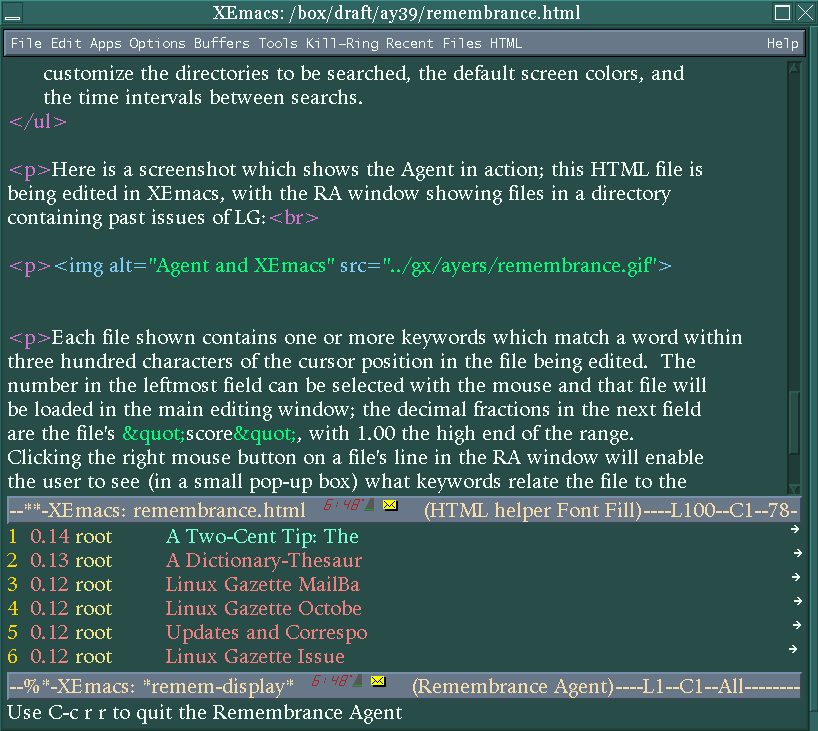
Each file shown contains one or more keywords which match a word within three hundred characters of the cursor position in the file being edited. The number in the leftmost field can be selected with the mouse and that file will be loaded in the main editing window; the decimal fractions in the next field are the file's "score", with 1.00 the high end of the range. Clicking the right mouse button on a file's line in the RA window will enable the user to see (in a small pop-up box) what keywords relate the file to the file in the main window. Every few seconds the listings in the RA window are updated to correspond to what is currently being written. Depending on typing speed this update interval can be a configurable number of seconds.
After the two executables have been compiled and moved to
/usr/local/bin or another binary directory, installation consists
of copying the two Lisp files to a location Emacs knows about, such as a
site-lisp directory. Then the remem-custom.el file needs to be
edited. In this file are options which set the location of the two
executables, databases to be searched, and font-lock highlighting colors.
The last step is insertion of these lines in your .emacs file:
(load "remem.el")
(load "remem-custom.el")
Before starting Emacs (after RA is installed) thought needs to be given to choosing files and directories to be indexed. Too many files will result in bulky databases and slower searches. I tried indexing some old mailbox files and discovered that I save too many messages. It all depends on the type of writing and subject matter planned. Run ra-index on some varied material, creating several subdirectories in ~/RA-indexes, and try them separately, editing the remem-custom.el in order to let the Emacs interface know which database to use.
It takes some practice to be able to use RA effectively. At first the periodically-refreshed Agent window is distracting; I'd find myself wondering just what connection a retrieved filename had to what I was writing and lose my train of thought while investigating. One technique is to toggle RA off when actively writing (the C-c rr command both starts and stops RA), then toggle it back on while reviewing newly-typed material. Choosing appropriate files to index makes a big difference in RA's usefulness and this takes experimentation as well.
I noticed some problems (mainly with the mouse) when running RA under XEmacs. The current version (2.01) is the first to support XEmacs at all, so possibly future releases will fix the aberrant behavior. Under GNU Emacs the package is well-behaved. The documentation at this point is minimal but adequate; enough is supplied to install and configure the package but little explanation of internals and advanced usage, though the source is well-commented.
Aside from these minor complaints, the Remembrance Agent is that rara avis in the software world, a software package which truly breaks new ground. The concept is innovative enough to explain why using RA is rather disconcerting at first and requires some user adaptation. Normal user-level software responds to a command, then quiescently waits for the next one. RA resembles a daemon process which goes about its work in the background, but daemons don't display the fruits of this activity in an editor window!
If you would like to give the Remembrance Agent a try, the current version is available from the RA home web-site.
"Linux Gazette...making Linux just a little more fun!"
The last article was on <ctype.h> character handling. This article is on <stdlib.h> which contains many small sections: integer math, sorting and searching, random numbers, string to number conversions, multibyte character conversions, memory allocation and environmental functions. Because this library contains so many small yet very important sections I want to discuss each of these groups in its own section. An example will be given in each section below because these functions are too diverse to have a single example for all of them.
I am assuming a knowledge of c programming on the part of the reader. There is no guarantee of accuracy in any of this information nor suitability for any purpose.
As always, if you see an error in my documentation please tell me and I will correct myself in a later document. See corrections at end of the document to review corrections to the previous articles.
Integer Math
int abs(int x);
div_t div(int numerator, int denominator);
long int labs(long int x);
ldiv_t ldiv(long int numerator, long int denominator);
abs returns the absolute value of the argument.
div returns a data structure that contains both the quotient
and remainder.
labs is the long version of the abs function.
ldiv is the long version of the div function.
Integer math is math using whole numbers. No fractions. This is math from the fourth grade. If you remember the numerator is divided by the denominator and the answer is the quotient with the left over stuff being the remainder then you have got it. The div_t and ldiv_t are structures that hold the quotient and the remainder. These structures look like this:
struct div_t {
int quot;
int rem;
}
struct ldiv_t {
long int quot;
long int rem;
}
These types are already defined for you in the <stdlib.h> library. The example file shows a few ways to use these four functions.
String to Number Conversions
double atof(const char *string);
int atoi(const char *string);
long int atol(const char *string);
double strtod(const char *string, char **endptr);
long int strtol(const char *string, char **endptr, int base);
unsigned long int strtoul(const char *string, char **endptr, int
base);
atof is acsii to float conversion.
atoi is ascii to integer conversion.
atol is acsii to long conversion.
strtod is string to double conversion.
strtol is string to long and the string can contain numbers
in bases other than base 10.
strtoul is the same as strtol, except that it returns an unsigned
long.
If you are reading in a number from user input then you will need to use these routines to convert from the digits '1' '2' '3' to the number 123. The easiest way to convert the other way, from a number to a string, is to use the sprintf() function.
The example program is just a sample of use of each of the above commands.
Searching and Sorting
void qsort(void *base, size_t num_of_objs, size_t size_of_obj, int
(*compar)(const void *, const void *));
void bsearch(const void *key, void *base, size_t num_of_objs, size_t
size_of_obj, int (*compar)(const void *, const void *));
qsort will sort the array of strings using a comparison function
that you write yourself.
bsearch will search the sorted array using a comparison function
that you write yourself.
You do not need to write your own sorting routines yourself. Through the use of these functions you can sort and search through memory arrays.
It is important to realize that you must sort an array before you can search it because of the search method used.
In order to generate the information to have something to sort I combined this example with the random number generation. I initialize a string array with a series of random numbers and then sort it. I then look to see if the string 1000 is in the table. I finally print out the sorted array.
Memory Allocation
void *calloc(size_t num_of_objs, size_t size_of_objs);
void free(void *pointer_to_obj);
void *malloc(size_t size_of_object);
void *realloc(void *pointer_to_obj, size_t size_of_obj);
free will free the specified memory that was previously allocated.
You will core dump if you try to free memory twice.
malloc will allocate the specified number of bytes and return
a pointer to the memory.
calloc will allocate the array and return a pointer to the
array.
realloc allows you to change the size of a memory area "on-the-fly".
You can shrink and grow the memory as you need, be aware that trying to
access memory beyond what you have allocated will cause a core dump.
Runtime memory allocation allows you to write a program that only uses the memory that is needed for that program run. No need to change a value and recompile if you ask for the memory at runtime. Also no need to setup arrays to the maximum possible size when the average run is a fraction the size of the maximum.
The danger of using memory this way is that in complex programs it is easy to forget to free memory when you are done with it. These "memory leaks" will eventually cause your program to use all available memory on a system and cause a dump. It is also important to not assume that a memory allocation will always work. Attempting to use a pointer to a memory location that your program doesn't own will cause a core dump. A more serious problem is when a pointer is overwriting your own programs memory. This will cause your program to work very erratically and will be hard to pinpoint the exact problem.
I had to write two different examples to demonstrate all the diversity of these functions. In order to actually demonstrate their use I had to actually program something halfway useful.
The first example is a stack program that allocates and deallocates the memory as you push and pop values from the stack.
The second example reads any file into the computers memory, reallocating the memory as it goes. I left debug statements in the second program so that you can see that the memory is only reallocated when the program needs more memory.
Environmental
void abort ( void );
int atexit ( void ( *func )( void ) );
void exit ( int status);
char *getenv( const char *string);
int setenv ( const char *name, const char *value, int overwrite
);
int unsetenv ( const char *name, const char *value, int overwrite
);
int system ( const char *string );
abort causes the signal SIGABORT to be sent to your program.
Unless your program handles the signal it will exit with an abort error.
atexit will allow you to run a set of function calls upon
exit from your program. You can stack them up quite a bit, I seem
to remember that you can have up to 32 of these.
exit will exit your program with the specified integer return
value.
getenv will return the value of the environmental variable
specified or a NULL if the environmental variable is not set.
setenv will set the specified variable to the specified value, will
return a -1 on an error.
unsetenv will unset the specified variable
system will execute the specified command string and return the exit
value of the command.
These functions allow you to connect back to the unix environment that you ran your program from and set exit values, read the values of environmental variables and run commands from within a c program.
The example program demonstrates how to read an environmental variable and the two different methods of setting an environmental variable. Run this program without TESTING being set and then run `export TESTING=anything` and run the program again. You will notice the difference between the two runs. Also notice the order of the atexit() function calls and the order that they are actually called when the program does exit. Copy one of the abort() calls out before the exit and reexecute the program, when the abort is called the atexit() functions are not called.
Random Numbers
int rand(void);
void srand(unsigned int seed);
rand will return a random value between 0 and RAND_MAX.
seed starts a new sequence of psuedo-random numbers.
The rand function will set the seed to 1 the first time that you call rand in your program unless you set it to something else. The sequence of numbers that you get from rand will be in the same order if you set seed to the same value each time. To get closer to truly random numbers you should set the seed to something that won't repeat. time() is what I use in the example.
The example for this section has been combined with the sorting and searching.
Multibyte Conversions
The Standard C Library, P. J. Plauger, Printice Hall P T R, 1992
The Standard C Library, Parts 1, 2, and 3, Chuck Allison, C/C++ Users Journal, January, February, March 1995
STDLIB(3), BSD MANPAGE, Linux Programmer's Manual, 29 November 1993
The "web" started out as a small project in which data was to be easily accessed by different people. In modern times, the web has filled the role of a worldwide storehouse of data and communication. Most companies have a location with which they may now be accessed on the internet. Everybody and anybody has a web page nowadays. A good web page can captivate the readers and relay information easily. Remember; there are 2,000,000 other web pages discussing a topic identical to yours; but you want to attract people with a well laid out web page. If done right, you can even get people who do not know you interested about you. This article will outline how to create an attractive webpage under the best of OSes, Linux.
Building an informational and interesting web page can actually be difficult. First off, a web page must be aesthetically pleasing. It sounds kind of funny, but that is the plain truth. People will enjoy what they are reading if what they read is well laid out. Also, a web page cannot suck up too much bandwidth. You want to appeal to many people; not just those who have an OC3 to their house. Sometimes it may be nice to offer a higher and a lower bandwidth version of your page. If someone looking for information comes to your page and has to wait a long time for it to come in, they will leave. Also, eyecandy can be bad. Two thousand little things moving on a screen and sharp bright colors will distract and more importantly annoy the reader. I know that if I go to a page which annoys me or is too slow, I will go to the next that I found! Lastly, be expedient and terse. Modern HTML provides many splendid ways to provide data in a small clean manner. For example, tables look really nice in newer versions (see www.gnome.org for a nice example). Unordered and ordered lists are an easy and effective way to lay out info. Well those are the simple basics; now let's get to work.
A true web page is made by hand. If you wrote a cgi script which cranks out html, it was all done by hand (and if a computer did it automatically, it was most likely incredibly inefficient). The html should be indented and spaced for clarity. Important however is to have a program with which to edit HTML, and linux offers many.
A editor for html is vim. The newer versions automatically detect what type of file you are editing and will load in key words accordingly. Vim will automatically color code certain words, and with different colors, alert you to some mistakes, etc. Vim can be attained from www.vim.org, and some neat mods for it can be received from ftp.mandrake.net. Another editor is Xemacs. Xjed also does the job. Both can color code and do all the other nice tricks, all in an intuitive and attractive X interface.
HTML editors may seem a superficial thing, however they really help in reading code, understanding errors and building web pages quickly, efficiently, and cleanly.
A web page needs graphics. I don't mean gaudy backgrounds and huge logos; I mean images which mesh with the text and other aspects of the web page seamlessly. Once again, linux offers many ways to create, edit, and view graphics.
Simple graphical elements may made with xpaint and played around with and viewed with xv. For the real stuff however, one needs the GIMP (if you don't have it, run to www.gimp.org by all costs!). For those who are unfamiliar with the GIMP, it is the free photoshop for Linux. Most photoshop users will agree that this free software app is easily better than photoshop. And it runs on Linux. In any case, with the GIMP, logos, transparent images, animated gifs, and a million other things can be made. With the GIMP, a background that looked too caustic can be modified to be perfect. An image that just doesn't seem to fit can have the edges faded into transparency and other neat tricks. The GIMP is the comprehensive tool with which to create attractive web page graphics. For some creative ideas of what you can do with the GIMP, refer to www.gimp.org, contest.gimp.org, and to some older linux journal articles.
Graphics must be made to mesh seemlessly with the text and other information in a web page. With the GIMP and other tools, professional quality graphics can be made quickly and easily. Remember; people will stay at that pretty homepage, and if you create nice graphics that go well with the rest of the page, than you have a winner.
Other areas of multimedia are also common on the web. Animations can be made with the GIMP, and viewed with xanim. The use of midi seems to be dying down and so really doesn't seem important. It bugs a lot of people, anyway.
A note on backgrounds. Don't make backgrounds that hurt peoples eyes, are 2 meg jpegs, or just mess things up in general. Sometimes good backgrounds can be a very simple pattern (slashdot.org, just plain white). Backgrounds should be interesting, but should not render the text unreadable. Newer versions of HTML can make tables look very pretty; one approach taken is to have the text in a table on a background (www.gnome.org). Remember; if people can't read the page, they'll leave! One of the reasons why slashdot.org is so popular is because it is very beautifully and easily laid out (kudos go to Rob). A rule of thumb is to have a background which is just one color or an image without much color variation. One idea would be to emboss what you wanted to use as a background and then play with the color balance to give it the color you want. But this isn't absolute; don't get me wrong, you can break this rule, it is just that this is a rather safe approach if nothing else seems to work. Backgrounds are actually an extremely tough issue in web page design.
As far as browsers go, there are many possibilities. Netscape/Mozilla is pretty much the staple now, especially since it is free and source code is distributed (cheers). KDE also has a pretty nice one. Many are being developed for GTK/GNOME, and can be looked up at www.gnome.org. Even though they are "in development," don't be scared to use them; they will definitely make up their shortcomings by being twenty times faster than netscape.
Experiment! It's amazing how many ways there are to create informational and well outlined web pages! A few examples of good web pages are www.gnome.org, www.gimp.org, slashdot.org. Notice that in all of these there are no readability problems, no nuisances on the screen, terseness, etc. If you notice an HTML trick you like, check out the source code and note down the page (bookmark it).
So now you are ready to make neat wepages fast, right? Right. Always keep the basic rules in your head. Remember that you want people coming to your page. Necessary grpahics and text editors are easily and freely available for linux, and browsers to view your products with shouldn't be a problem. Above all else, have fun, make a web page you like, and ... use Linux =).
Even though the world is moving toward slick graphical user interfaces and World Wide Web (WWW) technology, there is still a need to cater to those who use ASCII-based terminals. For example, many Internet Service Providers offer shell accounts, and even more public-access systems see a lot of use of their text-based interfaces. The systems that offer ASCII front-ends often have programs to automate common tasks that a user would want to accomplish, but the user still has to learn how to run those programs from a shell prompt. Some organizations have developed complex menu systems that shield the user from the intricacies of the underlying system. However, those programs-- usually written in some shell scripting language--are often slow, offer minimal security, consume an inordinate amount of resources, and may be confusing to maintain.
Having experience as an administrator for a few public-access systems, I have been faced with the challenge of not only designing browser independent WWW interfaces, but also easy-to-use text-based interfaces. After creating mixtures of clunky shell scripts and inflexible C programs to address the latter, I decided that it would make things easier for me and other administrators to have a fast, easy-to-manage, and highly configurable method for generating text menus. The solution that I came up with, and which I will be discussing in this article, is Xenmenu, (pronounced zen-menu).
During the initial design of Xenmenu, a few major goals were addressed. First and foremost, a solution that strives to make things easy should not be overly complex to use or administrate. At the same time, this solution should be flexible enough to allow administrators to tailor the system to meet their exacting specifications. These requirements may include a security policy for a site, so Xenmenu needs to incorporate features that allow it to be used as a secure shell. Finally, Xenmenu should be as small and fast as possible.
The four main components of Xenmenu are the core program, the configuration files, the menu description files, and the support files. The job of the core program is to first configure itself, then go into a loop of reading the menu description files, formating and displaying them to the user, and reading the user's input. Each of these stages will now be described in detail.
There are three configuration files which may or may not exist. The first two of these files are analogous to the system-wide and user-specific shell configuration files such as /etc/csh.login and ~/.login. The final configuration file, which also may or may not exist, is the secure configuration file; any previous action taken by the first two configuration files may be overridden by the secure configuration file. This allows administrators to give users access to change their environment without compromising security. Of course, the installer may also opt to disallow the user from creating a personalized configuration file at all if security is a major concern.
The configuration files only allow two directives: the setting of environment variables and the execution of programs. For this reason the configuration language is simple. The format of the configuration files are:
ENVIRONMENT_VARIABLE VALUE
run PROGRAM [ARGUMENT [ARGUMENT ...]]
The first line is an example of setting an environment variable. An example of this in use would be: PAGER /usr/bin/more. This would set the environment variable PAGER equal to /usr/bin/more. The second line is an example of executing an external program from within the configuration file. An example of this would be: run /bin/cat /etc/motd.
Once the configuration files are acted upon, a menu file is read and displayed to the user. These menu files are the most important part of Xenmenu from an administrator's standpoint since they define how the menu will look and react to the user. Since most of an administrator's time will be spent writing the menu files, they are designed to be easy to create. At the same time, flexibility is a major concern.
Menu files are plain text files that may be modified and reinstalled even while people are actively using Xenmenu. Each line of a menu file is a command, comment, or a blank line. Commands may have zero or more arguments separated by one or more spaces depending on the command. Comments are inserted by placing a # as the first non-space character on a line and continue until a new line is reached. Blank lines are ignored.
There are three main parts to a menu file: global options, formatting and display options, and choice declarations. Global options should appear before any choice declarations are made and affect the overall look and feel of the menu. Currently, there are only two global options: checkcase and nocheckcase. If checkcase is defined, then choice declarations will be case sensitive. This means that if the user enters a "Q", it will be acted upon differently than if they entered a "q". The default behavior is nocheckcase which means that a user may enter either a "Q" or a "q" and the same action will be taken.
The bulk of the commands available for use in menu files are the formatting and display options. These options define how a menu will be drawn on a user's screen and may be given at any point within a menu file. The available commands and the arguments they accept, (if any), are given below. Arguments given in <> marks are required, while those in [] marks are optional. Some references are made to the file config.h. This file is part of the Xenmenu distribution and may be edited before compilation when installing Xenmenu.
option {
   <definitions>
}
The <definitions> part may contain one or more of the commands listed below.
The argument convention is the same as above with required arguments contained
in <> marks, and optional ones enclosed in [] marks. Again, references to
the file config.h are given.
As mentioned above, Xenmenu may also be used as a secure shell. When compiling Xenmenu, the administrator may select various security options. Zero--the default--or more of these options may be given at compile time. The options allow for:
Finally, there are a couple small features that Xenmenu offers which are not listed above. First of all, if the user enters something which is not an option for the menu they are viewing, what they input is sent to a shell for parsing. This allows the user to enter valid shell commands even if they are not a menu option. This does not allow them to violate any security settings, however. Secondly, the user may resize their screen and the next menu loaded will adjust itself to fit within the new screen size.
I hope that this article gives you a good understanding of Xenmenu and what it can do. I also hope that Xenmenu provides a solution to your need for an ASCII menu generator, (if you have such a need). Currently, Xenmenu is still under development, however it is actively being heavily used on more than one system. The source code for Xenmenu is released under the Gnu Public License and may be found at http://www.xenos.net/~xenon/software/xenmenu. The author welcomes any suggestions, comments, or complaints you may have via E-Mail to xenon@xenos.net.
 Larry Ayers
Bill Bennet
Jim Dennis
Michael J. Hammel
Ron Jenkins
Eric Marsden
J.W. Pennington
James Rogers
Richard Sevenich
Karyl F. Stein
Matus Telgarsky
Paul Woods
Thanks to all our authors, not just the ones above, but also those who wrote giving us their tips and tricks and making suggestions. Thanks also to our new mirror sites.
Have fun!
Marjorie L. Richardson
Editor, Linux Gazette, gazette@ssc.com









 The Mailbag!