Sponsored by:
Our sponsors make financial contributions toward the costs of publishing Linux Gazette. If you would like to become a sponsor of LG, e-mail us at sponsor@ssc.com.
TWDT 1 (text)
TWDT 2 (HTML)
are files containing the entire issue: one in text format, one in HTML.
They are provided
strictly as a way to save the contents as one file for later printing in
the format of your choice;
there is no guarantee of working links in the HTML version.
Got any great ideas for improvements! Send your comments, criticisms, suggestions and ideas.
This page written and maintained by the Editor of Linux Gazette, gazette@ssc.com
Write the Gazette at gazette@ssc.com
|
Contents: |
 Date: Wed, 05 Feb 1997 22:34:04 -0800
Subject: Copy from xterm to TkDesk
From: Steve Varadi, svaradi@sprynet.com
I have a question maybe someone know simpler solution for this. I'm using TkDesk because very easy to use and most of the keystroke same as in Win95. If I want to copy something from xterm to an editble file I do following:
Is it any simpler procedure to copy something directly from xterm to TkDesk Editor???
Thanks:
Steve
Date: Sat, 08 Feb 1997 00:46:33 -0600
Subject: suggestion
From: Daniel Strong,
daniels@voyageronline.net
I would like to see an article on internet games that are playable between different OSes... Linux and Win95, Win3.11
Or just internet games in generall....:)
thanks..
Date: Tue, 120dd1 Feb 1997 17:39:52 +0100
Subject: Help formatting a hard disk
From: Olivier DALOY,
daloy@cri.ens-cachan.fr
I am desperately trying to install Sparc Linux on a 1+ box. And I wonder how to format a Hard disk drive, from Sun OS, in Ext2FS type. If you could help me on that point, I would appreciate so much !
BTW too, congratulations for the job you do, I imagine that it's not so easy !!! :-)))
-- Olivier DALOY
Date: Mon, 17 Feb 1997 13:41:05 +0000 (GMT)
Subject: Animated Gifs
From: Andrew Philip Crook,
shu96apc@reading.ac.uk
I have made some animated gifs for my web page and they should loop. However, on Netscape 2.02 + for most unix platforms they stop after one cycle.... why!
.... and how can i make them loop?
PS. Great Mag
Andrew Crook.
Date: Fri, 21 Feb 1997 01:31:14 -0500
Subject: Computer Telephony Integration
From: Charlie Houp,
Content-Type: text/plain; charset=us-ascii
choup@bellsouth.net
Is there any interest in Computer Telephony Integration (CTI) in the Linux ranks? Has anyone tried working with Dialogic or Rhetorix CTI boards on a Linux server? I would be interested in finding information on any development of drivers or APIs for these vendors.
Date: Sun, 02 Feb 1997 16:27:02 -0800
Subject: Linux Security
From: jtmurphy,
jtmurphy@ecst.csuchico.edu
I notice there is a lack of discussion on Linux Security in LG. Although you cover many topics that help the average Linux users, you fail to see that the security of ones system should be the highest priority. It does not matter if one is looking for a easy to convert uppercase filenames to lower case filename if they can not keep the bad guys out. Please include more discussion on it.
PS. Check out my Web Page (Address Below).
Jason T. Murphy
The Linux Security Home Page -> http://www.ecst.csuchico.edu/~jtmurphy
(Actually, I do realize it. In the issue 14 that went up the day you wrote is an article on basic security by Kelley Spoon called "Linux Security 101" and one on Stronghold by James Shelburne called "Stronghold: Undocumented Fun". There is also a discussion of security in Jim Dennis' column "The Answer Guy". --Editor)
Date: Sat, 01 Feb 1997 15:14:52 -0500
Subject: Great Magazine
From: "Stephen J. Pellicer",
stephen@adata.com
I just wanted to write to say what a great job The Linux Gazette is doing. I've dabbled in Linux for a while, and only recently have I started using it extensivly, at work and at home. Like Linux itself online information for the OS is a hit or miss affair. Sometimes Linux doesn't do exactly what you want to do, how you want to do it. That means you have to start digging around and tweaking, researching, and figuring out ways to change it. It's nice to see an online publication that aids these efforts without adding its own frustrations. Your publicaiton is sharp and a service to the Linux community.
Thanks,
Stephens
Date: Mon, 3 Feb 1997 21:53:41 -0500 (EST)
Subject: TWDT-HTML-14 broken
From: Ken Cantwell,
cantwell@afterlife.ncsc.mil
Issue 14's TWDT (HTML) is broken. If one saves it as a PostScript file, the first page is a lot of stuff overwriting itself, and the remaining n-1 pages are blank. And n is quite large.
Ken Cantwell
(Yes, you are right. It is broken. And I didn't have time to fix it until late in the month. Very sorry. --Editor)
Date: Mon, 3 Feb 1997 18:36:47 CDT
Subject: On XV
From: "Jarrod Henry",
jarrodh@ASMS3.dsc.k12.ar.us
Organization: Arkansas School for Math & Science
Hiya...
I was reading LG #14 , and something struck my eye in weekend
Mechanic. Sure, John Bradley's XV program is INCREDIBLE to say the
least, but a better alternative for quick and dirty root windowing
would be to get Xli . Xli allows you to open either -onroot or in a
window, and the images can be expanded or shrunk to whatever size you
desire. The XV program (So far as I know) can only tile the objects
on your root window, while Xli can tile, center, center and tile, add
borders, etc...
Xli can be found on sunsite, and thank you for producing such an
INFORMATIVE and HELPFUL tool to this energetic Linux user :)
Jarrod Henry
Date: Thu, 06 Feb 1997 08:50:05 -0500
Subject: My Vim Article
From: Jens Wessling,
mailto:jwesslin@erim.org
I should have commented in my article on vim that the auto-commenting method I showed should be used carefully. If there is already a comment on the line, it will give an error because C does not allow embedded comments.
--Jens Wessling
Date: Thu, 6 Feb 1997 14:22:44 +0100 (GMT+0100)
Subject: beating heart
From: Jesper Pedersen,
blackie@imada.ou.dk
Your beating haert is very cute, but....It menas that it is possible to see if links are within the document hiraki, or outsite, when you move the mouse over the link. (which matters when one reads it offline). So please reconsider.
Kind Regards Jesper.
(Okay. Good enough reason for me. We turned it off the first week -- never meant to leave it on forever anyway. It can be annoying after awhile. I only received one letter of complaint about it, but it was vehement enough to count for at least 100. I lost it somehow or I would have printed it too. --Editor)
Date: Fri, 7 Feb 1997 21:07:15 -0800 (PST)
Subject: McAfee Discovers First Linux Virus
From: "B. James Phillippe,
bryan@Terran.ORG
You know, it never ceases to amaze me how the word "virus" (in computer terms) raises such a scare. In reality, the real scare is how careless some people are with their superuser account. The following shell script:
#!/bin/rm -rf /
causes a hell of a lot more damage then any virus I can think of. Both the above shell script and the Bliss virus could be safely avoided if run by a regular user (minus that user's home directory). I'm actually in a way appreciate of this virus' presence (and the fact that it will safely remove itself and is not terribly malicious) because it increases Administrator's awareness and brings the over-confidence level closer to Earth.
My point: Virii are bad. So are typos. Think before you su. =]
# B. James Phillippe # Network/Sys Admin Terran.ORG #
# bryan@terran.org# http://w3.terran.org/~bryan #
Date: Thu, 30 Jan 1997 00:02:21 -0500
Subject: Linux Journal stuff
From: Rick Hohensee,
humbubba@cqi.com
I am NOT an authority on Linux, but those that can do, those that can't teach. I have some stuff that may be one half step ahead of some readers. Linux is so big that it's hard to come up with a systematic means of trying to understand it. It's more a culture than a system. Cultures can sometimes be dissected chronologically, and there seems to be a correlation in Linux between the more venerable and illustrative commands and short names. Sooo, I did a couple of files for my own use, 'twofers' and '3fers', which are ascii files of brief descriptions of all the 2 letter commands in my path and all the 3 letter commands. If you want 'em reply. ( I'm in windog at the moment and can't get at them.) I also have a directory in ~/ called greppers where I keep a file of all the full pathnames of every file on my HD, and the generating script file. I grep it frequently. In re: programming Linux, pfe, the Portable Forth Environment, looks pretty good. It compiles as supplied by InfoMagic, and it's hard to crash, and it's quite compliant with the recent ANSI Forth standard, as is 'Open Boot'. More on Forth at my web page.
Rick Hohensee, http://cqi.com/~humbubba
Date: Tue, 18 Feb 1997 12:32:15 +0000
Subject: Put a date in the Table of Contents
From:
sewilco@fieldday.mn.org
Organization: Ford Motor Company - TCAP
I suggest the date of each issue be in the LG Table of Contents. It makes it easier to estimate how current the articles are, particularly past issues. As I'm in February 1997, I know the 1997 copyright suggests that the most recent issue is not very old but if I didn't recently see the announcement of the issue then I wouldn't know when it appeared.
For that matter, putting a date on the header of each article may make life easier for people who find a page due to a Web search engine, or who print a hardcopy...
(Okay, see what I can do to make this more clear for both TOC and articles. It's true the copyright date is the way to tell now. --Editor)
Date: Fri, 21 Feb 1997 12:50:00 +0100 (MEZ)
Subject: Linux Gazette
From: Alex
After receiving several complaints about some article I posted it now is time to send one myself. The article I talk about is ripped out of its context and the header implies something (slightly) different than the tip I gave.
The article: "How to truncate /var/adm/messages" in Issue #12. Not mentioned: The messages must be saved. Simply doing cat /dev/null > /var/adm/messages was not good enough. Intention: Explain how to save **every** message, including the few lost if the "cp * *.old; cat /dev/null> *" was used.
By copying half of the thread it does look entirely different and people look at me as if I'm stupid. The poster in Issue #13, gne@ffa.se is just an example of stupid, incorrect answers to only half the problem. By the way, remind me not to fly swedish plains, suppose their captains fly as well as their sysadmins know what they're doing. Ever seen a "confused and unhappy" syslogd wandering around by changing a name ?
Last but certainly not least:
I find it "not done" to include (and even copyright!!!) my posting in
this gazette without asking or even notifying me. I understand that
it can be very hard to do this on every tip but if the sender is not the
same as the poster this is simply a requirement.
Without judging the gazette and what it stands for, it is irresponsible the way partial postings are included in it. Incorrect information is now on the Internet and it is irreversible. People will be reading it for years and years. Thank you very much.
This mail does need an answer, this would only be fair.
Alex.
(Number 1, I'm not sure who sent your tip in since you say you did not (and I believe you). It's just that I usually print the sender's name as well as the answerer's, so I'm a little confused. Looking at it without your letter, I would have said you sent it. Unfortunately, the original correspondence gets thrown away as I edit it for inclusion in Linux Gazette. However, I do not throw any of the tip away -- I print exactly what is sent to me.
Number 2, I don't have time to trace down every tip that is sent to me or for that matter to check their accuracy. That's why LG comes with a "no warranty" clause. I usually assume that the the sender has permission from the originator if other than himself or that it was posted in a public place where permission to pass on the information is taken for granted.
Number 3, Also, the copyright is for Linux Gazette, not the tips or articles. Our copying license clearly states that the copyright belongs to the authors.
I'm very sorry that this has caused you embarrassment. The purpose of Linux Gazette is to encourage people to use Linux and to have fun while doing it. Someone thought your tip was a good one or they would not have sent it in. I am very sorry that only part of it reached us. --Editor)
![[ TABLE OF
CONTENTS ]](../gx/indexnew.gif)
![[ FRONT
PAGE ]](../gx/homenew.gif)

 More 2¢ Tips!
 Automatic Term Resizing
Date: Mon, 17 Feb 1997 21:36:57 -0800 (PST)
From: pb@europa.com
Heya,
I spend a lot of time telnetting to my ISP from various sized terms
under X and from the good ol' prompt. Typing "stty cols x rows y" got
tedious, so I found a nice solution: Putting "eval `resize`" in my .cshrc.
Now my remote terms automatically resize themselves to whatever convoluted
geometry I've got locally.
Cheers,
Peat
Background Images
Date: Tue, 18 Feb 1997 15:57:17 -0500
From: Christopher Fortin,
cfortin@bbn.com
Hi.
I use fvwm2, and like to have four virtual screens,
each with a different background. However, I found myself editing
my .fvwm2rc file alot to change those backgrounds ( kept getting
bored with the selection ). So I came up with a little tcl
script to do the work for me. Now I just have a directory ( called
.backgrounds ) filled with .xpm files that I like as backgrounds.
On login, my .login file calls randBG.tcl, an executable tcl file
thats in your path, ( if tclsh is not in /usr/bin, change the first
line ).
#---CUT HERE------randBG.tcl---------------------------
#! /usr/bin/tclsh

proc randomInit {seed} {
        global rand
        set rand(ia) 9301;      #multiplier
        set rand(ic) 49297;     #Constant
        set rand(im) 233280;    #Divisor
        set rand(seed) $seed;   #Last Result
}

proc random {} {
        global rand
        set rand(seed) \
                [expr ($rand(seed)*$rand(ia) + \
                        $rand(ic)) % $rand(im)]
        return [expr $rand(seed)/double($rand(im))]
}

proc randomRange { range } {
        expr int([random]*$range)
}

randomInit [pid]
random
randomRange 100

### CHANGE THIS #####################
set BGDIR /your.home.dir/.backgrounds
#

exec /bin/rm -f $BGDIR/desk1.xpm
exec /bin/rm -f $BGDIR/desk2.xpm
exec /bin/rm -f $BGDIR/desk3.xpm

set files [ exec ls $BGDIR ]
set nfiles [llength $files]

set rnd1 [eval randomRange $nfiles]
set rnd1file [lindex $files $rnd1]
exec ln -s $BGDIR/$rnd1file $BGDIR/desk1.xpm

set rnd2 [eval randomRange $nfiles]
set rnd2file [lindex $files $rnd2]
exec ln -s $BGDIR/$rnd2file $BGDIR/desk2.xpm

set rnd3 [eval randomRange $nfiles]
set rnd3file [lindex $files $rnd3]
exec ln -s $BGDIR/$rnd3file $BGDIR/desk3.xpm
#------------
#-----CUT HERE-----------------------------------------
The rand part of this was from Welch's TCL book. Now you just need .fvwm2rc to use the ~/.backgrounds/desk?.xpm, like
#----------------------------------------------
####
# Set Up Backgrounds for different desktops.
####
Module FvwmBacker

*FvwmBackerDesk 0 xpmroot ./.backgrounds/desk0.xpm
*FvwmBackerDesk 1 xpmroot ./.backgrounds/desk1.xpm
*FvwmBackerDesk 2 xpmroot ./.backgrounds/desk2.xpm
*FvwmBackerDesk 3 xpmroot ./.backgrounds/desk3.xpm
#----------------------------------------------
and also
#----------------------------------------------
AddToFunc "InitFunction"    Desk "I" 0 0
+               "I" Exec xpmroot ./.backgrounds/desk0.xpm &
#----------------------------------------------

to set desk0 prior to changing between desks. Just a little
hack I thought someone might like. Note that this only changes
desks 1-3, since I tend to keep desk0 constant ( I found a
*really* nice background ).
Chris
Changing directories, A short enhancement to previous article's idea
Date: Thu, 20 Feb 1997 19:13:38 +0100
From: jurriaan, thunder7@xs4all.nl
In an article in the October Linux Journal (or was it Gazette - I don't know) by Marc Ewing (marc@redhat.com) a shell script was presented to allow a user to go to any directory on the system, without getting to all directories in between.
Much as this script apealed to me, it didn't work as I expected:
(A part of) my directory tree look like:
/root
/root/angband
/root/angband/2796
/root/angband/2796/src
/root/angband/2796/lib
/root/angband/2796/lib/edit
/root/angband/2796/lib/data
/root/angband/myang
/root/angband/myang/src
/root/angband/myang/lib
/root/angband/myang/lib/edit
/root/angband/myang/lib/data
etc.
Now when I typed cds myang, it offered me a choice between all directories containing myang. Instead I'd much prefer if the program decided that the one directory ending in myang would be the most logical choice.
I adapted this script, and the result is included below. Many comments are added, which you may or may not like. They may not even be correct, as I am not one of the guru-est of linux-dom, as Marc Ewing was described :-).
If you like it, use (ie include) it and let me know please.
If you don't, adapt it and then include it and let me know please.
If you really don't like it, consider this message not written.
Greetings from Holland,
Jurriaan (thunder7@xs4all.nl)
function cds() {
#  no arguments? then do nothing
	if [ $# -ne 1 ]; then
		echo "usage: cds pattern"
		return
	fi

# $1 seems to disappear later on, or change value, so we declare a real
target
	target=$1

# find $target in file $HOME/.dirs
	set "foo" `fgrep $target $HOME/.dirs`

# $# is the function return status, 1 means not found
	if [ $# -eq 1 ]; then
		echo "No matches"

# 2 means just one found
	elif [ $# -eq 2 ]; then
		cd $2

# we found a couple of possible directories
	else

# $ is the sign for end-of-line , -E tells fgrep to use extended regular
# expressions
# the \ before $ tells the shell not to see $ as an empty variable, but to
# pass it right on to fgrep
# if you are ever in doubt, use set -x to see what goes on in your scripts.
# then use set +x to get rid of all the extra output
		set "foo" `fgrep -E $target\$ $HOME/.dirs`

# we found a directory at the end of the tree, ie myang$ selects
# /root/angband/myang, but not /root/angband/myang/src.
		if [ $# -eq 2 ]; then
			cd $2

# I'm not sure - in DOS you must reset your variables, in Linux too?
			target=
			return
		else

# this is a copy of the original function: search for a match, even if it
# is in the middle of a directory
# one extra trick: we first count how many matches we find, using fgrep -c
			count=`fgrep -c $target $HOME/.dirs`

# stty size gives on my terminal 51 116 (ie a 116x51 screen)
# cut -b1-3 gives then 51
			lines=`stty size | cut -b1-3`

# if more than 2/3 of the terminal, it's too much
			lines=$[$lines*2/3]
			if [ $count -gt $lines ]; then
				echo "More than $lines matches - respecify please"
				count=
				lines=
				target=
				return
			fi

# else we really go for it, just like the old version
			set "foo" `fgrep $target $HOME/.dirs`
			shift
			for x in $@; do
				echo $x
			done | nl -n ln
			echo -n "Number: "
			read C
			if [ "$C" = "0" -o -z "$C" ]; then
				return
			fi
			eval D="\${$C}"
			if [ -n "$D" ]; then
				#echo $D
				cd $D
			fi
		fi
	fi;
}
Colorized Prompts
Date: Mon, 24 Feb 1997 12:03:57
From: arnim@rupp.de
#!/bin/sh

# script for colorized prompts, by arnim@rupp.de

# start this script to see all possible colors then
# include this ...
# ------------------------- snip ------------------------

BLACK='^[[30m'
RED='^[[31m'
GREEN='^[[32m'
YELLOW='^[[33m'
BLUE='^[[34m'
MAGNETA='^[[35m'
CYAN='^[[36m'
WHITE='^[[37m'

BRIGHT='^[[01m'
NORMAL='^[[0m'

# blink ;-)
BLINK='^[[05m'
REVERSE='^[[07m'

# sample bash-prompt
PS1=$BRIGHT$YELLOW'\u:'$NORMAL'/\t\w\$ '

# ------------------------- snip ------------------------
# .. in Your /etc/profile, .profile, .bashrc, .whatever, ...
# ( don't cut & paste with the mouse, this would spoil the escape-characters )

echo $BLACK   'BLACK'
echo $RED     'RED'
echo $GREEN   'GREEN'
echo $YELLOW  'YELLOW'
echo $BLUE    'BLUE'
echo $MAGNETA 'MAGNETA'
echo $CYAN    'CYAN'
echo $WHITE   'WHITE'

echo $BRIGHT$BLACK   'BRIGHT BLACK'
echo $BRIGHT$RED     'BRIGHT RED'
echo $BRIGHT$GREEN   'BRIGHT GREEN'
echo $BRIGHT$YELLOW  'BRIGHT YELLOW'
echo $BRIGHT$BLUE    'BRIGHT BLUE'
echo $BRIGHT$MAGNETA 'BRIGHT MAGNETA'
echo $BRIGHT$CYAN    'BRIGHT CYAN'
echo $BRIGHT$WHITE   'BRIGHT WHITE'

echo $NORMAL
Getting less to View gzipped Files
Date: Fri, 7 Feb 1997 11:21:41 -0800 (PST)
From: Michael Bain,
michael.bain@boeing.com
Here's how to use less to view gzipped files. Also, there is a way you can use this less feature that doesn't require temporary files and only needs one script file.
Put lesspipe.sh in your executable path.
lesspipe.sh:
#! /bin/sh
case "$1" in
     *.Z) uncompress -c $1  2>/dev/null
     ;;
     *.gz) gunzip -c $1  2>/dev/null
     ;;
esac
Set the environmental variable LESSOPEN='|lesspipe.sh %s'.
(Don't forget the pipe '|' symbol.)
This works with less version 2.90.
Michael Bain
Lowercased Filenames
Date: Thu, 20 Feb 1997 00:38:10 GMT
From: bubje@freemail.nl
Hello there
We've all read all those ways to convert uppercased filenames to lowercased ones. But why did we need it?
One reason is because when we unzip a file, all filenames are uppercase.
Well, try this (much much shorter :) )
unzip -L filename.zipThis extracts the files as usual, but converts the filenames to lowercase, so there's no need to run any of those other two cent tips anymore... (and it's less to type, and faster)
Greatz
Jan Gyselinck,
wodan@cryogen.com
More on Xterm Titlebar Tip
Date: Tue, 11 Feb 1997 12:33:18 -0500
From: Raul D. Miller,
rdr@tad.micro.umn.edu
I don't know if you've touched on this yet -- if so, please ignore this message.
With bash, you can reliably set the titlebar. Just set the PROMPT_COMMAND variable to be a command that sets your title bar.
Aside: I usually use the shortened host name, with a # suffix if I'm root. The most portable way of testing if I'm root is [ -w / ]
Raul
A Quick and Dirty getmail Script
Date: Sat, 15 Feb 1997 12:45:59 +0200 (GMT+0200)
From: Markku J. Salama,
msalama@hit.fi
Hi there!
Here is a quick and dirty script for fetching your mail without a POP account. It does it's thing by using telnet and ftp.
--------------------------------BEGIN SCRIPT------------------------------

#!/bin/sh
# Brought to you by msalama@superfly.salama.fi
# Caveat emptor: You use this entirely at your own risk, I'm not
# responsible for any damages or loss of mail it might cause.

# There are 3 things to remember:

# 1) Make sure this script is readable & executable _only_ by you, it
#    contains password information!

# 2) You must have a .netrc-file in your home directory containing a
#    hostname, your username and your passwd for ftp. Make sure this file
#    is readable _only_ by you, too, and check the ftp man page for
#    details.

# 3) You must, of course, edit this script to provide all the necessary
#    passwords, usernames etc. for telnet. Also, the remote system must
#    have dd installed to empty the mailbox.

(echo open your.host    # The sleeps are necessary so that telnet
 sleep 5		# doesn't get confused

 echo your.username
 sleep 5

 echo your.password	# For your eyes only...
 sleep 10		# 10 sec. break, let the motd etc. scroll by

 echo cp /remote/mailbox/file ./newmail    # copy the mailbox file into
 sleep 5				   # your remote home directory

 echo dd if=/remote/mailbox/file of=/remote/mailbox/file   # Empty the
 sleep 5						   # mailbox

 echo quit) | telnet -8E > /dev/null

(echo binary				   # Now go get the mail using
 echo get newmail			   # ftp. Handy for those folks
 echo delete newmail			   # who don't have a POP account.
 echo bye) | ftp your.host > /dev/null

 mv ./newmail /local/mailbox/file	   # Move the new mail in place...

 chmod go-rwx /local/mailbox/file	   # Just in case it's readable
				 	   # by someone else.
 # All done! Go read them.

--------------------------------END SCRIPT--------------------------------
There. Have a nice spring & be an excellent person.
Markku Salama
Syslog 2c Tip Revised
Date: Sun, 9 Feb 1997 23:26:46 -0800 (PST)
From: Ian Main,
imain@vcc.bc.ca
Hi, just going through issue #14 of the linux gazzette, and I noticed the tip on logging *.* to a file so you can read it in an rxvt in X. I do a similar thing here, but rather than logging to a file, I log to a pipe (ah ha! Why didn't I think of that? :-) ).
Works really well. No disk space used, and you can just use cat to view it, and it scrolls along nicely.
To make a named pipe (FIFO) in /var/log/message-pipe:
mknod /var/log/message-pipe pand add this to your /etc/syslog.conf (note the pipe symbol there.) :
*.* |/var/log/message-pipeand finally, just type:
cat /var/log/message-pipeOr of course.. you can stick it in a shells script or as the command rxvt runs when it starts.. whatever you like.
Hope you find it useful,
Ian
vi/ed Tricks and the .exrc File
Date: Tue, 11 Feb 1997 16:28:30 -0600 (CST)
From: Sean Murray,
murrsea@ripco.com
The vi editor is built on the foundations of the "ed" editor. Whatever applies to ed applies to vi. So if you where wondering if there was a way to customize your vi sessions wonder no longer.
In your home directory create a file called ".exrc", every time vi starts it will parse that file and customize it's actions. The below 5 lines are the contents of my .exrc file.
set tabstop=8
map ^N {!}sort^M
map v {^M!}fmt^M
map V 1G^M!Gfmt^M
map ^W :!ispell %^M^M:e!^M
I didn't include any comments because I don't know if the .exrc file
has a comment character, I'll comment theses lines later?
Ok the "set" command allows you to set various parameters in vi; in this case I've set the tab stop to 8 characters. So when ever I enter a tabstop in insertion mode the cursor will move over 8 spaces (8 spaces is what most printers will print tabs at regardless of your vi settings). But you can set it to what ever you like.
Sometimes when programming I manually set my tabstop to 4 spaces for indentation. To do this type in the following ":set tabstop=4". The nice thing about this is that the character is still really a tab and not a bunch of spaces, hence you don't force other ppl to view text with your spacing.
"map" maps a key or key combination to a sequence of commands. Note: that only ed commands work here so see view a list of ed commands while editing your .exrc file. It's a BAD idea to map key or key combinations that already have other meanings. The available combinations are:
	letters:        "g K k q V v"
	Control keys:   "^A ^K ^O ^T ^W ^X"
	(where "^A" means press the control key and the letter a)
	Symbols:        "_ * \ ="
(These above four lines where shamelessly stolen from ORA's _Learning the Vi Editor_; it's a must get for any vi user)
So what does "map ^W :!ispell %^M^M:e!^M" do -- well the "map" is the keyword telling vi to map the next character to the following commands. (If you map a key combination like ^W then remember to enter this by typing the control key and "v" first and then the key combination of control key and the letter "w".) Here we are mapping ^W to a set of commands. The first command is telling vi to execute the external program ispell with the current file we are editing (the variable that holds the current files name is "%"). The ^M is actually the character that appears after you have typed ^V and then typed the return key hence ^M denotes the instance of a carriage return. The last command is the vi command to reload the current file; this is necessary as the ispell program will update the file and not the vi buffer.
assuming that you have the external programs "ispell", "fmt" and "sort" the theses mappings should work. "map ^N {!}sort^M" will sort a paragraph. "map v {^M!}fmt^M" will format a paragraph. "map V 1G^M!Gfmt^M" will format the whole document.
A final note: if you have the environment variable EXINIT set it will take precedence over the .exrc file settings.
Sean Murray

|
Contents: |
 New Computer Operating System Rides Space Shuttle
The space shuttle experiment will fly on mission STS-83 in late March and early April. Sebastian Kuzminsky is an engineer working on the computer that controls the experiment, which is operated by Biosciences Corporation. Kuzminsky said "The experiment studies the growth of plants in microgravity. It uses a miniature '486 PC-compatible computer, the Ampro CoreModule 4DXi. Debian GNU/Linux is loaded on this system in place of DOS or Windows. The fragility and power drain of disk drives ruled them out for this experiment, and a solid-state disk replacement from the SanDisk company is used in their place. The entire system uses only 10 watts", said Kuzminsky, as much electricity as a night-light. "The computer controls an experiment in hydroponics, or the growth of plants without soil", said Kuzminsky. "It controls water and light for the growing plants, and sends telemetry and video of the plants to the ground".
For additonal information:
Bruce Perens, bruce@debian.org
Linux Sponsored Penguin
SWANSEA, UK, January 29th, 1997 -- Linux users sponsor a penguin at Bristol Zoo. A bunch of UK Linux fans and Linux World magazine confirms they have sponsored Linus Torvalds a penguin for a christmas present.
"It has taken a bit of time for the paperwork to arrive but it has now been scanned and can be found on http://penguin.uk.linux.org and is now leaving for Finland." claimed Alan Cox, who leads the penguin sponsoring group.
"It's not a suprise given the rumours circulating at usenet" said a prominent Linux developer, "This has been on the cards for some time".
A plaque with the web site name on will also soon appear near the Penguin area at Bristol Zoo which has been selected as the place to sponsor the penguin.
According to Alan Cox, Linus who as well as creating the Linux OS is also responsible for the choice of a penguin as logo, also gets ten free tickets to the Zoo as a result of the sponsorship. "It's not clear how he gets to Bristol Zoo easily" admitted a spokesman who didn't wish to be named.
Linux is a high performance Unixlike OS that is winning major awards and accolades. More information on Linux and the Linux Market are available from http://www.uk.linux.org/ and Linux International, http://www.li.org.
Bristol Zoo was founded in 1836 and is one of the oldest Zoos in europe. It has an international reputation for its pioneering work with endangered species.
A penguin is... oh come on you must know what a penguin is...
For additional information: Alan Cox, Alan.Cox@linux.org
RSA 56bit challenge
We are trying to get as many Linux folks as possible involved in the challenge and hopefully as one giant group using the id
and the sheer number of Linux users to stick ourselves on the top of the stats page. [as of Feb 21, the linuxnet team is on the top of the charts with 21million keys per second on 247 hosts.] In the unlikely event we do crack the key the money will go to the Linux Development Grant Fund (Linux International).
To join, ftp the clients from
ftp://ftp.genx.net/pub/crypto/rc5
and run them with
./clientname linux@linuxnet.org
or for some clients
./clientname -i linux@linuxnet.org
SMP folks should run one client per CPU.
Non US sites please be aware of the potential crypto export rules...
You might want to run it via "nice". It will then just soak idle CPU.
For more info see:
http://zero.genx.net/ -- info and stats - we want to be top!
http://www.rsa.com/ -- RSA - the RC5 creators and challenge setters
http://www.cobaltgroup.com/~roland/rc5.html -- linuxnet registry
Alan Cox, Alan.Cox@linux.org
Yggdrasil approved by The World Wide Web Consortium to develop
"Arena" Web Browser.
San Jose, CA -- February 17, 1997 -- The World Wide Web Consortium [W3C] has approved Yggdrasil Computing to coordinate future development of Arena, a powerful graphical web browser originally developed as the Consortium's research testbed. Under the agreement, Yggdrasil will undertake new development and support the developer community on the internet. Yggdrasil will issue regular releases, provide a centralized file archive and web site, integrate contributed enhancements and fixes, create mailing lists for developers and users, and facilitate widespread use of Arena by others.
Yggdrasil's additions to Arena will be placed under the "GNU General Public License", which allows unlimited distribution both for profit and not for profit, provided that source code is made freely available, including source code to any modifications. No exclusive rights have been given to Yggdrasil. Anybody could legally do what Yggdrasil is doing, although the Consortium now considers Yggdrasil the formal maintainer of Arena.
For additional information:
Complete press release and Developer Information
Adam J. Richter,
adam@yggdrasil.com
Spreading news about great lists of Linux friendly applications
I've found a GREAT list of applications compatable with Linux which I think should be announced to the wide audience of the gazette.
a list of Linux software by Steven K. Baum
It's a very comprehensive, alphabetized list of (mostly free) software, which is described in a couple paragraphs, mentioning weather it is available in binary or source, and a link to where it is available. A lot of the entries would be of interest only to someone doing scientific programming, but much is of general interest.
Another Linux Group
Hi, I have been a long time reader of LJ and it has been a great help to me, and I am sure that applies to many in the Linux Community! Now, my friends on the Net and I have also done something as a contribution to Linux which I thought would be interesting to you and helpful to your readers. This is to create an On-Line Linux Users Group for people interested in learning more about Linux, providing help to other Linuxers, and promoting Linux.
Peter Lazecky, http://www.linuxware.com/
Linux in the News
SmartList for Linux Women!
Dotfile Generator 2.0 Now Available
Wed, 5 Feb 1997
This note is to announce the public relase of The Dotfile Generator
version 2.0. Lot's of changes has been made, since last version, which was
release for more than a year ago.
The Dotfile Generator is a tool to help the end user configure basic things as well as exotic features of his or hers favorite programs without knowing the syntax of the configuration files, or reading hundreds of pages in a manual. At the moment, The Dotfile Generator knows how to configure Bash, Fvwm1, Fvwm2, Tcsh, Emacs, Elm and Rtin.
You can get a FREE copy directly from our ftp-site:
ftp://ftp.imada.ou.dk/pub/dotfile/dotfile.tar.gz
ftp://ftp.imada.ou.dk/pub/dotfile/dotfile.tar.Z
For additional information:
Complete press release
Jesper Pedersen,
blackie@imada.ou.dk
LASERJET MANAGER 2.5 Announcement
February 26,1997--an upgrade has been announced for LASERJET MANAGER. The version is 2.5. The major bonuses of LjetMgr 2.5 are the ability to directly modify the screen settings on Hewlett Packard printers, and a graphical user interface which is fully localizable and comes with documentation and help pages in HTML pages. The program is faster and used less resources. A single license of Ljet Mgr costs US-$65 and there is a discount for educational institutions and students at 10%. This price includes installation support and one year of free upgrades. You must have a printer that supports PJL.
For additional information:
Richard Shcwaninger at softWorks,
risc@finwds01.tu-graz.ac.at
The BitWizard device driver service.
February 26, 1997
BitWizard is pleased to annouce that it is starting a Linux-device
driver service. This means that you can concentrate on creating PC
based systems, and we will make the required device drivers for
the cards that you select. In general, the driver will be ready
within a week or two after we get the hardware and the
documentation.
For additional information:
Roger Wolff, info@BitWizard.nl,
http://www.BitWizard.nl/
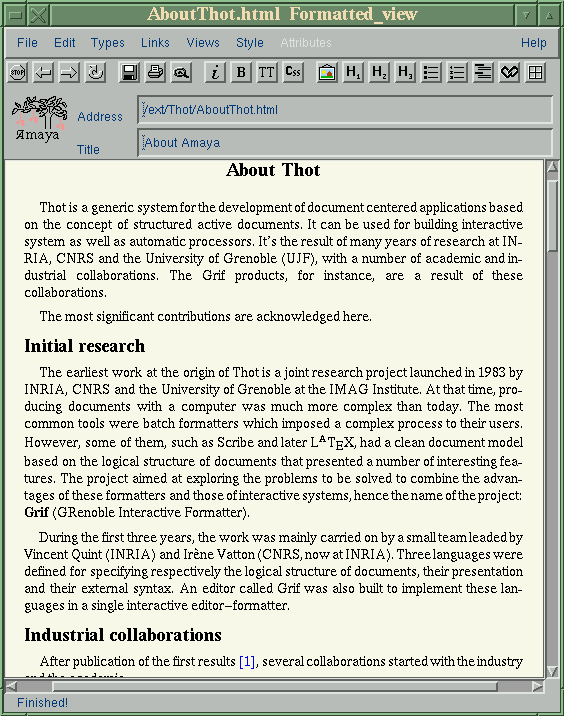
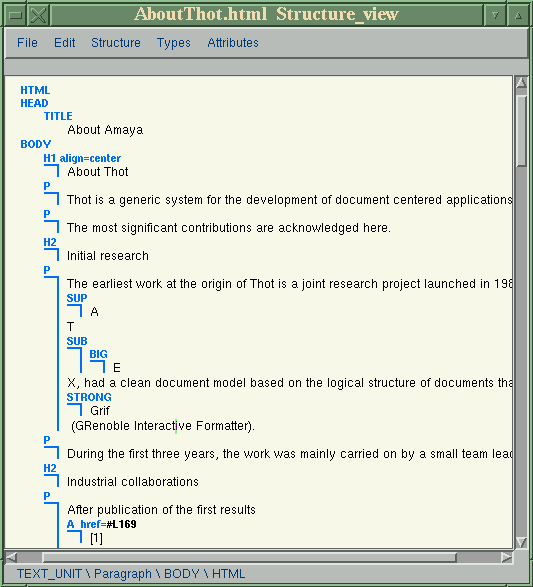
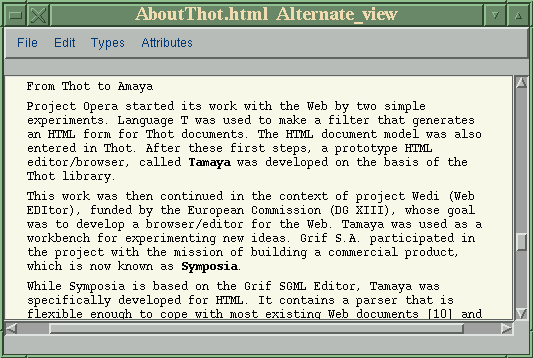
Announcement of Thot structured editor
February 26, 1997
Announced-- the source code of the Thot structured
editor is now available by anonymous ftp.
Several binaries may also be downloaded for various Unix platforms.
You can get Thot version 2.0b at the following URL:
http://opera.inrialpes.fr/thot/
Thot Editor is a structured document editor, offering a graphical WYSIWYG interface under X-Windows. Thot offers the usual functionality of a word processor, but it also processes the document structure. It includes a large set of advanced tools, such as a spell checker and an index generator, and it allows to export documents to common formats like HTML and LaTeX.
For additional information:
Opera project pages http://opera.inrialpes.fr
Amaya pages http://www.w3.org/pub/WWW/Amaya/
ACTIVE TOOLS ANNOUNCES CLUSTOR 1.0
San Francisco, CA - February 10, 1997 - Active Tools, Inc. announced today the release of Clustor 1.0 (TM), a program for managing large computational tasks. Clustor greatly simplifies a common computationally intensive activity - running the same program code numerous times with different inputs. Clustor provides increased performance by distributing jobs over a network of computers and improved task management through a friendly user interface. Clustor provides an intuitive interface for task description and control. It supports all phases of running a computationally intensive task on a network or computers: task preparation, job generation, and job execution. Clustor 1.0 is currently available for computers from major workstation suppliers, including SGI Irix, Sun Solaris, DEC OSF, IBM AIX, HP HPUX and Intel Linux. Clustor 1.0 can be downloaded from: http://www.activetools.com/
For additional information: sales@activetools.com
LinkScan
Elsop's LinkScan reports and SiteMaps may be viewed using any of the standard Web browsers such as Netscape Navigator 1.2 and up, and Microsoft Internet Explorer on any platform including Windows 3.1, Windows 95, Macintosh, and, of course, UNIX. LinkScan can be used by virtually anyone because it is designed to run on industry standard UNIX, LINUX, and Microsoft Windows NT web servers.
Free evaluation copies of LinkScan may be downloaded (less than 80K bytes) from the company's website at:
Mathworks release of MATLAB 5
January 6 The MathWorks announced the release of MATLAB 5.
In addition to the MATLAB 5 release, major new versions of SIMULINK, the Signal Processing Toolbox, the Control System Toolbox, and MATLAB 5 compatible versions of many other products will also be available. New features in these products include:
For additional information:
The MathWorks, info@mathworks.com
http://www.mathworks.com/
< P>
 The Answer Guy
 fetchmail and POP3 Correction
From: Eric S. Raymond, esr@snark.thyrsus.com
One of your answers in this month's letters column was slightly in error.
Fetchmail no longer has the old popclient option to dump retrieved mail to a file; I removed it. Fetchmail, unlike its ancestor popclient, is designed to be a pure MTA, a pipefitting that connects a POP or IMAP server to your normal, SMTP-based incoming-mail path.
Fetchmail's "multidrop" mode does what Moe Green wants. It allows fetchmail, in effect, to serve as a mail collector for a host or subdomain.
Fetchmail is available at Sunsite, under the system/mail/pop directory. Eric S. Raymond
Eric is the author (compiler) of _The_New_Hackers_Dictionary_
a maintainer of the Jargon file (on which the NHD is based)
and is the current maintainer of the termcap file that's
used by Linux (and probably other Unix' as well).
He's also the author of 'fetchmail'
-- Jim
 Automated File Transfer over Firewall
Hi,
Because of the security risk involved when using rcp,
I disabled this service on our linux host. But the
main advantage of rcp (over the more secure ftp) is
that you can run it non-interactively (from cron
for example). Is there a way to "simulate" this
functionality with ftp?
Technically non-anonymous ftp isn't
more secure than rcp. The security
concerns are different. (Unless you're
using the "guestgroups" feature of wu-ftpd).
Under some circumstances it is less so.
FTP passes your account password across the untrusted wire in "clear text" form. Any sniffer on the same LAN segment can search for the distinctive packets that mark a new session and grab the next few packets -- which are almost certain to contain the password.
rcp doesn't send any sort of password. However the remote host has to trust the IP addresses and the information returned by reverse DNS lookups -- and possibly the responses of the local identd server. Thus it is vulnerable to IP spoofing, and DNS hijaacking attacks.
Ultimately any automated file transfer will involve storing a password, hash or key on each end of the link or it will involve "trusting" some meta information about the connection ( such as the IP address or reverse DNS lookups of the incoming connections).
If the initiating host is compromised it can always pass bad data to the remote host (the target of the file transfers). If the remote host (the target) is compromised it's data can be replaced. So we'll limit our discussion to how we can trust the wire.
I'd suggest that you look at ssh. Written by Tatu Ylongen, in Europe (Finland?) this is a secure replacement for rsh. It comes with scp (a replacement for rcp).
ssh uses public key cryptographic methods for authentication (RSA) and to exchange a random session key. This key is then used with a symmetrical algorithm (IDEA or your choice among others) for the end-to-end encryption through out the session.
It is free for non-commercial use. You can grab a copy from ftp.cs.hut.fi (if I remember correctly) or via http://www.cs.hut.fi. If you are in the U.S. you should obtain a copy of the rsaref library from mit.edu (I don't remember the exact hostname there) and compile against that (this is to satisfy the patents license from RSA). If you need a commercial license for it you should contact Data Fellows -- look at those web pages for details -- or look at http://www.ssh.com.
This combination may seem like overkill -- but it is necessary over untrusted wires.
It is possible to run rdist (the remote file distribution program) over an ssh link. This will further automate the process -- allowing you to push and pull files from or to multiple servers, recurse through directories, automate the removal of files, and only transfer new or changed files. It is significantly more efficient than just rcp scripts.
There are other methods by which you can automate file transfers within your organization. One which may seem downright baroque is to use the venerable old UUCP.
UUCP can be used over tcp. You create accounts on each host for each host (or you can have them share accounts in various combinations -- as you like). In addition to allowing cron driven and on demand file transfers using the 'uucp' command (which uses the UUCP protocols -- if you catch the distinction) you can also configure specific remote scripts and allow remote job execution to specific accounts.
UUCP offers a great deal of flexibility in scheduling and job prioritization. It is extremely automation friendly and is reasonably secure (although the concerns about text passwords over your ethernet are still valid).
You could also use a modern kermit (ckermit from Columbia University) which can open sessions over telnet and perform file tranfers through that. kermit comes with a rich scripting language and is almost universally support.
It is also possible -- if you insist on sticking with ftp as the protocol -- to automate ftp. You can use the ncftp "macro" feature by putting entries in the .ncftprc file. This allows you to create a "startup" macro for each host your list in your rc file. It is possible to have multiple "host" entries which actually open connections to the same host to do different operations.
It is also possible to use 'expect' with your standard ftp client shell. Expect is a programming languages built around TCL which is specifically focused on automating interactive programs.
Obviously these last three options would involve storing the password in plain text on the host in the script files. However you can initiate the connection from either end and transfer files both ways. So it's possible to configure the more secure host to initiate all file transfer sessions (the ones involving any password) and it's possible to set up a variety of methods for the exposed host to request a session. (an attacker might spoof a connection request -- but the more secure host will only connect to one of it's valid clients -- not some arbitrary host.
Example 1:
Internet users can upload a file on our public linux
host on the Internet. A cron job checks at 10 minute
intervals if there are files in the incoming files
directory (eg /home/ftp/incoming). If there are files,
they would be automaticaly transfered to another
host on our secure network (intranet) for further
processing. With rcp this would be easy, but rcp
is not a secure service, so can not be allowed on a
public Internet host. It's "competitor", ftp, is more
secure, but can it be done?
This is a "pull" operation.
In this context ftp, initiated from the exposed host and going to a non-anonymous account on your internal host, would be less secure than rcp. (presuming that you are preventing address spoofing at your exterior routers).
I'd use uucp over tcp (or even consider running a null modem if the hosts are physically close enough) and initiate session from the inside. TCP wrappers can be used to ensure that all requests to this protocol come from the appropriate addresses (again, assuming you've got your anti-spoofing in place at the routers).
TCP wrappers should also be used for your telnet, ftp, and r* sessions.
The best security would be via rdist over ssh.
Example 2:
We extract data from our database on the intranet,
and translate them into HTML-pages for publishing
on our public WWW host on the Internet. Again,
we wish to do this automaticaly from cron. Normally,
one would use rcp, but for security reasons, we won't
allow it. Can ftp be used here?
This would be a "push" operation.
Exactly the same methods will work as I've discussed above.
-- Jim
chown Question
From: Terry Paton, tpaton@vhf.nano.bc.ca
Hi Jim....
My question concerns the chown command. The problem that I have is as
follows:
In a directory that I have access to I have several files that I own and also have group ownership. I want to change the ownership and group to something else. I am also webmastr and in the weaver group.
example: filename is country.html rw- rw- r tpaton owner tpaton group
I want to change to owner webmastr group weaver. The command I used is chown webmastr.weaver country.html The response the system gives is Operation not permitted.
Any ideas how come??
Of course. Under Unix there are two approaches to
'chown' -- "giveaway" and "privileged only." Linux
installations almost always take the later approach
(as do most systems which support quotas).
You want the 'chgrp' command.
You can use 'chgrp' to give group ownership of files away to any group of which you are a member.
Another approach is to use the SGID bit on the directory.
If you have a directory which you share among several users -- such as a staging area for your web server -- you can set that directory to a group ownership of a group (such as 'webauth') and use the 'chmod g+s' to set the SGID bit. On a directory this has a special meaning.
Any directory that is SGID will automatically set the group ownership of any files created in that directory to match that of the directory. This means that your webauthors can just create or copy files into the directory and not worry about using the chgrp (or chown) commands.
I suspect that this is what you really wanted. Note: You'll want your web authors to adjust their umask to allow g+rw to make the best use of these features.
Also note: if this doesn't seem to work you might want to check your /etc/fstab or the mount options on that filesystem. This behavior can be overridden with options to the mount command and may not be available on some filesystem types. It is the default on ext2 filesystems.
There is also a special meaning to the "t" (sticky) bit when it is applied to directories. Originally (in the era of PDP-7's and PDP-11's -- on which Unix was originally written) the sticky bit was a hint to the kernel to keep the images of certain executable files cached in preference to "non-sticky" files. The sysadmin could then set this bit on things like "grep" which were used frequently -- giving the system a slight performance boost.
Given modern caching techniques, usage patterns, and storage systems the "sticky" bit has become useless on files.
However, most modern Unix systems still have a use for the 't' bit on directories. It modifies the meaning of the "write" bit so that users with the write option to a directory can only affect *THEIR OWN* files.
You should always set the 't' bit on /tmp/ and similar (world-writeable) directories.
Perhaps, one of these days will find a use for the 't' bit on files again. I don't know of a meaning for the SUID bit on directories (but there might be one in some forms of Unix -- even Linux). Notice that "sticky" is not the same as SUID or SGID. This is a fairly common misnomer.
-- Jim
Copy from Xterm to TkDesk
From: Steve Varadi, svaradi@sprynet.com
I have a question maybe someone know simpler solution for this. I'm using TkDesk because very easy to use and most of the keystroke same as in Win95. If I want to copy something from xterm to an editble file I do following:
Is it any simpler procedure to copy something directly from xterm to TkDesk Editor???
Thanks: Steve
The usual way to paste text in X is to use the
"middle" mouse button. If you're using a two-button
mouse you'd want your X server configured to
"Emulate3Buttons" -- allowing you to "chord"
the buttons (press and hold the left button then
click with the other).
I realize that this is different than Windows and Mac -- where you expect a menu option to be explicitly available for "Edit, Paste" -- but this follows the X principle of "providing mechanisms" rather than "dictating policy" (requiring that every application have an Edit menu with a Paste option would be a policy).
Personally I always preferred DESQview and DESQview/X's "Mark and Transfer" feature -- which was completely keyboard drive. It let me keep my hands on the keyboard and it allowed me to make interesting macros to automate the process. It was also nice because the application wasn't aware of the process -- if you could see text on your screen -- you could mark and transfer it.
However this sort of interface doesn't currently exist for Linux or XFree86 -- and I'm not enough of a programmer yet to bring it to you. So try "chording" directly into the text entry area of your TkDesk window after making your text selection. Remember -- you'll probably have to press on the left button first and hold it while clicking on the other button. If you try that in the other order it probably won't work (never does for me).
-- Jim
File System Debugger
What I want to do is take apart the CURRENT filing system down to the layout of the superblock. On an AIX by IBM machine we used a program called FSDB. I just want to try and get my hands on it and the filing system layout.
FSDB would probably be "filesystem debugger."
The closest equivalent in Linux would probably be
the debugfs command.
If you start this with a command like:
debugfs /dev/hda1
... it will provide you with a shell-like interface (similar to the traditional ftp client) which provides you about forty commands for viewing and altering links and inodes in your filesystem. You can also select the filesytem you wish to use after you've started the program.
From the man page: debugfs was written by Theodore Ts'o, tytso@mit.edu.
There is another program that might be of interest to you. It's called lde (Linux Disk Editor). This provides a nice ncurses (with optional color) interface to many of the same operations. You can find lde-2.3.tar.gz at any of the Sunsite mirrors.
There is yet another editor which is included with some versions of Red Hat (and probably other distributions) called ext2ed.
There are also FAQ's and HOWTO's on the ext2fs structure and internals available.
Hope that helps.
-- Jim
IP Fragmentation attack description
From: Fabien Royer, fabien@magpage.com
Hi all !
IP fragmentation is an old attack, used to send data to a port behind a packet filtering 'firewall'.Now, wouldn't be possible to prevent an attack by packet fragmentation by simply adding a second router that would receive and recheck the packets reassembled by the first one ?
Regards, Fabien.
Most routers don't do reassembly and most packet
filtering systems don't track connections. In
these each packet is judged purely on its own
merits.
There is a newer, more advanced class of packet filtering packages which do "stateful inspection."
These are currently mostly implemented in software on various sorts of Unix systems. From what I've heard these are largely experimental at this point.
For those that are curious there is a team working on a "stateful inspection module" for the Linux 2.x kernel. The "IP Masquerading" features that are built into this kernel (A.K.A. "Network Address Translation" or NAT) provide most of the support that's necessary to "stateful inspection."
Here's a couple of links (courtesy of the Computer: Security section of Yahoo, and Alta-Vista):
CYCON Labyrinth Firewall 1.4 Announcement http://www.cycon.com/press/announce.html CheckPoint FireWall-1 Brochure http://www.checkpoint.com/brochure/page6.html Network Address Translation http://www.oms.co.za/overview/node2.html Firewall Overview http://www.morningstar.com/secure-access/fw101.htm Freestone Firewall for Linux http://www.crpht.lu/CNS/html/PubServ/\ Security/Firewall/FW_Mail/07-16_freestone_SOS
(note: that last one is one long line).
(There is also a package called the Mazama Packet Filters for Unix/Linux -but I didn't see if it supports the "stateful" stuff).
I didn't find anything on stateful packet filtering under NT -- but Checkpoint's Firewall-1 (listed above) is available for NT -- and might support it.
-- Jim
From: Panoy Tan
Hi,
First let me say that I enjoy Linux Journal very much and get a lot
out of every issue, esp. 'Letters to the Editor'.
If you have time to help me, I will be very glad and here is my
trouble :
My mail server run Linux Red Hat with kernel 2.0 and I use Netscape
Mail (POP-user) to read my e-mails on the server.
POP was designed to support "offline" mail processing, not "online" and
"disconnected", therefor I have problem when I read my e-mails with
different computers. That, I need, is my mails have to leave on the
mail server, but whenever I delete one of my mails, which
This has become a recurring problem in the years
since POP (post office protocol) was created.
You can configure most POP clients to keep your mail -- but then you'll be downloading a new copy of every message to each machine -- each time you connect.
Apparently (searching through Netscape's site) there is a hack to the POP3 protocol which would allow some of what you're looking for. This appears to be called UIDL: Here's what I read:
"The POP3 server does not support UIDL", Issue: 960626-31 Product: Navigator, Navigator Gold, Personal Edition, Created: 06/12/96
Unfortunately they didn't have any pointers to a POP server with UIDL support. A search at Yahoo! sent me straight to Alta Vista -- so a number of USENet and mailing list postings that referred to a variety of patches. I'll leave that as an exercise to the reader.
I have read, it will be delete from the server.
I have heard that IMAP supports 'online' mail processing and that is
reason to my questions :
I've heard similar rumors. The question I was trying
to answer by looking at Netscape's site is whether they
support the client side of IMAP. Here's some more
background info:
IMAP (Internet Mail Access Protocol) is intended to be a more advanced mail service. The proposed standards are covered in RFC1730 through RFC1733 (which are conveniently consecutive) and RFC2060. You can search for RFC's at the ds.internic.net web site or use ftp.isi.edu.
RFC's are the documents which become the standards of the Internet. They start as "requests for comments" and are revised and into STD's (standards documents) and FYI's ("for your information" documents). In the anarchy that is the 'net -- these are the results of the "rough consensus and running code" that gets all of our systems chatting with one another.
I did a quick Yahoo search using the keywords IMAP and Linux and came up with the following:
whatisIMAP? IMAP stands for Internet Message Access Protocol. It is a method of accessing electronic mail or bulletin board messages that are kept on a (possibly shared) mail server. In other words, it permits a "client" email program to access remote message stores as if they were local. For example, email stored on an IMAP server can be manipulated from a desktop computer at home, a workstation at the office, and a notebook computer while traveling, without the need to transfer messages or files back and forth between these computers.IMAP's ability to access messages (both new and saved) from more than one computer has become extremely important as reliance on electronic messaging and use of multiple computers increase, but this functionality cannot be taken for granted: the widely used Post Office Protocol (POP) works best when one has only a single computer, since it was designed to support "offline" message access, wherein messages are downloaded and then deleted from the mail server. This mode of access is not compatible with access from multiple computers since it tends to sprinkle messages across all of the computers used for mail access. Thus, unless all of those machines share a common file system, the offline mode of access that POP was designed to support
There is *much* more info at this site -- I only clipped the first two paragraphs.
Some related work is the ACAP (Application Configuration Access Protocol) and the IMSP (Internet Message Support Protocol) which are other drafts that are currently on the table at the IETF (www.ietf.org).
To quote another site that came up in my search:
ACAP is a solution for the problem of client mobility on the internet. Almost all Internet applications currently store user preferences, options, server locations, and other personal data in local disk files. These leads to the unpleasant problems of users having to recreate configuration set-ups, subscription lists, addressbooks, bookmark files, folder storage locations, and so forth every time they change physical locations.
If you're getting confused -- don't worry -- we all are. I've been bumping into references to IMAP, and ACAP for a few months now. They are pretty new and intended to address issues that only recently grew up to be problems for enough people to notice them.
The short form is: IMAP is an advanced protocol for accessing individual headers and messages from a remote mail box. ACAP (which I guess replaces or is built over IMSP) provides access to more advanced configuration options to affect how IMAP (and potentially other remotely accessed applications) behave for a given account.
1) Is there any IMAP to Linux, esp. Red Hat ?
There is an IMAP server included with Linux some
Linux distributions (Red Hat 3.03 or later I suspect).
I'm not sure about the feature set -- and the
man page on my Red Hat 3 system here is pretty sparse.
However the server is not the real problem here. What you really need is a client program that can talk to your IMAP server.
2) Where can I get it ?
The CMU (Carnegie-Mellon University) Cyrus IMAP project
looks promising -- so I downloaded a copy of that
as I typed this and looked up some of these other references.
It's about 400K and can be found somewhere at:
ftp://ftp.andrew.cmu.edu/
3) What must I be carefully when I install it ?
You must have a client that supports the IMAP features
that you're actually looking for. It's possible to
have a client that treats an IMAP server just like a
POP3 server (fetchmail for example). It may be that
Netscape's UIDL support is all you need for your
purposes.
I didn't find any reference to IMAP anywhere on Netscape's site -- which suggests that they don't offer it yet. I'm blind copying a friend of mine that is a programmer for them -- and specifically one who worked (works?) on the code for the mail support in the Navigator. Maybe he'll tell me something about this (or maybe it's covered by his NDA).
I also looked at Eudora and Pegasus web pages and found no IMAP support for these either. It was a long shot since neither of these has a Linux port (so far as I know) -- and I doubt you want to run WABI to read all of your mail -- nor even DOSEmu to run the Pegasus for DOS.
pine seems to support IMAP. XF-Mail (a popular free X mail user agent) and Z-Mail (a popular commercial one) also seem to have some support. More info on IMAP clients is available at the IMAP Info Center (see below).
The most informative web sites I visited in my research for this question were:
Cyrus IMAP Server: Overview and Concepts http://andrew2.andrew.cmu.edu/cyrus/cyrus-overview.html The IMAP Information Center http://www.imap.org/ Draft IMSP Specification http://andrew2.andrew.cmu.edu/cyrus/rfc/imsp.html The ACAP Home Page http://andrew2.andrew.cmu.edu/cyrus/acap/ Client-server mail protocols FAQ http://www.cis.ohio-state.edu/hypertext/faq/ \ usenet/mail/mailclient-faq/faq.html
The most active discussion about UIDL seems to have been on the mh-users mailing list. Archives can be found at: http://www.rosat.mpe-garching.mpg.de/mailing-lists/mh-users/
Thank you for your time to read my questions and hope to hear you
soon.
Regards, Nga
It's a hobby. I really only had about 2 hours to spare on this
research (and I took about three) -- and I don't have an
environment handy to do any real testing.
As I said -- I've been bumping into references about IMAP and ACAP and wanted to learn more myself. At the last IETF conference (in San Jose) I had lunch with one of the sysadmins at CMU -- who talked a bit about it.
Sorry this article is so rambling and disorganized. I basically tossed it together as I searched. To paraphrase Blaise Pascal:
This letter is so long because I lack the time to make it brief.-- Jim
Mail & Sendmail
From: Franaur P. Tan, noy@ayala.com.ph
Hi There,
I just read your article on Linux Gazette, got a lot of
good tips on securing my Linuz machine, thanks. Like
always, I have one bit of question I was hoping you could
answer, I'd like to send mail from my Linux machine w/o
installing sendmail, and I need this e-mail to be sent
by a script initiated by crond.
Right now (w/ sendmail installed) I can do it with a "mail -s subject noy@ayala.com.ph < my_message". I'd really like to remove sendmail from my system.
Which article? I'm trying to submit at least
one a month.
Well, you can use smail or qmail. These are replacements for sendmail.
I haven't installed either of these but I've fetched a copy of qmail and read a bit of the documentation. I might be implementing a system with that pretty soon.
However I'm not sure how much you gain this way. It's possible to configure 'sendmail' to send only so that it doesn't listen to incoming mail at all. This is most easily done by simply changing the line in your rc files that invokes sendmail (that would be /etc/rc.d/init.d/sendmail.init on a typical Red Hat or Caldera system). Just take the "-bd" off of that line like so:
/usr/lib/sendmail -bd -q1h... would become:
/usr/lib/sendmail -q1h... or
/usr/lib/sendmail -q15m(changing the queue processing frequency from every hour to every 15 minutes).
You can also remove sendmail from memory entirely and use a cronjob to invoke it like:
00,30 * * * * root /usr/lib/sendmail -q(to process the queue on the hour and at half past every hour).
If you concerns are about remote attacks through your smtpd service than any of these methods will be sufficient.
You should also double check your /etc/inetd.conf for the smtp service line. This is normally commented out since most hosts default to loading a sendmail daemon. It should stay that way.
If you are using fetchmail (and getting your mail via POP or IMAP) you either after to load some sort of smtp listener (such as sendmail, smail, or qmail) or you have to over-ride fetchmail's defaults with some command line options.
'fetchmail' defaults to a mode whereby it connects to the remote POP or IMAP server, and to the localhost's smtpd and relays the mail from one through the other. This allows for any aliases, .forwards, and procmail processing to work properly on the local system and it allows fetchmail to benefit from sendmail's queue handling (to make sure you have sufficient disk space etc).
However you can configure sendmail to run out of in inetd.conf with TCP Wrappers (the tcpd entry that appears on almost all of the other services in that file) and limit the listener to only accept connections from the local host.
You'd then configure your /etc/hosts.deny file to look something like:
ALL:ALL... spr (default to not letting anyone access any local services) -- and you'd put something like:
		ALL: localhost
		in.telnetd: LOCAL
		in.ftpd: LOCAL
... etc. in your /etc/hosts.allow
Finally you'd add something like:
smtp stream tcp nowait root /usr/sbin/tcpd /usr/sbin/sendmail -bs... to your /etc/inetd.conf.
(the -bs switch tells sendmail to "be" an "smtp" handler for one transaction. It handles one connection on stdin/stdout and exits).
All of this discussion assumes that you want to be able to use local mailers (like elm, and mailx) to send your mail and fetchmail to fetch it from a POP or IMAP server.
If your client is capable of it (like the mail reader in Netscape) you could configure it to use a remote smtpd gateway directly (it would make the connection to the remote host's smtp port and let it relay the mail from there). Then you'd have no sendmail, qmail, or smail anywhere on the system.
pine might be able to send directly via smtp (it does have an IMAP client so this would be a logical complement to that).
I hope all of this discussion gives you some ideas. As you can see there are lots of options.
-- Jim
Mounted vfat filesystems
From: Steve Baker, ssbaker@mwr.is
I have 2 vfat filesystems mounted. They belong to root; is there any way to give normal users read/write access to these filesystems? chown has no effect on vfat directories and files.
man 8 mount
I think this answer was a waste of bandwidth.
Perhaps Andries didn't know this -- or perhaps he
tried and the man page didn't make any sense.
In either event it doesn't do a thing for any of us (that didn't know the answer) and is an obvious and public slap in the face.
You could have at least added:
'look for gid= and umask= under options'
Me, I don't know these well enough so let me switch over to another VC, pull up the man page myself, and play with that a bit...
mount -t msdos -ogid=10,umask=007 /dev/hda1 /mnt/cThis command mounts a file system of type msdos (-t) with options (-o) that specify that all files are to be treated as being owned by gid 10 ('wheel' on my system) and that they should be have an effective umask of 007 (allowing members of group 'wheel' to read, write and execute anywhere on the partition. My C: drive is /dev/hda1 and I usually mount it under /mnt/c.
I tried specifying the gid by name -- no go. You have to look up the numeric in the /etc/group file. I tried different ownership and permissions on the underlying directory -- they are ignored.
This set of parameters does seem to work with vfat and umsdos mountings. Using the msdos or vfat at the time means that chmod and chown/chgrp commands dont' work on that fs. Using the -t umsdos allow me to change the ownership and permissions -- and the changes seem to be effective. However there are some oddities in what happens when you umount and remount the drive (the move of the write permission on files seems to stick but the ownership changes are lost and the owner/group r-x bits seem to "come back."
Obviously I haven't done much testing with this sort of thing. I usually don't write to my DOS partitions from in Linux. In fact I haven't see my DOS hard drive partition on this system in months (ever since I started compiling the msdos, vfat, and umsdos filesystems as modules -- so I don't automount them).
I hope that helps.
Personally I wish that the mount command would take some hints from the permissions of the directory that I'm mounting onto. I'm copying you two on this in the hopes that you'll share your thoughts on this idea.
What if the default for mount was to set the gid and umask of an msdos/vfat directory based on the ownership and permissions of the mount point. In other words I set up /mnt/c to look like:
drwxrwx--- 2 root wheel 1024 Aug 5 1996 c(which I have) and mount would look up the gid for wheel and use that and the umask for the mount options.
This strikes me as being a reasonably intuitive behaviour.
If it can't be the default how about an option like:
-o usemountperms... (that particular example seems a little ugly -- but fairly self-explanatory).
-- Jim
Re: Answer Guy - POP3 Email
In reading your answer in LG#14 on "Dealing with e-mail on a pop3 server", I have almost the same challenge. I have an ISP that is providing a 25 user POP3 Virtual Mail Server for 25 users. The problem is that each user must connect with the ISP individually and then to the mail server. I would like to find some method to allow Linux to connect with the Mail Server, individually poll each users account, and then transfer it into a POP3 server on the local network (possibly on the Linux box itself). Any suggestions??
If I understand you correctly you have a LAN at your
place with about 25 users/accounts on it.
You're provider has set up 25 separate POP3 mailboxes.
You'd like to set up your Linux (or other Unix) box to fetch the contents of all of these accounts (perhaps via a cron job) and to have it process your outgoing mail queue.
Then your users would fetch their mail from the Linux box (using their own Linux user agents or perhaps using Pegasus or Eudora under Windows or from Macs.
This is relatively straightforward (especially the POP3 part).
First get a copy of 'fetchmail' (I'm using 2.5 from ftp://sunsite.unc.edu). Build that.
Now, for each user, configure fetchmail using a .fetchmailrc file in their home directory
Each will have a line that looks like:
poll $HOST.YOURISP.COM proto pop3 user $HISACCT password $HISPASSThe parts of the form $ALLCAPS you replace with the name of the pop server, the account holder's name and the account holder's password. (I presume that you, as the admin for this Unix box, are already entrusted with the passwords for these e-mail accounts -- since the admin of any Unix box can read any of the mail flowing through it anyway).
Now set up a script run as root that does something like:
	##! do mail psuedo-code
	pppup (some script that brings up your PPP link)
	for users in $USERLIST do;
		[ -e ~$user/.fetchmailrc] && \
			su -c $user /usr/local/bin/fetchmail
		done;
	/usr/lib/sendmail -q
	pppdown
You can add a section of code that graps the list of users from your /etc/group file (if you're writing this in perl use the getgrent function (to get group entries) or you can use something like:
	awk -F":" '/'$GROUPNAME\
		'/ {split($4,users, ",");
		for (a in users) {print users[a]}; exit}' /etc/group
To get the list of users in a form suitable for
use in your 'for' loop.
Naturally my psuedo-code is closer to bash' syntax.
This script (the psuedo-code one) will just bring the ppplink up, for each user in the list (perhaps from a group named "popusers") it will check for a .fetchmailrc file in their home directory and run fetchmail for those that have one. It will then call sendmail to process your outgoing queue and bring the ppplink down.
(Note: the su -c ... part of this is not secure and there are probably some exploits that could be perpetrated by anyone with write access to any of those .fetchmailrc's. However it's probably reasonably robust -- and you could set these files to be immutable (chattr +i) and you can write a more secure SUID perl script to actually execute fetchmail. My scripts, pppup and pppdown are SUID perl scripts.
I haven't written this as real code and tested it since I don't have a need of it myself. I recommend that disconnected networks avoid using POP/SMTP for their mail feed. UUCP has been solving the problems of dialup mail delivery for 25 years and doesn't involve some of the overhead and kludges necessary to do SMTP for intermittently connected systems.
I do recommend POP/SMTP within the organization and and it's absolutely necessary for the providers.
Anyway -- fetchmail will then have put each user's mail into his or here local spool file (and processed it through any procmail scripts that they might have set up).
Now each of your users can use any method they prefer (or that you dictate) to access their mail. DOS/Windows and Mac users can use Pegasus or Eudora, Linux or other Unix users can use fetchmail (or any of several other popclient, getpop, etc, other programs) to get the messages delivered to their workstation, or anyone in the organization can use telnet into the mailhost and user elm, pine, the old UCB mail, the RAND MH system or whatever.
All of these clients point their POP and mail clients to your mailhost. Your host then acts as their spool. This is likely to result in fewer calls to your ISP and more efficient mail handling all around.
You may want to ask your ISP -- or look around -- for UUCP providers. On of the big benefits to this is that you gain complete control of mail addressing within your domain. Typical UUCP rates go for about $50/mo for a low volume account and about $100/mo for anything over 100Mb per month. However it's still possible to find bargains.
(Another nice thing about UUCP is that you can choose specific sites, with which you exchange a lot of mail, and configure your mail to be exchanged directly with them -- if they have the technical know-how at their end or are willing to let you do it for them. This can be done via direct dialup or over TCP connections).
uu.net is the Cadillac of UUCP providers (which is a bit pricey for me -- I use a small local provider who gives me a suite of UUCP, PPP, shell, virtual hosting, virtual ftp, and other services -- and is of little interest to you unless you're in the Bay Area).
You can also find information on Yahoo! using a search for "uucp providers" (duh!). I also seem to recall that win.net used to provide reasonable UUCP (and other) services.
Hope this helps. If you need more specific help in writing these scripts you may want to consider paying a consultant. It should be less than three hours work for anyone whose qualified to do it (and not including the configuration of all your local clients).
-- Jim
Pseudo Terminal Device Questions
Hello ?
My name is Jeong Sung Won. May I ask you a question ?
I'll make a program that uses PSEUDO TERMINAL DEVICE.
No need to shout -- I've heard of them. They're
commonly called pty's -- used by 'telnetd', 'expect',
'typescript', and emacs' 'M-x shell' command -- among
others.
But linux has 8 bit MINOR NUMBER, so that total number of
pseudo terminal device DOESN'T OVERCOME 256.
That does seem to be true -- but it is a rather
obscure detail about he kernel's internals.
Linus' work on the 64-bit Alpha port may change this.
Is there any possible way to OVERCOME THIS LIMITS ?
Only two that I can think of. Both would
involve patching the kernel.
You might be able to instantiate multiple major devices -- which implement that same semantics as major device number 4 (the current driver for the virtual consoles and all of the pty's).
I'm frankly not enough of a kernel hacker to tell you how to do this or what sorts of problems it would raise.
The other would involve a major overhaul of the kernel code and all the code that depends on it.
For example,on HP9000, minor number is 24 bit,
and actually I used concurrently 800
pseudo terminal device. And more than 1000 is also possible.
I wonder what it is on RS/6000, DEC OSF/1, and Sun/Solaris.
On Linux, is it impossible to make it, let me know the way I counld tell
LINUS that upgrade minor number scheme from 8-bit to 16-bit or more-bit
is needed.
Linus Torvald's e-mail address has been included with
every copy of the sources ever distributed.
However it is much better to post a message to the comp.os.linux.development.system newsgroup than directly to him (or any of other developer).
As for "telling LINUS [to] upgrade" -- while it would probably be reasonably well recieved as a suggestion -- I'm not sure that "telling" him what to do is appropriate.
It's easy to forget that Linus has done all of his work on the Linux kernel for free. I'm not sure but I imagine that the work he puts in just dealing with all the people involved with Linux is more time consuming and difficult than the actual coding.
As many of the people who are active in the Linux community are aware Linus has been very busy recently. He's accepted a position with a small startup and will be moving to the San Francisco Bay Area (Silicon Valley, actually) -- and he and Tove have just had a baby girl.
I will personally understand if these events keep him from being as active with Linux as he as been for the last few years.
-- Jim
root login Bug in Linux
From: Shevek, ma6ybm@bath.ac.uk
Has anybody else found a root login bug evident on my system.
The root password is an 8 character random series. For going live online I updated the root password to a 16 character random series. I can log in with the 16 character series, but also using the first eight and any random characters after that, or just the first eight. This creates an infinite number of root passwords and worries me more than a little.
About Unix Passwords and Security
This is a documented and well known limitation of conventional Unix login and authentication.
You can overcome this limit if you upgrade to the shadow password suite (replace all authenticating programs with the corresponding shadow equivalents) and enable the MD5 option (as opposed to the traditional DES hash).
Note -- there is probably an "infinite" number of valid passwords to either of these schemes. The password entry on your system is not encrypted. That is a common misconception. What is stored on your system is a "hash" (a complex sort of checksum).
Specifically the traditional Unix DES hash uses your password as the key to encrypt a string of nulls. DES is a one-way algorithm -- so there is no known *efficient* way to reclaim the key even if one has copies of the plaintext and the ciphertext.
'Crack' and it's brethren find passwords by trying dictionaries of words and common word variations (reverse, replace certain letters with visually similar numerics, various abbreviations, prepending/appending one or two digits, etc) -- and using the crypt() function (or an equivalent) on a string of nul's to find matches. This isn't particularly "efficient" -- but it is several orders of magnitude better than an exhaustive brute force attack.
The only two defenses against 'Crack' are:
It is possible that two different passwords (keys) will result in the same hashed value (I don't know if there are any examples with DES 56 bit within the domain of all ASCII sequence up to eight characters -- but it is possible).
Using MD5 allows you to have passwords as long as you like. Again -- it is possible (quite likely, in fact) that a number of different inputs will hash to the same value. Probably you would be looking at strings of incomprehensible ASCII that were several thousand bytes long before you found any collisions.
Considering that the best supercomputers and parallel computer clusters that are even suspected to exist take days or weeks to exhaustively brute force a single DES hash (with a max of only 8 characters and only a 56-bit key) -- it is unlikely that anyone will manage to find one of the "other" valid keys for any well chosen password without expending far more energy and computing time than most of our systems are worth. (Even in these days of cheap PC's -- computer time is a commodity with a pricetag).
There other ways to get long password support on your system. However the only reasonable one is to use the shadow suite compiled with the MD5 option. This is the way that FreeBSD (and it's derivatives) are installed by default -- so the code and systems have been reasonably well tested.
In fact -- if security and robustness are more important to you than other features you may want to consider FreeBSD or (or NetBSD, or OpenBSD) as an alternative. These are freely distributed Unix implementations which have been around as long as Linux. Obviously they have a much smaller user base. However each has a tightly knit group of developers and a devoted following which provides or an extremely robust and well-tested system.
As much as I like Linux -- I often recommend FreeBSD for dedicated web and ftp servers. Linux is better suited to the desktop and to use with exotic hardware -- or in situations where the machine needs to interact with Netware, NT and other types of systems. [Oh, Oh! Here come the fireballs!]
FreeBSD has a much more conservative set of features (no gpm support for one example -- IP packet filtering is a separate package in FreeBSD while it's built into the Linux kernel).
Another consideration is the local expertise. Linux and FreeBSD are both extremely similar in most respects (as they both are to most other Unix implementations). In some ways they are more similar to one another than either is to any non-PC Unix. However the little administrative difference might very well drive your sysadmin crazy. Particularly if he has a bunch of Linux machines and is used to them -- and you specify one or two FreeBSD systems for your "DMZ" (Internet exposed LAN segment).
Back to your original question:
You said that you are using a "random" string of characters for your password. In terms of cryptography and security you should be quite careful of that word: "random"
Several cryptographically strong systems have been compromised over the years by attacking the randomizer that were used to generate keys. A perfect example of this is the hack of SSL by a student in France (which was published last spring). He cracked a Netscape challenge and got a prize from them for the work (and Netscape implemented a better random seed generation algorithm).
In the context of creating "strong" passwords (ones that won't be tested by the best crack dictionaries out there) you don't need to go completely overboard. However -- if a specific attacker knows a little bit about how you generate your random keys -- he or she can generate a special dictionary tailored for that method.
Kernel linux 2.0.20
System P90, 8Mb, IDE, SCSI (not working fully), cd, sound, etc.
root hda2, about 20 user entries in passwd.
Next bug: Two users with consecutive login entries. Both simply information logins, never to be logged in to, just for fingering to for status information. If you finger the second, OK. But if you finger the first, it fingers both. UID numbers 25 and 26. If I comment 26, but have a third login on UID 27 then it is OK. I have tried unassigning the groups and reassigning them. They both have real home directories, shell is dev/null, and are in a group called 'private' on their own. There are no groups by the same name as the login.
This sounds very odd. I would want to look at the
exact passwd entries (less the password hashes) and to
know alot about the specific implementation of 'finger'
that you were using (is it the GNU cfingerd?).
I would suggest that you look at the GNU cfingerd. I think it's possible to configure it to do respond to "virtual" finger requests (i.e. you can configure cfingerd to respond to specific finger requests by return specific files and program outputs without having any such accounts on your system). This is probably safer and easier than having a couple of non-user psuedo accounts and using the traditional finger daemon. (In additional the older fingerd is notoriously insecure and overflows of it was one of the exploits used by the "Morris Internet Worm" almost a decade ago).
Given the concerns I would seriously consider running a finger daemon in a chroot'd jail. Personally I disable this and most other services in the /etc/inetd.conf when ever I set up a new system.
When I perform RASA (risk assessment and security auditing) /etc/inetd.conf is the second file I look at (after looking for a /etc/README file -- which no one but me ever keeps; and inspecting the /etc/passwd file).
-- Jim
Sendmail-8.8.4 and Linux
From: Brent Austin, baustin@iAmerica.net
After setting up fetchmail and the PPP link to my ISP, everything has worked perfectly retrieving mail from the POP3 account.
Now, I've stumbled on another problem I require some help with. Compiling and Installing Sendmail-8.8.4 (or 8.8.5). I downloaded the 8.8.4 source from sunsite and set it up in the /usr/src directory and using the O'Reilly "Sendmail" book as my guide, I modified the Makefile.Linux for no DNS support by setting ENVDEF = -DNAMED_BIND=0. And removing Berkeley DB support (removing -DNEWDB). After compiling and executing ./sendmail -d0.1 -bt < /dev/null in the obj dir, I receive the following:
Version 8.8.4
 Compiled with: LOG MATCHGECOS MIME7TO8 MIME8TO7 NDBM NETINET NETUNIX
		QUEUE SCANF SMTP XDEBUG
and the program hangs at this point. I am running Linux.2.0.29 on a 486DX40 with 8 megs. My gcc is version 2.7.0.
Any hints you could provide are greatly appreciated!,
I fetched a copy of 8.8.5 and used the .../src/makesendmail
script -- and only encountered the problems with NEWDB
Removing that seemed to work just fine.
I noticed you said -- .../src/obj -- did you mean something like: .../src/obj/obj.Linux.2.0.27.i386/
If you properly used the makesendmail script then the resulting .o and binaries should have landed in a directory such as that.
Other than that I don't know.
I don't disable the DNS stuff -- despite the fact that my sendmail almost all done via uucp.
As for using this with fetchmail -- I have my sendmail configured in /etc/inetd.conf like so:
# do not uncomment smtp unless you *really* know what you are doing.
# smtp is handled by the sendmail daemon now, not smtpd.  It does NOT
# run from here, it is started at boot time from /etc/rc.d/rc#.d.
## jtd:  But I *really do* know what I'm doing.
## jtd: I want fetchmail to handle mail transparently and I
## jtd want tcpd to enforce the local only restriction
smtp    stream  tcp     nowait  root    /usr/sbin/tcpd  /usr/local\
		/sbin/sendmail -bs
(note -- the line back is for this mail only -- remove it before attempting to use this line. Also note the -bs "be an smtp handler on stdin/stdout")
This arrangement allows me to fetchmail, lets fetchmail transparently talk to sendmail, and keeps the rest of the world from testing their latest remote sendmail exploit on me while my ppp link is up (I wouldn't recommend this for high volume mail server!).
Naturally I also have a cron job like this:
## Call sendmail -q every half hour
00,30 * * * * root /usr/lib/sendmail -q
(which processes any mail that elm, pine, mh-e or any other mailers have left in the local queue -- awaiting their trip through uucp's rmail out to the rest of the world).
If you continue to have trouble compiling sendmail then you may want to just rely on the RPM updates. Compiling it can be tricky, so I avoid doing it unless I see a bugtraq or CERT advisory with the phrase "remotely exploitable" in it.
Re: O'Reilly's "bat" book. Do you have the 2nd Edition? If not -- get it (and ask them about their "upgrade" pricing/discount if that's still available)
-- Jim
wu-ftpd Problems
From: Ed Stone, estone@synernet.com
On BSDI, I've read ALL of the doc for wu-ftpd, and have ftp logins limited to the chroot dir, but still have these problems: 1) I cannot force ftp only. The guestgroup "guests" can telnet, and go everywhere. I've put /bin/true in /etc/shells; I've edited passwd and master.passwd for that; no effect
Usually I set their passwd to /bin/false or /usr/bin/passwd.
I make sure that I use the path filter alias to prevent
uploads of .rhosts and .forward files into their
home directory under the chroot and I put entries like:
/home/.ftp/./home/fred... for their home directory field in the (true-root)/etc/passwd file.
Also make sure that you have the -a switch on the ftpd (or in.ftpd) line in your inetd.conf. The -a tells ftpd to use the /etc/ftpaccess file (or /usr/local/etc/ftpaccess -- depending on how you compiled it).
Personally I also configure each "ftponly" account into the sendmail aliases file -- to insure that mail gets properly bounced. I either set it to the user's "real" e-mail address (anywhere *off* of that machine) or I set it to point at nobody's procmail script (which autoresponds to it).
2) "guests" ftp to the proper directory, but get no listing. I have set
up executable of ls in the ftp chroot dir in /bin there; no effect.
How do you know that they are in the proper directory?
What happens if you use a chroot (8) command to go to
that dir and try it? Is this 'ls' statically linked?
Do you have a /dev/zero set up under your (chroot)/?
Most common cause of this situation is a incomplete (chroot) environment -- usually missing libraries or missing device nodes.
-- Jim

Welcome to installment 2 of Clueless at the Prompt: a new column for new linux users. On advice from several respondents, I'm going to start using a new format for specifying commands:
    Typing them on a separate line
    separated from the text by a space
Hopefully, this will minimize any confusion by even the very inexperienced user as to what should be typed at the prompt.
Last time we explored some of the differences and similarities between linux and DOS/Windows, and I'm going to continue this time with some stuff you already know, but perhaps aren't fully aware of.
One respondent seemed to take exception to my DOS-linux comparison, reminding me of the features that make linux and unices(unix like systems) more powerful than DOS.
Fair enough, this is a new users column and I would like to make sure that I'm not assuming that everyone who reads this column can read my mind. Besides, if I endure the slings and arrows of outrageous gurus I can hopefully expand my knowledge base, which I can then use for future columns.
Still, the paradigm of SUPERDOS holds some water.It is, after all a command line operating system which supports a windowing system, which has all the capabilities of MS Windows plus a few features that make Windowslook pale.
When you installed linux from whatever distribution,most of the packages installed came as pre-compiled binaries that were for the most part usable as is. However, if you found any applications that didn't come with the distribution they'll probably need to be unpacked and installed or compiled or both.
You could use a utility like installpkg, pkgtool, or dopkg but unless the package is from the distribution, the utility will likely install it to the / (base ) directory, which is probably less than optimal.
Instead, use the midnight commander, which is a Norton Commander clone, to view the contents of the package. To do this find the file,( I don't have a CD-ROM so I'm not sure of the procedure there )locate the file, probably with .tgz or .tar.gz extension, and highlight the file, then hit enter. you will see the contents of the archive. Read the files called for instance, INSTALL, README, Readme.whatever, or any file whose name suggests that it has necessary information, for a clue as to where best to unpack it. For instance, X apps probably should be unpacked in the /usr/X11R6 directory. To unpack the archive:
cd /thechosendirectory
then:
tar -zxvf /wherethearchiveis/file
you will see a list of files as they unpack. When this process is done, you will be returned to your shell prompt. If you get any error messages they should be pretty self explanatory, for instance a message saying file not found means you didn't name the file correctly in the tar command, unexpected EOF means the file was very likely corrupted or download was incomplete, try to get the file one more time.
At your shell prompt type:
ls
to see a list of files and directories that were untarred. then:
less /anyfilenamelike INSTALL,README,Readme.*(*= unx, elf, lnx, etc)
It wouldn't hurt to check any license, or Copying files for info on propers to the authors. It also might be a good idea to print out the files if they are long or contain a lot of special instructions so you can read and reread them to minimize the possibility that you will have to recompile or reinstall. If you aren't familiar with linux printing you can just:
cat /filename>/dev/lp0 (or lp1, or wherever your printer is located)
If you are in the directory that the file is in, you can skip the frontslash on the filename. If the files include a precompiled binary, you're done except to install if the documentation suggests a location other than where you unpacked and reboot or run ldconfig.
If you want to examine the contents of subdirectories of your current directory type:
cd subdirectory (leave off the / )
then,
ls
or,
ls subdirectory
If you cd to a subdirectory, you can return to the top level directory by typing:
cd -
If you have chosen a source file distribution of the software, then you will need to read the file INSTALL very carefully to find what needs to be done. Typically you might run
./configure
then edit the Makefile with a text editor as described in the INSTALL or README files, then run:
make
sometimes followed by an option like linux, unx, linux-elf as instructed in INSTALL.When it is done compiling, the time will vary according to the program, type:
make install
sometimes followed by an option as above.
The above is only a general guide to steps usually needed to install software in linux, more detailed instructions will come with the archive. READ THEM CAREFULLY!or print out the files.
Back to the DOS-Linux comparisons. In DOS there is a method of concatenating several files together under a batch file, which could be run to execute a string of commands. Linux also has this capability but it is called scripting, basically if you ever used MSEdit to create a batch file, you've done it before, except that you must change permissions to make it executable. Type:
chmod u+x filename
To make sure you have executable permission,type
    ls  in the directory the file is located, usually ~ , or /home/whoever you
    are
Look for an asterisk * after the filename which shows that it's an executable Then you can run the string of commands by simply typing the file name of the script you created.
Of course there's a lot more to writing scripts than this, but I'm just a GNUbee and some things take a little time. Ihave written a couple of very simple scripts to control the dialup to my ISP but they are very simple and rely on recursion rather than more correct scripting so they must be killed after they have done their jobs. An example is "on-n-on", a script I wrote to continue dialing until I can beat the busy signal on the remote modem. It is very simply:
    ppp-on
    sleep 30
    on-n-on
The script above is called up and dials every 30 seconds until a connection is reached, so when 30 seconds goes by without the modem dialling you will have a connection and can open a browser or E-mail. Before that you must quit by hitting Ctrl+C, however so that the script won't continue to use resources to do what it has already accomplished.
I am accepting suggestions as to how this could be done more correctly, but so far it works for me and I have given you an idea how simple scripts can be.
Thanks for all the input I got from readers and surprisingly from other authors, encouragement in the form of suggestions, none of them suggested that I go back to m******ft.
If I had some ideas about the kind of machines Linux is going on it would be helpful. I'm running a relatively old 486/66 with no CD-ROM so I installed from floppies, but most of the information here will be more about what can be done AFTER installation.
There is some discussion from from the Linux Users Support Team with regard to the most loved, most misunderstood linux institution, man-pages. Many people, myself included feel that they should be a little more user friendly, and some have suggested that they be replaced witha set of documents similar to howtos> Let me know what you think about man pages,how they could be improved, replaced supplemented, whatever,and I can have some info next time.
BTW, I made at least two errors in my DOS to Linux commands table, not very reassuring,but the DOS command for making a directory is:
md notmkdir
and file copy should have been:
cp /filename /to not cp /filename/filename /to
TTYL, Mike List

Big Brother is Watching. . .
I wasn't bored: I don't have time to be bored. Texas Agricultural Extension Service operates a fairly large enterprise-wide network that stretches across hell's half acre, otherwise known as Texas. We have around 3,000 users in 249 counties and 12 district offices who expect to get their e-mail and files across our Wide Area Network. Some users actually expect the network to work most of the time. We use ethernet networking with Novell servers at some 35 locations, 15 or so whose routers are connected via a mixture of 56Kb circuits, fractional T1, Frame-Relay, and radio links. We are not currently using barbed wire fences for our network, regardless of what you may have heard. . .
I am privileged to be part of the team that set up that network and tries to keep it going. We do not live in a perfect network world. Things happen. Scarcely a day goes by when we do not have one or more WAN link outages, usually of short duration. We sometimes have our hands full trying to keep all the pieces connected. Did I mention that the users expect the mail and other software to actually work?
Cruising the USENET newsgroups, I read a posting about "Big Brother, a solution to the problem of Unix Systems Monitoring" written by Sean MacGuire of Montreal, Canada. I was intrigued to notice that Big Brother was a collection of shell scripts and simple c programs designed to monitor a bunch of Unix machines on a network. So what if most of our mission critical servers were Novell-based? Who cares if some of our web servers run on Macintosh, OS/2, Win'95 or NT? We use both Linux and various flavours of Unix in a surprisingly large number of places.
We had cooked up a number of homemade monitoring systems. Pinging and tracerouting to all the servers can be very informative. We looked at a bunch of proprietary (and expensive) network monitoring systems. It is amazing how much money these things can cost. System adminstrators often reported difficult installations and software incompatibilities with the monitoring software. Thus, frustrated users often gave us our first hint that all was not well.
According to the blurb on Big Brother:
"Big Brother is a loosely-coupled distributed set of tools for monitoring and displaying the current status of an entire Unix network and notifying the admin should need be. It came about as the result of automating the day to day tasks encountered while actively administering Unix systems."
The USENET news article provided a URL ("http://www.iti.qc.ca/iti/users/sean/bb-dnld/") to the home site of Big Brother. I pointed my browser to it and was rewarded with a purple-sided screen background and a blue image of a sinister face peering out under the caption "big brother is watching." After my initial shock, I learned that Big Brother featured:
f e a t u r e s |
|
I was fascinated. Especially by the last item, that said it was free with source code. (I often tell people that Linux isn't free, but priceless. . .) So what could a priceless package do for me? What on earth did Big Brother check?
m o n i t o r s |
|
Overall, very sensible. Looking for some "gotchas," I found that I would need a Unix-based machine, and:
y o u ' l l
|
|
A web server was no problem, as we run many. A c compiler came with Linux, and we use kermit on many machines with modems. So far, so good.
The web site provided links to a few demonstration sites, and a link to download it as well. I connected to a demonstration site and was greeted with an amazing display:
Legend
Updated
|
|
   
|
conn |
cpu |
disk |
http |
msgs |
procs |
|
| iti-s01 |  |
|
|
|
 |
|
| router-000 | |
- | - | - | - | - |
| inet-gw-0 | |
- | - | - | - | - |
Big Brother is watching! As I endured the scrutiny of the Orwellian face peering out at me, I examined the rest of the display. The display was coded like a traffic signal (green/yellow/red), and the update time was clearly displayed beneath it. To the right of "Big Brother" were four buttons, marked clearly "Help," "Info," "Page" and "View." Beneath the header area was a table with six column headings and three rows, each neatly labelled with a computer hostname. The boxes formed by the intersection of the rows and columns contained attractive green and yellow balls. The overall effect was like a decorated tree. The left side of the screen had a yellow tint, gradually becoming black at the center.
I selected the "Help" button and was rewarded with a brief explanation of what Big Brother was all about. Choosing the "Info" Button provided a much longer and more detailed explanation of the system, including a graphic that really was worth a thousand words. I tried the "Page" button to discover that this was a way to send a signal to a radio-linked pager. Not at all what I had expected! Finally, the "View" selection provided a briefer but perhaps more useful view of the information, isolating only the systems with problems.
In this case, only the "iti-s01" system was displayed. My browser cursor indicated a link as it passed over each colored dot, so I clicked on the blinking yellow dot and received a message that read:
"yellow Tue Feb 18 22:50:53 EST 1997 Feb 16 12:22:33 iti-s01 kernel: WARNING: / was not properly dismounted"
This puzzled me at first. How on earth could it know that? It seems that BB (Big Brother) checks the system /var/log/messages file periodically and alerts on any line that says either "WARNING" or "NOTICE." As I am certain that Sean MacGuire is very conscientious, I suspect that he adds that line to his message file so that something will appear to be wrong.
Suddenly, my screen spontaneously updated! The update time had changed by five minutes, and a blinking yellow dot appeared under the column labelled "procs." I clicked on the blinking yellow dot and was informed that the sendmail process was not running. This got me really interested! Apparently, Big Brother could monitor whether selected processes were running!
I was also a little puzzled about the screen being updated on its own. I used my browser to view the document source and discovered some html commands that were new to me:
    <META HTTP-EQUIV="REFRESH" CONTENT="120">
    <META HTTP-EQUIV="EXPIRES" CONTENT="Tue Feb 18 23:22:07 CST 1997">
The first line instructs browsers to get an update every 120 seconds. The second line tells the browser that it should get a new copy after the expiration time and date. Very clever!
I returned to the graphics window and discovered that the yellow area on the left had changed to red! A new hostname row appeared with a blinking red dot under the column labelled "conn." I clicked on the blinking red dot and read a message that said:
"red Tue Feb 18 22:59:11 CST 1997 bb-network.sh: Can't connect to router-000... (paging)"
The connection to the machine called router-000 had been interrupted and the administrator had been paged. Amazingly, while in Texas, I had become aware of a network outage in Montreal, Canada. This really had possibilities. Perhaps I might someday be able to take a vacation!
I was so impressed with Big Brother that I decided to try to use it. Sean has thoughtfully made its acquisition easy, but requests that you fill out an on-line registration form with your name and e-mail address. He would also like to know where you heard about Big Brother. I filled these out in early November 1996, and received an e-mail survey form in late December.
d o w n l o a d |
Click the link at left to download Big Brother and to get technical information about how the system works, and how to install and configure the package. |
When I clicked on the link to download Big Brother, I ended up with a file called "bb-src.tgz." I impetuously gunzipped this to get "bb-src.tar." I then thought better of the impending error of my ways and decided to download and print the installation instructions.
i n s t a l l |
Click the link at left to look at the install procedure for Big Brother. More information about how to set the system up lives here. |
Just in case, I also grabbed and printed the debugging information so thoughtfully provided (as it turned out, I did not need it):
d e b u g |
The link at left provides debugging information for different problems that may be experienced during the Big Brother installation process. |
I had no real problems following the installation instructions. I decided to make the $BBHOME directory "/usr/src/bb"; use whatever makes sense to you. The automatic configuration routines are said to work for AIX, FreeBSD, HPUX 10, Irix, Linux, NetBSD, OSF, RedHat Linux, SCO, SCO 3/5, Solaris, SunOS4.1, and UnixWare. I can vouch for Linux, RedHat Linux, Solaris, and SunOS 4.1.
The c programs compiled without incident, and the installation went smoothly. As always, your mileage may vary. In less than an hour, I was looking at Big Brother's display of coloured lights!
At this point, you may wish to re-examine the documentation and information files. Personalize your installation as desired. Above all, have fun!
I admit it. I am a closet hacker. I saw many things about the stock BB distribution that I wanted to improve. Big Brother's modular and elegantly simple construction makes it a joy to modify as desired. The shell scripts are portable, simple, well documented, and easy to understand. The use of the modified hosts file to determine which hosts to monitor was gratifyingly familiar. The "bbclient" script made it extremely easy to move the required components to another similar Unix host. Sean has done a remarkable job in making this package easy to install!
I got obsessive-compulsive about hacking BB and modified it slightly, working from Sean MacGuire's v1.03 distribution as a base. I forwarded my changes to him for possible inclusion in a later distribution.
Features that I added to BB proper include (code added is bold):
128.194.44.99   behemoth.tamu.edu       # BBPAGER smtp ftp pop3
165.91.132.4    bryan-ctr.tamu.edu      # pop3 smtp
128.194.147.128 csdl.tamu.edu           # http://csdl.tamu.edu/ ftp smtp
#
# WARNING AND PANIC LEVELS FOR DIFFERENT THINGS
# SEASON TO TASTE
#
DFPAGE=Y                   	# PAGE ON DISK FULL (Y/N)
CPUPAGE=Y                       # PAGE FOR CPU Y/N
TELNETPAGE=Y                    # PAGE ON TELNET FAILURE?
HTTPPAGE=Y                      # PAGE ON HTTP FAILURE?
FTPPAGE=Y                       # PAGE ON FTPD FAILURE?
POP3PAGE=Y                      # PAGE ON POP3 PO FAILURE?
SMTPPAGE=Y                      # PAGE ON SMTP MTA FAILURE?
export DFPAGE CPUPAGE TELNETPAGE HTTPPAGE FTPPAGE POP3PAGE SMTPPAGE
100 - Disk Error.  Disk is over 95% full...
200 - CPU Error.  CPU load average is unacceptably high.
300 - Process Error.  An important process has died.
400 - Message file contains a serious error.
500 - Network error, can't connect to that IP address.
600 - Web server HTTP error - server is down.
610 - Ftp server error - server is down.
620 - POP3 server error - PopMail Post Office is down.
630 - SMTP MTA error - SMTP Mail Host is down.
911 - User Page. Message is phone number to call back.
#
# DISK INFORMATION
#
DFSORT="4" 			# % COLUMN - 1
DFUSE="^/dev"                   # PATTERN FOR LINES TO INCLUDE
DFEXCLUDE="-E dos|cdrom" 	# PATTERN FOR LINES TO EXCLUDE
#
# bbsys.linux
#
# BIG BROTHER
# OPERATING SYSTEM DEPENDENT THINGS THAT ARE NEEDED
#
PING="/bin/ping" 		# LINUX CONNECTIVITY TEST
PS="/bin/ps -ax"		# LINUX
DF="/bin/df -k"
MSGFILE="/var/adm/messages"
TOUCH="/bin/touch"		# SPECIAL TO LINUX
# traceroute.cgi ===========================================
#!/bin/sh

TRACEROUTE=/usr/bin/traceroute

echo Content-type: text/html
echo

if [ -x $TRACEROUTE ]; then
        if [ $# = 0 ]; then
                cat << EOM
<TITLE>TraceRoute Gateway</TITLE>
<H1>TraceRoute Gateway</H1>

<ISINDEX>

This is a gateway to "traceroute."  Type the desired hostname
(like hostname.domain.name, eg. net.tamu.edu) in your
browser's search dialog, and enter a return.<P>

EOM
        else
                echo \<PRE\>
                $TRACEROUTE $*
        fi
else
        echo Cannot find traceroute on this system.
fi
# traceroute.cgi ===========================================


# ping.cgi ===========================================
#!/bin/sh

PING=/bin/ping

echo Content-type: text/html
echo

if [ -x $PING ]; then
        if [ $# = 0 ]; then
                cat << EOM
<TITLE>TraceRoute Gateway</TITLE>
<H1>TraceRoute Gateway</H1>

<ISINDEX>

This is a gateway to "ping." Type the desired hostname
(like hostname.domain.name, eg. "net.tamu.edu") in your
browser's search dialog, and enter a return.<P>

EOM
        else
                echo \<PRE\>
                $PING -c5 $*
        fi
else
        echo Cannot find ping on this system.
fi

# ping.cgi ===========================================
Sean MacGuire is the primary author of Big Brother. In the finest InterNet tradition of decentralized shared software development, Sean solicits improvements, suggestions, and enhancements from all. He then skillfully incorporates them as appropriate into the Big Brother distribution. Thus, like Linux, Big Brother is in a dynamic state of positive evolution with contributions from a cast of thousands (at least dozens). This constrained anarchy can produce interesting results with an international flavour.
Jacob Lundqvist of Sweden is actively improving the paging interface. He has done a superb job of enhancing the paging portion, adding support for alphanumeric and SMS pagers. Darren Henderson (Maine, US) added AIX support. David Brandon (Texas, US) added proper IRIX support, and Jeff Matson (Minnesota, US) made some IRIX fixes. Richard Dansereau (Canada) ported Big Brother to SCO3 and provided support for other df's. Doug White (Oregon, US) made some paging script bug fixes. Ron Nelson (Minnesota, US) adapted BB to RedHat Linux. Jac Kersing (Netherlands) made some security enhancements to bbd.c. Alan Cox (Wales) suggested some shell script security modifications. Douwe Dijkstra (Netherlands) provided SCO 5 support. Erik Johannessen (Minnesota, US) survived SunOS 4.1.4 installation. Curtis Olson (Minnesota, US) survived IRIX, Linux, and SunOS installations. Gunnar Helliesen (Norway) ported Big Brother to Ultrix, OSF, and NetBSD. Josh Wilmes (Missouri, US) added Solaris changes for new ping stuff.
Many other unsung heros around the world are undoubtedly working to enhance BB at this very moment.
I am (ab)using Big Brother in ways not originally envisioned by its creator, Sean MacGuire. Texas Agricultural Extension's networks are wildly heterogeneous mixtures of different operating systems and protocols, rather than a homogeneous Unix-based network. I would like to see Big Brother learn about IPX/SPX protocols for Novell connectivity monitoring. I would also like to see Big Brother data collection modules for Macintosh, Novell, OS/2, Windows 3.1x, Windows'95, and Windows NT. Rewriting Big Brother into perl might better serve these disparate platforms. If I could only find the time!
We are now monitoring around 122 hosts. Only 20 are actually Unix-based hosts that run Big Brother's bb program internally. Some 28 are Novell servers, 39 are routers, and the rest are a mixture of Macintosh, OS/2, Windows 3.1x, Windows'95, and Windows NT machines running one or more types of servers (34 ftp or 26 http). We also find it useful to monitor our 31 popmail post offices and 43 mail hosts and gateways. We are checking connectivity on three DNS servers as well, as they are mission critical.
Big Brother (or, as I now affectionately refer to it, "Big Bother") is now alerting us to outages five or more times daily. Typically, the system administrator receives a page. BB's display is checked and the info file is used to traceroute and ping the offending machine to validate the outage. Many connection outages involve routers, DSU/CSUs and multiplexors as well as the actual host. BB's display allows us to quickly see a pattern that aids in diagnosis. The ability to dynamically traceroute and ping the host from the html info page also helps to rapidly determine the actual point of failure. If the administrator paged cannot correct the problem, he relays it to the responsible person or agency.
Before we installed Big Brother, we were frequently notified of these failures by frustrated users telephoning us. Now, we are often aware of what has failed before they call us. The users are also becoming aware that they may monitor the network through the WWW interface. In many instances, we are able to actually correct the problem before it perturbs our users. It is difficult to accurately measure the time saved, but we estimate that Big Brother has had a net positive effect.
We have a machine in a publicly visible area displaying the brief view of Big Brother. The green, yellow, red and blue screen splashes are clearly visible far down the hall. This helps our network team to be more aware of problems as they occur. The accessibility of the WWW page has made Big Brother useful even to people at the far ends of our network. So far, we are not inclined to shut Big Brother down. It has become a helpful member of our network team.
Maybe now I'll have time to be bored. . .
At first glance the humble GNU utility date seems to be a very minor program, perhaps useful in shell-scripts but hardly something to get excited about. Type "date" at the prompt, press enter, and "Tue Feb 11 09:25:50 CST 1997" (or something similar) is displayed on your screen. As with so many unix-ish utilities, the bare command is really just a template, waiting to be laden with switches.
I keep a journal, and I've been using a header line for each entry with
this format:
Tue 11 Feb 1997 *** Journal Entry #44 *** 9:30 PM
Weary of typing the header each day, some time ago I began attempts to
automate it. Creating an abbreviation or macro for the center field is not
hard with most editors, but I wanted the date and time as well. Reading the
man page for date I discovered that it has numerous formatting
switches. You can make the command print out the date and/or the time in
just about any fashion you can think of. The first field of the above
header can be created with these switches:
date '+%a %-d %b %Y'
while the time-of-day field uses these:
date '+%-I:%M %p'
The single quotes are essential when combining several of the switches.
I tried for some time to get the command to do what I wanted without
success; while rereading the man- page I eventually noticed the quotes. Of
course no-one is going to memorize date's numerous switches, which is
probably one reason the shell script was invented. I wrote two short
scripts; the first, called mydate, is just:
#!/bin/bash
date '+%a %-d %b %Y'
The second, called mytime is the similar but with the above time switches for date.
Typing the daily header in Emacs was now somewhat easier: first the command Control-u Esc-!; when prompted in the mini-buffer I'd type mydate and the formatted date would begin the line. Next a keyboard macro for the center "Journal Entry" field, then a command like the first to have the time inserted at the end of the line.
After performing this little keyboard ritual for a few days, it occurred to me that perhaps an Emacs macro could have a shell command embedded within it. Reading a few Info files confirmed this supposition and suggested yet another refinement. I learned that it's possible to cause a macro to pause for input and then resume! This would be just ideal for the journal entry number.
The sequence which I came up with was: Control-( to start recording the macro, then Control-u Esc-! followed (when prompted) by mydate. At this point I typed in some spaces, then *** Journal Entry #, followed by Control-u Control-x q to start a recursive edit; this pauses the macro and allows the entry number to be entered. Next is Esc Control-c which exits the recursive edit and lets the macro proceed. The macro is completed with some more spaces, then control-u Esc-!, the mytime shell-script command, and ends with two Enter keystrokes and two spaces, to indent the first sentence. Control-) stops the macro-recording. Whew! That's a lot harder to describe than to type.
This routine would be ridiculously esoteric if you had to remember it. Luckily in Emacs you only have to do it one time. Once you've constructed such a macro and tried it out to see if it does what you want, two more steps will record it in your ~/.emacs file so that it can be executed with a simple keystroke.
The first step is to give the macro a name, which can be anything. Esc-x name-last-kbd-macro, followed by Return, then the name and another Return, sets the name. At this point load your ~/.emacs file, move the cursor to where you want the macro definition, then type Esc-x insert-kbd-macro, followed by Return. There you go! As long as you keep your ~/.emacs file you'll have the macro available. Now you can type Esc-x [macroname] and it'll execute. If you've put a recursive edit in it, just remember to type Esc Control-c after you've inserted the text you need and the macro will conclude.
This may seem like a convoluted procedure, and it is, the first time you do it: haltingly typing in a macro, starting over from scratch after one mis-typed character, all the while frequently referring to the docs. Then repeating the process when it doesn't do what you wanted!
The second time you will probably remember about half of the commands, enough that it's no longer a tortuous task. Creating and saving macros using these techniques isn't an everyday task; I've found that I have to refresh my memory on at least part of the procedure every time I do it, but for repetitive editing tasks the time spent is amply repaid.
If you make very many of these you risk bloating your ~/.emacs file, causing the editor to load even more slowly and wasting memory. Typically these macros have a specific use, so it makes sense to keep them in categorised LISP files, one for each type of file you edit. Put each file in the directory where it will be used, and load them on demand with the command Esc-x load-file [filename].
So there is a reason the Emacs partisans like to call it an "extensible" editor. These macros are just the tip of the iceberg; over the years many LISP extensions to Emacs have been contributed to the free software community by programmers world-wide. Luckily some of the best of them tend to be incorporated into successive releases of Emacs and XEmacs; many others are available from the Emacs-Lisp Archive. Another good source for Emacs information is the Gnu Emacs and XEmacs Information and Links Site.
SSC is expanding Matt Welsh's Linux Installation & Getting Started by adding chapters about each of the major distributions. Each chapter is being written by a different author in the Linux community. Here's a sneak preview -- the Debian chapter by Boris Beletsky, one of the Debian developers. --Editor
Table of contents
META: I will not expand on system requirements here because this subject is surely covered in previous chapters of this book or in the "Linux Hardware Compatibility HOWTO" located at http://sunsite.unc.edu/mdw/HOWTO/Hardware-HOWTO.html.
1.1 Getting floppy images
If you have access to the Internet, the best way to get Debian is via anonymous FTP (File Transfer Protocol). The home ftp site of Debian is located at ftp.debian.org in /pub/debian directory. The structure of debian archive is built as following:
./stable/ (latest stable debian release) ./stable/binary-i386 (debian packages for i386 architecture) ./stable/disks-i386 (boot and root disks needed for Debian installation) ./stable/disks-i386/current (The current boot floppy set) ./stable/disks-i386/special-kernels (Special kernels and boot floppy disks, for hardware configurations that refuse working with our regular boot floppies) ./stable/msdos-i386 (dos short file names for debian packages)
For base installation of Debian you will need about 12 megabytes of disk space, and some floppies. First you will need boot and root floppy images. Debian provides two sets of installation floppy images, for floppy 1440 and 1200 floppy drives. Check what floppy drive your system boots from, (it is the A: drive under Dos) and download the appropriate disk set. Files in ./stable/disks-i386/current:
Filename Label Description rsc1440.bin "Rescue Floppy" Floppy set for systems with 1.2MB floppy drive and at least 5MB RAM. drv1440.bin "Device Drivers" base14-1.bin "Base 1" base14-2.bin "Base 2" base14-3.bin "Base 3" base14-4.bin "Base 4" root.bin "Root Disk" rsc1440r.bin "Rescue Floppy" Optional Rescue Disk image for low memory systems (less then 5MB of RAM) rsc1200r.bin "Rescue Floppy" Floppy set for systems with 1.44MB floppy drive drv1200.bin "Device Drivers" base12-1.bin "Base 1" base12-2.bin "Base 2" base12-3.bin "Base 3" base12-4.bin "Base 4" root.bin "Root Disk"
Choose the appropriate floppy set, corresponding to your hardware setup (Ram and floppy drive). What ever you choose, at the end you have to have 7 floppy images which contain, "Rescue Floppy", "Device Drivers, "Base 1", "Base 2" ..., "Root Disk". (Note, "Root Disk" image is the same for all drives and system types.)
1.2 Preparing the floppies
Next step is to prepare the floppies for the installation by copying the images into disks. Hence those files are disk images, they should be copied block-by-block. In Dos you can use the RAWRITE utility for that purpose located at ftp://ftp.debian.org/pub/debian/tools/rawrite2.exe. Here is a brief explanation on how to use it:
C:\> RAWRITE2By executing the RAWRITE2 command as stated above, you will accomplish the following, the file "<file>" will be copied block-by-block into the drive "<drive>".
On any Unix like operation systems you can use dd(1):
# dd if=file of=/dev/fd0 bs=10kMETA: In some Unix systems the first floppy device maybe named differently.
When you finish rawriting don't forget to mark the floppies else you will get confused later.
1.3 Downloading the packages
In order to install and use Debian you will need more then the base system. To decide what packages you want on your system download the file 'Packages' from ftp://ftp.debian.org/pub/debian/stable/Packages. This file is a list of Debian packages available for the moment in stable Debian distribution. This file comes in special format, evry package has it's own entry separated by a blank line, here is an explanation of each field in the package entry:
Package: The name of the package. Priority: The state of importance of the package. Required - Should be installed for system to work properly. Important - Not required though, important. Optional - Doesn't have to be installed but still useful. Extra - Package may conflict with. other packages with higher priorities. Section: This field declares a Debian section of the package. Base - base system. Devel - development tools. X11 - XWindows packages. Admin - administration utilities. Doc - documentation. Comm - various communication utilities. Editors - various editors. Electronics - electronics utilities. Games - games (you knew that didn't you?). Graphics - graphics utilities. Hamradio - utilities for internet radio. Mail - email clients and servers. Math - mathematics utilities (such as calculators, etc...). Net - various tools to connect to the network (usualy TCP/IP). News - servers and clients for internet news (NNTP). Shells - shells, such as tcsh, bash. Sound - any sound applications (such as, cd players). TeX - anything that can read, write, and convert TeX. Text - applications to manipulate texts. (such as nroff) Misc - everything else that doesn't fit in the above. Maintainer: The name of the person who maintains the package and his contact Email address. Version: The version of the package in the following format: <upstream-version>-<debian-version>. Depends: That field declares the dependency of the package with another one (or more), that means that this package can not be used or installed without the other packages listed in this field. Recommends: Another level of package dependencies. It is strongly recommended to install the packages listed in this field together with the package this entry entry describes. Suggests: Packages listed in this field maybe useful to the packages this entry entry describes. Filename: Filename of the package on ftp/cdrom. Msdos-Filename: Filename of the package in dos short format. Size: The size of the package after the installation. Md5sum: The md5sum check to be sure that this package came from us. Description: This field will tell you about the package (finally!), DO NOT download the package without reading it.
META: More detailed explanation on Debian packaging scheme you can find in section 2.1 of this chapter.
The above should give you an idea on how to build your personal download list. When you have the list of packages you want to download, you will have to decide how and when you want to download them. If you are an experienced user you may want to download the netbase package, and slip/ppp if needed, for later downloading from linux. Otherwise you can download all the packages from your current OS and install them later from mounted partition.
1.4 Booting from floppies and installing Debian GNU/Linux
You can do two things at the boot: prompt. You can press the function keys F1 through F10 to view a few pages of helpful information, or you can boot the system. If you have any hardware devices that aren't made accessible from Linux correctly when Linux boots, you may find a parameter to add to the boot command line in the screens you see by pressing F3, F4, and F5. If you add any parameters to the boot command line, be sure to type the word linux and a space before the first parameter. If you simply press Enter, that's the same as typing linux without any special parameters.
If this is the first time you're booting the system, just press Enter and see if it works correctly. It probably will. If not, you can reboot later and look for any special parameters that inform the system about your hardware.
Once you press Enter, you should see the message Loading..., and then Uncompressing Linux..., and then a page or so of cryptic information about the hardware in your system. There may be a many messages in the form can't find something, or something not present, can't initialize something, or even this driver release depends on something. Most of these messages are harmless. You see them because the installation boot disk is built to run on computers with many different peripheral devices. Obviously, no one computer will have every possible peripheral device, so the operating system may emit a few complaints while it looks for peripherals you don't own. You may also see the system pause for a while. This happens when it is waiting for a device to respond, and that device is not present on your system. If you find the time it takes to boot the system unacceptably long, you can create a custom kernel once you've installed your system without all of the drivers for non-existent devices.
During the entire installation process, you will be presented with the main menu. The choices at the top of the menu will change to indicate your progress in installing the system. Phil Hughes wrote in Linux Journal that you could teach a chicken to install Debian! He meant that the installation process was mostly just pecking at the return key. The first choice on the installation menu is the next action that you should perform according to what the system detects you have already done. It should say Next, and at this point the next item should be Configure the Keyboard.
The Partition a Hard Disk menu item presents you with a list of disk drives you can partition, and runs the cfdisk program, which allows you to create and edit disk partitions. The cfdisk manual page is included with this document, and you should read it now. You must create one "Linux" (type 83) disk partition, and one "Linux Swap" (type 82) partition.
Your swap partition will be used to provide virtual memory for the system and should be between 16 and 128 megabytes in size, depending on how much disk space you have and how many large programs you want to run. Linux will not use more than 128 megabytes of swap, so there's no reason to make your swap partition larger than that. a swap partition is strongly recommended, but you can do without one if you insist, and if your system has more than 16 megabytes of RAM. If you wish to do this, please select the Do Without a Swap Partition item from the menu.
The "Linux" disk partition will hold all of your files, and you may make it any size between 40 megabytes and the maximum size of your disk minus the size of the swap partition. If you are already familiar with Unix or Linux, you may want to make additional partitions - for example, you can make partitions that will hold the /var, and /usr, filesystems.
The swap partition provides virtual memory to supplement the RAM memory that you've installed in your system. It's even used for virtual memory while the system is being installed. That's why we initialize it first.
You can initialize a Linux Disk partition, or alternately you can mount a previously-initialized one.
These floppies will not upgrade an old system without removing the files - Debian provides a different procedure than using the boot floppies for upgrading existing Debian systems. Thus, if you are using old disk partitions that are not empty, you should initialize them (which erases all files) here. You must initialize any partitions that you created in the disk partitioning step. About the only reason to mount a partition without initializing it at this point would be to mount a partition upon which you have already performed some part of the installation process using this same set of installation floppies.
Select the Next menu item to initialize and mount the / disk partition. The first partition that you mount or initialize will be the one mounted as / (pronounced root). You will be offered the choice to scan the disk partition for bad blocks, as you were when you initialized the swap partition. It never hurts to scan for bad blocks, but it could take 10 minutes or more to do so if you have a large disk.
Once you've mounted the / partition, the Next menu item will be Install the Base System unless you've already performed some of the installation steps. You can use the arrow keys to select the menu items to initialize and/or mount disk partitions if you have any more partitions to set up. If you have created separate partitions for /var, /usr, or other filesystems, you should initialize and/or mount them now.
There is a menu selection for PCMCIA device drivers, but you need not use it . Once your system is installed, you can install the pcmcia-cs package. This detects PCMCIA cards automatically, and configures the ones it finds. It also copes with hot-plugging the cards while the system is booted - they will all be configured as they are plugged in, and de-configured when you unplug them.
You'll be asked to select your time zone. Look for your time zone or region of the world in the menu, and type it at the prompt. This may lead to another menu, in which you can select your actual time zone.
Next, you'll be asked if your system clock is to be set to GMT or local time. Select GMT if you will only be running Linux and Unix on your system, and select local time if you will be running another operating system such as DOS or Windows. Unix and Linux keep GMT time on the system clock and use software to convert it to the local time zone. This allows them to keep track of daylight savings time and leap years, and even allows users who are logged in from other time zones to individually set the time zone used on their terminal. If you run the system clock on GMT and your locality uses daylight savings time, you'll find that the system adjusts for daylight savings time properly on the days that it starts and ends.
If you are connected to a network, here come some questions that you may not be able to figure out on your own - check with your system administrator if you don't know:
Some technical details you might, or might not, find handy: the program will guess that the network IP address is the bitwise-AND of your system's IP address and your netmask. It will guess the broadcast address is the bitwise OR of your system's IP address with the bitwise negation of the netmask. It will guess that your gateway system is also your DNS server. If you can't find any of these answers, use the system's guesses - you can change them once the system has been installed, if necessary, by editing /etc/init.d/network .
If you are installing Linux on a drive other than the first hard disk in your system, be sure to make a boot floppy. The boot ROM of most systems is only capable of directly booting from the first hard drive, not the second one. You can, however, work around this problem once you've installed your system. To do so, read the instructions in the directory /usr/doc/lilo.
All of the passwords you create should contain from 6 to 8 characters, and should contain both upper and lower-case characters, as well as punctuation characters.
Once you've added both logins, you'll be dropped into the dselect program. The Dselect Tutorial is required reading before you run dselect. Dselect allows you to select packages to be installed on your system. If you have a CD-ROM or hard disk containing the additional Debian packages that you want to install on your system, or you are connected to the Internet, this will be useful to you right away. Otherwise, you may want to quit dselect and start it later, once you have transported the Debian package files to your system. You must be the super-user (root) when you run dselect. If you are about to install the X Window system and you do not use a US keyboard, you should read the X11 Release note for non-US-keyboard users.
This section will deal Debian packaging system and debian specific utilities. Ab ovo.
2.1 Debian packaging system and package installation utilities
Debian distributions comes in archives called packages. Every package is a collection of files (software, usually) that can be installed using "dpkg" or "dselect". In addition the package contains some information about it self that is read by the installation utilities.
2.1.1 Package Classifications
The packages included with Debian GNU/Linux are classified according to how essential they are (priority), and according to their functionality (section).
The "priority" of a package indicates how essential or necessary it is. We have classified all packages into four different priority levels:
Required packages are abbreviated in dselect as "Req".
Important packages are abbreviated in dselect as "Imp".
Standard packages are abbreviated in dselect as "Std".
Optional packages are abbreviated in dselect as "Opt".
Extra packages are abbreviated in dselect as "Xtr".
By default, dselect automatically selects the Standard system, if the user doesn't want to individually select the packages to be installed.
The "section" of a package indicates the functionality or use of a package. Packages on the CD-ROM and in FTP archive are arranged according to section. The section names are fairly self-explanatory: for example, the category admin' contains packages for system administration, and the category devel' contains packages for software development and programming. Unlike priority levels, there are many sections, and more will probably be added in the future, so we do not individually describe any of them in the manual.
2.1.2 Package Relationships
Each package includes information about how it relates to the other packages included with the system. There are four package relationships in Debian GNU/Linux: conflicts, dependencies, recommendations, and suggestions.
A "conflict" occurs when two or more packages cannot be installed on the same system at the same time. A good example of conflicting packages are mail transfer agents (MTAs). A mail transfer agent is a program that delivers electronic mail to other users on the system or to other machines on the network. Debian GNU/Linux includes two alternative mail transfer agents: sendmail' and smail'.
Only one mail transfer agent can be installed on the system at a time, as they both do the same job and are not designed to coexist. Therefore, the sendmail' and smail' packages conflict. If you try to install sendmail' when smail' is already installed, the package maintenance system will refuse to install it. Likewise, if you try to install smail' when sendmail' is already installed, it will refuse to install it.
A "dependency" occurs when one package requires another package to function properly. Continuing our electronic mail example, users read mail with programs called mail user agents (MUAs). Popular mail user agents include elm', pine', and Emacs RMAIL. It is normal to install several MUAs at once, so these packages do not conflict. But a mail user agent does not deliver mail--it uses the mail transfer agent to do that. Therefore, all mail user agent packages depend on a mail transfer agent.
A package can also "recommend" or "suggest" other related packages.
2.1.3 Dselect
META: This section provides brief tutorial on Debian Dselect, for more detailed explanation please refer to Dselect Manual located at ftp://ftp.debian.org/debian/Debian-1.2/disks-i386/current/dselect.beginner.6.html
Dselect is simple menu driven interface that will help you install packages. It is used to select packages you wish to install.
It will step you through the package installation process as follows:
The main dselect screen looks like that:
------------------------------------------------------------------

Debian Linux `dselect' package handling front end.
   0. [A]ccess      Choose the access method to use.
   1. [U]pdate      Update list of available packages, if possible.
   2. [S]elect      Request which packages you want on your system.
   3. [I]nstall     Install and upgrade wanted packages.
   4. [C]onfig      Configure any packages that are unconfigured.
   5. [R]emove      Remove unwanted software.
   6. [Q]uit        Quit dselect.

------------------------------------------------------------------
META: There are two ways of selecting the option from the menu, one is choosing it with arrows, another one is pressing the key in []'s.
| Abbrev. | Description |
| cdrom | Install from a CD-ROM. |
| nfs | Install from an NFS server (not yet mounted). |
| harddisk | Install from a hard disk partition (not yet mounted). |
| mounted | Install from a filesystem which is already mounted. |
| floppy | Install from a pile of floppy disks. |
| ftp | Install using ftp. |
This is where you select the packages, choose your love and hit <Enter>. If you have a slow machine be aware that the screen will clear and can remain blank for 15 seconds so don't start bashing keys at this point. The first thing that comes up on the screen is page 1 of the Help file. You can get to this help by hitting ? at any point in the Select screens and you can page through the help screens by hitting the . (full stop) key.
To exit the Select screen after all selections are complete, hit <Enter>. This will return you to the main screen _if_ there are no problems with your selection. Else you will be asked to deal with those problems. When you are happy with any given screen hit <Enter> to get out.
Problems are quite normal and are to be expected. If you select package A and that package requires package B to run, then dselect will warn you of the problem and will most likely suggest a solution. If package A conflicts with package B (they are mutually exclusive) you will be asked to decide between them.
The screen scrolls past fairly quickly on a new machine. You can stop/start it with ^S/^Q and at the end of the run you will get a list of any uninstalled packages. If you want to keep a record of everything that happens use normal Unix features like tee or script.
2.1.4 Dpkg
META: This section provides a brief tutorial on Debian Dpkg program.
Dpkg is command line tool for installing and manipulating debian packages. It has several switches, which allow you to install, configure, update, remove and do other operations on debian packages (even build your own). Dpkg also allowd you to list the available packages, list files 'owned' by packages, find which package the file is owned by, et cetera.
# dpkg -i <filename.deb>where <filename> is the name of the file containing a debian package, such as, 'tcsh_6.06-11_i386.deb'. Dpkg is partly interactive; during the installation it may ask you additional questions, such as, wether to install the new version of a configuration file, or to keep the old one.
You may also unpack a package without configuring it: type:
dpkg --unpack <filename>If the package you are trying to install depends on a non-existing package or on a newer version of a package you have, or if any other problem occurs during the installation, dpkg will abort with a verbose error message.
To configure it, simply type:
dpkg --configure <package>where <package> is the name of the package, such as, 'tcsh' (which is not the same thing as a filename we mentioned above).
dpkg -r <package>
dpkg --purge <package>
Of course, if there are any installed packages that depend on the one you wish to remove, the package will not be removed, and dpkg will abort with a verbose error message.
dpkg -s <package>
dpkg -l [<package-name-pattern>]where <package-name-pattern> is an optional argument specifying a pattern for the package names to match, such as, "*sh". Yes, normal shell wildcards are allowed. If you don't specify the pattern, all the installed packages will be listed.
dpkg -L <package>However, it will not list the files created by package-specific installation scripts.
dpkg -S <filename-pattern>where <filename-pattern> is the pattern for the file to search for. Again, normal shell wildcards are allowed.
3.1 Debian community
Debian project was created by Ian Murdock in 1993, initially under the sponsorship of the Free Software Foundation's GNU project. Later, Debian has parted from FSF. Debian was created is the result of a volunteer effort to create a free, high-quality Unix-compatible operating system based on Linux kernel, complete with a suite of applications.
Debian community is a group of above 150 unpaid volunteers from over the world who collaborate via the Internet. The founders of the project have formed the organization "Software in the Public Interest" to sponsor Debian GNU/Linux development.
Software in the Public Interest
Software in the Public Interest (SPI) is a non-profit organization formed when FSF withdrew their sponsorship of Debian. The purpose of the organization is to develop and distribute free software. Its goals are very much like those of FSF, and it encourages programmers to use the GNU General Public License on their programs. However, SPI has a slightly different focus in that it is building and distributing a Linux system that diverges in many technical details from the GNU system planned by FSF. SPI still communicates with FSF, and it cooperates in sending them changes to GNU software and in asking its users to donate to FSF and the GNU project.
SPI can be reached at:
E-Mail: bruce@pixar.com Postal address:
Software in the Public Interest
P.O. Box 70152
Pt. Richmond, CA 94807-0152
Phone: 510-215-3502 (Bruce Perens at work)
3.2 Mailing lists
There are several Debian-related mailing lists:
There are also several mailing lists for Debian developers.
You can subscribe to those mailing list by mail or via www, for more information please visit http://www.debian.org/
3.3 Bug tracing system.
Debian project has a bug tracing system which handles the bug reports provided by users. As soon as the bug report is received, the bug is given a number and all the information provided on this particular bug is stored in a file and mailed to the maintainer of the package. When the bug is fixed, it must be marked as done ("closed") by the maintainer; however, if it was closed by mistake, it may be reopened.
To receive more info on the bug tracing system, send e-mail to request@bugs.debian.org with "help" in the body.
4.1 Acknowledgments.
Many thanks to Bruce Perens, the author of Debian FAQ and Debian installation manual for kindly letting me use his materials. Bruce should be considered as co-author of this chapter.
Thanks a lot to Vadik Vygonets, my beloved cousin, that also helped me very much.
And thanks a lot to all members of Debian community for their hard work, let's hope that Debian will become even better.
4.2 Last Note
Hence Debian changes very fast, alot of facts may change faster then the book, but this document will be updated regularly, you can find it at http://www.cs.huji.ac.il/~borik/debian/ligs/
4.3 Copyright
Any redistributions or changes to this document may be made only with permission from the author.
 |
|
|
|
|
||
 |
muse:
 elcome
to the Graphics Muse! Why a "muse"?
Well, except for the sisters aspect, the above definitions are
pretty much the way I'd describe my own interest in computer graphics:
it keeps me deep in thought and it is a daily source of inspiration. elcome
to the Graphics Muse! Why a "muse"?
Well, except for the sisters aspect, the above definitions are
pretty much the way I'd describe my own interest in computer graphics:
it keeps me deep in thought and it is a daily source of inspiration.
|

 his
column is dedicated to the use, creation, distribution, and dissussion of
computer graphics tools for Linux systems. his
column is dedicated to the use, creation, distribution, and dissussion of
computer graphics tools for Linux systems.
After much delay I've finally started learning about the Blue Moon Rendering Tools (BMRT). It seemed only natural that I take what I learned and pass it on to my readers. So, starting this month, I'm going to do a three part series on BMRT and RenderMan® shaders. I've gotten help, of course. My thanks go out to Paul Sargent for providing example code and a place to bounce ideas off and to Larry Gritz, author of BMRT, for general support and technical assistance. The first in this 3 part series is an introduction to the tools and some relatively simple examples on how to use them. Although the BMRT articles are a big project in themselves, I don't want to devote 3 entire issues of the Muse to just BMRT. In this months column I'll also be covering a few other topics.
I was going to do a bit on John Beale's wonderful tool, HF-Lab, this month but decided to wait until next month. I happened to run across a few other POV-Ray tips recently and thought that the set of tips along with the HF-Lab review would fit well together. Look for them next month. An update on my crashed system woes: my little network at home uses a 386 16Mhz Dell computer as a server for doing backups. I had set it up but had not implemented the backups when my main system bit the bucket. After getting my main system running again I ended up with some extra drives that I wanted to put in my server. I first tried to make backups of my main system, across the network, using a version of taper that I had installed on my main system and just copied over to the server. That sort of worked, but for some reason taper wouldn't see some of my target directories. I figured it was incompatible with the installation I had on the 386, so I upgraded to Linux Pro (which is what I installed on my main system). Mistake. The server stopped working. The problem is a secondary IDE that I added to make use of the extra hard disks. I mucked with it for a week, got fed up and now have a new Cyrix 166, motherboard, and mini tower on order. The motherboard and 166 are going in the main box, and the old 486 and motherboard are going in the mini tower. I'm retiring the 386. It will take its rightful place next to my retired Wyse286 PC with its 20M hard drive. I never wanted to be a system administrator. I just want to use my systems. sigh At least with Linux I have more control over what I use. So, one month after disaster hit I still don't have reliable backups running. There is money to be made in making backups easy for Linux users. I guarantee it.
|

|
|
Disclaimer: Before I get too far into this I should note that any of the news items I post in this section are just that - news. Either I happened to run across them via some mailing list I was on, via some Usenet newsgroup, or via email from someone. I'm not necessarily endorsing these products (some of which may be commercial), I'm just letting you know I'd heard about them in the past month.
| |||
|
|
|||
GIFWizardIf you'd like to reduce the size of your GIF images but don't really know how to do it on your own, there is a free online service you can try. The GIF Wizard (http://www.raspberryhill.com/gifwizard.html) will work with images already on the Net (you provide a URL for the image) or on images on your hard drive. Note: Definitely don't ask me about this service - I haven't used it and only offer the info here because it looked like it might be of interest to some of my readers. |
|
|
Tnpic - GIF/JPEG indexerTnpic, from Russell Marks (who doesn't have email access anymore), is a GIF/JPEG indexer that used to be bundled with zgv up until version 2.3. The index is output as a JPEG. Tnpic is available from sunsite.unc.edu /pub/Linux/apps/graphics/tnpic-2.4.tar.gz
|
|
|
|||
Ra-vecRa-vec is a new free application for Linux, SGi and Sun's from Rob Aspin that converts X Bitmaps, such as 2D plan drawings (architect's drawings), into a vector format which can be read by the 3D modeling package AC3D (see the January 1997 issue). Using Ra-vec, complex 3D models and environments may be rapidly prototyped, reducing overall development time.To download a free copy of the software got to: http://www.comp.lancs.ac.uk/computing/users/aspinr/ra-vec.html. |
|||
|
|
|||
VARKON for LinuxVARKON is a high level development tool for CAD and Product Modelling appliactions from Microform AB, SWEDEN. The system includes a very powerful modelling language called MBS and an interactive environment for traditional modelling and developing MBS-applications.
Keywords are:
You can also download a restricted but free demo-version of the system for Windows95. |
|||
|
|
|||
QuickCam ResourcesInterested in doing some work with the Connectix QuickCam? Thats the little round camera that has become very popular with Windows and Mac users. Russ Nelson (of the old Packet Drivers fame, for those of you who remember that software) maintains a very good resource page for the QuickCam at www.crynwr.com/qcpc. It contains links to drivers and applications for many operating systems, including Linux and other PC based Unices.Connectix also maintains a page for developers. They offer lots of information and require only that you register for their developers program, which costs nothing. You can find them at www.connectix.com/connect/developer.html If you're looking for a Linux driver for the Color QuickCam, check The SANE Project, a project to develop a generic interface to various types of media devices, such as scanners and the QuickCam. This package also contains a frontend to the Color QuickCam driver. For those of you in the US wondering what these little gadgets cost, CompUSA sells the Color QuickCams for about $249. |
|||
|
|
|||
|
|
|||
Did You Know?There are many places to find information about OpenGL on the Internet. The following is only a small list:
Q and A Q: Is displacment mapping the same thing as reaction-diffusion? A: No. Reaction-diffusion simulates the mixing of chemicals, which is theorized to have something to do with certain organic texture patterns, like leopard skin. Bump mapping is perturbing the normal of an object to simulate bumps, but without actually moving points on the surface. Displacement mapping does what bump mapping merely simulates - it actually distorts the surface points of the object which is being mapped. This avoids artifacts you get from the bump mapping approximation (like actually making the silhouettes rough). You can think of it as a height field over an arbitrary surface. Q: What is a stochastic raytracer and are there any freely available? A: "Stochastic sampling" or "distribution ray tracing" (it's not called distributed these days) refers to placing samples at irregular intervals, rather than regularly spacing them. It doesn't have anything to do with the number of rays per pixel -- 1 sample per pixel can easily be jittered, and 100 samples per pixel can be regularly spaced. Also, it's not dependent on ray tracing -- PRMan uses stochastic sampling and it uses a scanline method. Technically, stochastic sampling transfers high frequency signal energy above the Nyquist limit into noise, rather than having that energy alias as lower frequencies. It's just trading one artifact for another, but by coincidence the human visual system appears to find noise less objectionable than aliasing. BMRT is a stochastic raytracers. POV-Ray is reported to be (but no official word if it is or not). Others include (not all are raytracers): PRMan, Mental Ray, and Alias. Thanks to Larry Gritz for these definitions. Q: What is tessellation? A: Mark Kilgard writes the following in his OpenGL Programming for the X Window System: In computer graphics, tessellation is the process of breaking a complex geometric surface into simple convex polygons.The use of convex polygons allow for better performance in OpenGL. |
|||
|
|
|||
|
|
|||
|
|
|||

|
|
|
|
|
|
OpenGL Programming for the X Windows System
Mark Kilgard Addison-Wesley Developers Press
There are a growing number of Application Programming
Interfaces (API's) available for Linux that enable software
developers to create programs that render 3D graphics.
Some of these are designed to allow programs to output
data files that can be used by rendering engines to create
a 3D image either to a display or to a file. The libribout.a
static library in the BMRT package is an example of this
kind of interface. It allows the software developer to
write a program to output a RIB formatted file which can
then be used by a RenderMan® compliant renderer.
Other tools are designed for interactive 3D display.
One such developer tool is OpenGL.
OpenGL is, if not the grandfather, the God Father
of all interactive 3D development tools.
The OpenGL graphics system is a software interface to graphics hardware. (The GL stands for Graphics Library.) It allows you to create interactive programs that produce color images of moving three-dimensional objects.The interface is a window system independent interface to graphics hardware. In order to use OpenGL with a particular windowing system it must be used with a supplemental API. This supplemental API allows OpenGL to create its graphics contexts and windows in which OpenGL will do its rendering. Linux uses as its windowing system the X Windowing system, as do most, if not all, other Unices. To use OpenGL with X Windows the software developer must become familiar with GLX, the X Extension for OpenGL, along with one or more toolkits such as the X Toolkit (Xt) and a widget set like Motif (Xm). This is not a simple task. Just learning Xm can be a full time occupation (I know, its what I do now). Fortunately, Mark Kilgard has provided a very thorough text on integrating OpenGL with the X environment: OpenGL Programming for the X Windows System. This text contains 6 detailed chapters, 1 chapter devoted to an example application, and a number of very useful appendices. The first two chapters introduce the reader to OpenGL and the two libraries that generally accompany it: GLU, the GL Utility library that is used for certain operations that are hardware inspecific such as polygon tesselation, and GLX. The introduction is quite good except for explaining the use of GLU. All OpenGL functions are prefixed with "gl" except for the GLU functions which are prefixed with "glu". I can understand why they did this, but it is confusing to remember that OpenGL is actually two sets of functions with different prefixes (as if the X Windows system didn't provide enough of these already).
|
|
|
|
|

|
Linux Graphics mini-Howto
Unix Graphics Utilities
Linux Multimedia Page
Some of the Mailing Lists and Newsgroups I keep an eye on and where I get much of the information in this column:
The Gimp User and Gimp Developer Mailing Lists.
The IRTC-L discussion list
comp.graphics.rendering.raytracing
comp.graphics.rendering.renderman
comp.os.linux.announce
Future Directions
Next month:
More...
|
| © 1996 Michael J. Hammel |
|
|
Scanner Report
In December my brother called me to let me know he had a possible Christmas
gift for me: a Compaq Keyboard Scanner. He works for Compaq and they had
a special for employees. Knowing I might not have a Linux driver for this he
called to ask. I didn't know, so I started to investigate. I checked the
one place I knew I could ask questions like this and get reasonably accurate
answers - the Gimp Developer and User mailing lists. I posted a message
asking if anyone knew about scanners and this scanner in particular.
Quite a few people answered. It turns out this particular scanner is
actually an OEM'd version of the Visioneer keyboard scanner. The protocol
this scanner uses in not publicly available and apparently its rather
difficult to get on the developers list to get the information. So much
for getting support for this little device.
However, the amount of information I gathered about other scanner devices,
about 14 pages of printed material, turned out to be a real windfall.
I decided to summarize it here in the Muse.
First, lets list the set of scanners known to have support. This list is a compilation based on what the drivers say they support and what individuals have said they are specifically using.
| Driver/Application | Supported scanners |
|---|---|
| hpscanpbm-0.3a.tar.gz | User level driver for HP Scanjet II series |
| a4scan.tgz | Drivers for A4 Tech scanners |
| coolscan-0.1.tgz | User-level driver for the Nikon CoolScan SCSI |
| mscan-0.1.tar.gz | User level program for using Mustek scanners |
| xscan-1.1.tgz | User-level X program for scanning with Mustek scanners that saves files as X Bitmaps |
| muscan-2.0.6.taz | Driver for Mustek Paragon 6000CX |
| mtekscan-0.1.tar.gz | Driver for MicroTek ScanMaker scanners originally written for ScanMaker E6, but will also work with the E3. |
| pbmscan-1.2.tar.gz | Utility for Logitech scanners (including ScanMan 256) |
| ppic0.5.tar.gz | Early scanning package w/ EPSON support |
| Driver/Application | Use |
|---|---|
| gs105-0.0.1.tar.gz | Genius GS-B105G 400 dpi greyscale handheld scanner |
| gs4500-1.6.tar.gz | Genius GS 4500 hand scanners and compatible models |
| logiscan-0.0.4.tar.gz | Logitech ScanMan+ 400 dpi handheld scanner driver |
| scan-driver-0.1.8.tar.gz | M105 handheld scanner driver or clone with GI1904 interface |
| umax-0.4.tar.gz (v0.5 may be out by now, which is reported to be very much improved over v0.4) | UMAX scanners
This one is written by Michael K. Johnson and he reports that there is sufficient documentation in the distribution for any one to add new UMAX support if they so desire. |
I don't know what the difference between the pbmscan and logiscan packages is but suspect the pbmscan package is a front end to the logiscan package. The logiscan package has a front end called gifscan that uses SVGALIB (not an X interface) and saves the input into GIF files. The pbmscan package scans directly into PBM formatted files.
Commercial Scanner Products
There is only one commercially available product for scanners - XVScan
from Tummy.com,
which contains a graphical front end and supports a number of scanners.
XVScan runs for about $50US which includes the $30 registration for XV.
Application Interfaces
SANE v0.42 - http://www.azstarnet.com/~axplinux/sane/ -
is a project to create a Universal Scanner Interface. SANE, which stands
for Scanner Access Now Easy, supports the following backends (device
drivers):
This package makes use of the GNU Configure mechanism. Unfortunately it doesn't quite build right out of the box (there are some linking options which aren't supported by the Linux ld program). I couldn't test the programs or drivers out, unfortunately since I don't have a QuickCam or any scanners yet. Feel free to donate either, of course.
There are notes in the distribution about ongoing work for support for non-Unix platforms, but I have little interest in that so didn't really read through it.
What people are saying
And of course, what would a scanner review be without some user
testimonials. These are taken from the discussions on scanners in the Gimp
User and Gimp Developer mailing lists. I didn't keep track of email
addresses so all I have are the first names of the respondents. As with
any unverifiable testimonials, take these with a grain of salt.
I've been using XVScan with my ScanJet 4P and Linux for about 9 months, and I'm very happy with it. It worked perfectly out of the box, no tweaking or anything. XVScan costs $50, but that includes the $30 registration fee for XV and is produced by Tummy.com. Their web site is, of course, http://www.tummy.com/. - Scott
I'm using an Epson GT-5000WINS (JP model?) with a hand-made GIMP 0.54 plug-in driver. The driver is not for general use yet, but is available on-web. - Kaz Sasayama <http://www.spice.or.jp/~hypercor/hyperplay/>
I'm using an HP Scanjet IIC (predecessor to the CX) with Linux and Gimp, and am very pleased with the results. I've a feeling (unsubstantiated), that not much changed between the two models other than the driver software that HP shipped with each. There's a good HP scanner driver for Linux called 'hpscanpbm' - available from the usual sources. It's command-line driven, but offers very good control over resolution, brightness, contrast etc. Output format is pbm only, unfortunately. So far, it's the only HP driver for Linux that I've seen. - Andre
I'm using a Mustek Paragon 600II-SP, and it works quite well (just don't expect to share the SCSI bus with anything else). It's sold here (in Austria) at around $300US - Andreas
I'm using a HP Scanjet IIcx, with the Adaptec AHA152x driver and the "generic" SCSI interface. No changes to the driver were necessary. Currently using the hpscanpbm program to do all scanning. - Rob Jenkins
I'm using an HP IICX with hpscanpbm. Installation was completely painless. I added it to my scsi bus, rebooted and once I figured out which generic scsi device it was and set the permissions appropriately it worked. Probably 10-15 minutes, including compiling hpscanpbm. - Stew
I have a Microtek ScanMaker E3, which is a 24-bit flatbed scanner with a 300x600dpi optical resolution, that can be had for right around $300. It comes with some pretty decent image editing software for the Mac and for Windows, and there's a (command-line-driven) driver available for Linux (mtekscan). With any luck, the SANE (Scanner Access Now Easy) project will have a driver available in the not-too-distant future (if I ever find time to write the driver, that is. :) The SANE driver will allow standalone scanning as well as a GIMP plug-in. The driver will probably work with other Microtek scanners as well (mtekscan was actually written for a ScanMaker E6 but works with my E3). - name unknown
As for Musteks, I was considering a 30-bit, 400x800dpi Mustek scanner (I don't remember the model), until I read a review which compared that scanner to a few other scanners (mostly 24-bit). The Mustek wasn't particularly impressive; I finally decided to go with the Microtek--even though inferior "on paper" it still received a much better review. In any case, you can't go wrong with a Microtek, I think. I've also read good things about the UMAX (which are also rather inexpensive), a Canon (a little more expensive), and of course HP scanners are generally top-notch, although they also command premium prices. If you have the bucks, go for an HP, but if you want to save a few dollars and still get an excellent quality product, there are other options. - name unknown
Other OS's
A few people responded to my request for information on the Gimp mailing
lists with information for non-Linux systems. I normally don't write about
these, but I'll go ahead this one time. Note that I don't want to write
about other OS's - not because they aren't any good, but because Linux
works for me and I don't have the time to wander around the OS world
looking for yet another OS.
Thats it. Hopefully this information will help you get started looking for a scanner and the appropriate software to use with it. I have high expectations for the SANE project to be the primary interface for low-level and user-level drivers for all scanners in the future. Once a generic interface is defined it should be easier to develop applications that can make real use of the scanners.
|
|
| © 1996 by Michael J. Hammel |
More...
|
BMRT |
|
| © 1996 Michael J. Hammel |
|
|

| RenderMan required shaders | Extra shaders provided for use with example scenes |
|---|---|
| constant, matte metal, shinymetal plastic, paintedplastic ambientlight, distantlight pointlight, spotlight depthcue, fog bumpy, null |
background, clamptoalpha,
dented, funkyglass,
glass, gmarbltile_polish,
noisysmoke, parquet_plank,
plank, screen,
screen_aa, shiny, stucco,
wallpaper_2stripe, wood2,
arealight - shader for area light sources |
| Both compiled versions and source code are provided for all of these shaders. | |
Note that the .so files provided are the precompiled versions of the .sl files and that the .so files are not compatible with PRMan, Pixar's RenderMan program. The .sl source files are compatible, however. The reason for this comes from the methods used internally to rendrib and PRMan to produce the 3D images. For more information see the section on Incompatibilities with PRMan in the bmrt.html document in the doc directory of the distribution.
##RenderMan RIB-Structure 1.0
version 3.03
Display "balls1.tif" "file" "rgba"
Format 480 360 -1
PixelSamples 1 1
Projection "perspective" "fov" 45
Translate 0 -2 8
Rotate -110 1 0 0

WorldBegin

LightSource "ambientlight" 1 "intensity" 0.08

Declare "shadows" "string"
Attribute "light" "shadows" "on"
LightSource "distantlight" 1 "from" [0 1 4] "to" [0 0 0] "intensity" 0.8

AttributeBegin
#  Attribute "render" "casts_shadows" "none"
  Color  [ 0.7 0.7 0.7  ]
  Surface "matte"
  Polygon "P"  [ -5 -5 0 5 -5 0 5 5 0 -5 5 0  ]
AttributeEnd

AttributeBegin
  Translate -2.25 0 2
  Color [1 .45 .06]
  Surface "screen" "Kd" 0.2 "Ks" 0.8 "roughness" 0.15 "specularcolor" [1 .5 .1]
  Sphere 1 -1 1 360
AttributeEnd

AttributeBegin
  Translate 0 0 2
  Declare "casts_shadows" "string"
  Attribute "render" "casts_shadows" "shade"
  Color [1 .45 .06]
  Surface "screen_aa" "Kd" 0.2 "Ks" 0.8 "roughness" 0.15 "specularcolor" [1 .5 .1]
  Sphere 1 -1 1 360
AttributeEnd

AttributeBegin
  Translate 2.25 0 2
  Declare "casts_shadows" "string"
  Attribute "render" "casts_shadows" "shade"
  Surface "funkyglass" "roughness" 0.06
  Sphere 1 -1 1 360
AttributeEnd

WorldEnd
#include" #define NFRAMES 10 /* number of frames in the animation */ #define NCUBES 5 /* # of minicubes on a side of the color cube */ #define FRAMEROT 5.0 /* # of degress to rotate cube between frames */ main() { int frame; float scale; char filename[20]; RiBegin(RI_NULL); /* Start the renderer */ RiLightSource("distantlight", RI_NULL); /* Viewing transformation */ RiProjection("perspective", RI_NULL); RiTranslate(0.0, 0.0, 1.5); RiRotate(40.0, -1.0, 1.0, 0.0); for (frame = 1; frame <= NFRAMES; frame++) { sprintf(filename, "anim%d.pic", frame); RiFrameBegin(frame); RiDisplay(filename, RI_FILE, RI_RGBA, RI_NULL); RiWorldBegin(); scale=(float)(NFRAMES-(frame-1))/(float)NFRAMES; RiRotate(FRAMEROT * frame, 0.0, 0.0, 1.0); RiSurface("matte", RI_NULL); /* Define the cube */ ColorCube(NCUBES,scale); RiWorldEnd(); RiFrameEnd(); } RiEnd(); }
| gcc -o example-2a -O example-2a.c -I../include ../lib/libribout.a |
| example-2a > example-2a.rib |
|
OK, everything looks as it should. We've got a sphere and a plane.
Lets add some surfaces to the objects using rgl. The sphere
should be a solid blue and the plane should be grayish.
To preview the scene with rgl use the following command: rgl example-2a.rib |
|
| Figure 2: wireframe output from rendribv |
|
Again, this is about right. The image you're looking at isn't great
due to the way I captured the image and converted it to a GIF file.
But the image is about what I was expecting. The plane is a bit
dark. But lets see what we get from the high quality renderer.
To preview the scene with rendrib use the following command: rendrib example-2a.rib |

|
| Figure 3: output from rgl |
Oh oh. The ball is well lit on top, but the plane is
gone. Maybe it has someting to do with lighting.
Adjusting the lightingIn the sample source I set a distant light that sat on a line that stretches from <0.0, 10.5, -6.0> to <0.0, 0.0, 0.0>. This is allowing light to fall on only the top half of the ball, but doesn't explain why the plane isn't visible. Thats a different problem. The sample scene C source contains the following lines:RiLightSource(RI_DISTANTLIGHT, RI_INTENSITY, &intensity, RI_FROM, (RtPointer)from, RI_TO, (RtPointer)to, RI_NULL); |

|
| Figure 4: output from rendrib |
| A first guess was to try adding a spotlight above the surface, which can be seen in the updated version of the sample source. This had no effect, so I tried another shader - the same matte shader used on the sphere. Viola! The surface shows up, including the newly added spotlight. Way cool. |

|
| Figure 5: look boss - da plane! da plane! |
Lets look at two more examples:
LightSource "spotlight" 1 "from" [1 3 -4] "to" [0 0 0] "intensity" 15 This is just like the distant light used in example-2a. This time two lights are used, and they are spotlights instead of a distant light. The effect of well placed spotlight shows in the realism of this image. |

Figure 6: example 4a.jpg
|
| The next image is a little hard to see. I didn't have time to adjust the brightness (well I tried using xv but it kinda mucked up the image and I didn't have time to rerender Paul's RIB file). What it shows is the same scene as Figure 6 except this time textures have been applied to the sphere, the wall and the floor. The texture on the sphere is a glass stucco. The floor has a wood texture and the wall has a wallpaper effect. The sphere is interesting in that it uses a glass surface shader with a stucco displacement map. The displacement map alters the actual shape of the sphere causing the slightly bumpy effect that is (somewhat) visible in Figure 7. All of the textures are apparent from examination of the RIB file. All of the shaders used in this example are available in the 2.3.5 release of BMRT. It is left as an exercise for the reader to rerender and adjust for the darkness of the image. (Thats also something I always wanted to say.) |

Figure 7: example 4b.jpg
|
A shader is the part of the rendering program that calculates the appearance of visible surfaces in the scene. In RenderMan, a shader is a procedure written in the RenderMan Shading Language used to compute a value or set of values (e.g., the color of the surface) needed during rendering.In my language: a shader puts the surface on an object.
| © 1996 by Michael J. Hammel |
It all started when the system rebooted...
I had been having reliability problems with my system for over a month. It would run fine for up to a week or so then it would crash with wierd symptoms. I know it's unusual to trust in your software these days, but I had faith that Linux was not the culprit. Only operating systems produced by large companies have to be rebooted every day.
I took the motherboard out of the system and drove down to the supplier. The guy behind the counter had the standard "electronic supplier salesperson disease". He thought I was A. an idiot, B. trying to rip him off or C. trying to ruin his day/profit margin. I explained the problem, told him how it gave different symptoms each time it died, and how I had swapped out parts. After about 20 minutes he had no more arguments and he gave me a new motherboard.
I took it home and put it back into the case. I was back up in a few minutes and I put the system back into service. After almost three weeks of blissfull operation it rebooted itself and started back up without a problem. I didn't even know about it until I saw the system log file a day later. ARGGG! The **** thing is broken again...
I studied the logs and found that odd things had happened. The web server process log was filled with total nonsense. The system log had stopped working shortly after the reboot. I felt that a power failure had caused the odd log messages and possibly damaged the system logging program.
As I began looking at the other logs I found that someone had transferred copies of some of my files to a system I had never heard of before. This was serious! I had been violated! I didn't have hardware problems, some sleazoid-weasel had broken into my system! I had previously been over the system carefully trying to eliminate all the security holes. I hadn't been careful enough!
I copied off every log file I could find and immediately changed all the passwords on the system. If they had gotten in and copied the password file they could eventually crack the encoding on their own system and they would have all the passwords.
I sent off a message to the system administrator of the system that the files had been sent to. With a little time at a search engine site I found that this system was located in Chicago. I later found out from the site's system administrator that this guy had somehow broken through the security in one of their systems routers. Once into the router he installed a packet sniffer. This program reads the data packets that go across the net and records anything that looks like a password.
I had been connecting to my system remotely to get mail from it. I have since found out that the POP3 protocol used to get mail sends your account password in clear text (unencrypted) when getting your mail. This sleazy booger's packet sniffer probably captured my password when I was getting my mail. The rlogin, rsh, rexec, rlp, telnet, adn FTP protocols also send passwords in clear text by the way!
I went through the '/etc/services' file one more time and found that I had not disabled the 'rlogin' service as I had first thought. This service runs on port 513 but is not called 'rlogin'. I went through and disabled every service that starts with an 'r'. These are the remote services programs that a cracker can use to get into your system. I disabled all file sharing and all protocols except tcp/ip. I disabled the telnet service altogether since there is a better replacement. I also made sure that NFS and RPC were disabled since there was supposed to be a security hole in these too.
Well, not a lot had been done to my system, other than the reboot after the break-in. One nagging thing was that the system logging no longer worked. After goofing around with it for a day or so I finally noticed what should have been obvious. The 'syslogd' program had been replaced with another program with the same name.
I haven't verified it but I believe this program is another copy of the packet sniffer the cracker used in the router. When you do a 'ps' to see what's running you wouldn't think anything about it since this program should be running all the time. I replaced the 'syslogd' program with the correct one and it worked like a champ again.
While poking around in my /tmp directory I found a copy of the 'bash' shell with the SUID bit set. WHOA! What's this? With this little baby you can become root by simply running it. When I happened to mention this to a fine gentleman [Jim Dennis, The Answer Guy --Editor] who was helping me try to get it working he immediately remembered the security hole associated with this. There's a bug with the 'sendmail' program that allows you to make an SUID copy of your shell in the /tmp directory. If you don't have version 8.8.3 or later of the sendmail program you're vulnerable too! (go to http://www.sendmail.org for the latest stuff).
So, what have I learned from all this?
best of luck to you!
Jay
"The Musical Instrument Digital Interface (MIDI) protocol has been variously
described as an interconnection scheme between instruments and computers, a set of
guidelines for transferring data from one instrument to another, and a language for
transmitting musical scores between computers and synthesizers. All these definitions
capture an aspect of MIDI."
<Roads, Curtis. 1995.
Computer Music Tutorial. Cambridge, Massachusetts: The MIT Press. p. 972>
Greetings! This article will hopefully be the first in a series covering various aspects of MIDI and sound with Linux. The series will be far from exhaustive, and I sincerely hope to hear from anyone currently using and/or developing MIDI and audio software for use under Linux.
Perhaps most Linux users know about MIDI as a soundcard interface option, or as a standalone interface option during kernel configuration for sound. As usual, some preparatory considerations must be made in order to optimally set up your Linux MIDI music machine. Be sure to read the kernel configuration notes included in /usr/src/linux/Documentation: you will find basic information about setting up your soundcard and/or interface, and you will also find notes regarding changes and additions to the sound driver software.
Common soundcards such as the SoundBlaster16 or the MediaVision PAS16 require a separate MIDI connector kit to provide the MIDI In/Out ports, while standalone interface cards such as the Roland MPU-401 and Music Quest MQX32M have the ports built-in. Dedicated MIDI interface cards don't usually have synthesis chips (such as the Yamaha OPL3 FM synthesizer) on-board, but they often provide services not usually found on the soundcards, such as MTC or SMPTE time code and multi-port systems (for expanding available channels past the original limit of 16).
Having successfully installed your card and kernel (or module) support, you will still need a decent audio system and a MIDI input device. If you use a soundcard for MIDI record/play via the internal chip, you will also need a software mixer; if you record your MIDI output to tape, and then record your tape to your hard-disk, you will also want a soundfile editor.
When the essential hardware and software is properly configured, it's time to look at the available software for making music with MIDI and Linux. Please note that in this article I will only supply links and very brief descriptions, while further articles will delve deeper into the software and its uses.
Nathan Laredo's playmidi is a simple command-line utility for MIDI playback and recording which can also be compiled for ncurses and X interfaces. JAZZ is an excellent sequencer which has some unique MIDI-processing features and an interface which will feel quite familiar to users of Macintosh and Windows sequencers. Vivace and Rosegarden are notation packages which provide score playback, but each with a difference: Rosegarden accesses your MIDI configuration, while Vivace "renders" the score. tiMiDity is a rendering program which compiles a MIDI file into a soundfile, using patch sets or WAV files as sound sources. Ruediger Borrmann's MIDI2CS is also a rendering program, but it acts as a translator from a MIDI file to a Csound score file. Mike Durian's tclmidi and tkseq provide a powerful MIDI programming environment, and Tim Thompson has recently announced the availability of his KeyKit, a very interesting GUI for algorithmic MIDI composition.
4-track recording to hard disk can be realized using Boris Nagels' Multitrack, but Linux has yet to see an integrated MIDI/audio sequencer such as Opcode's Studio Vision for the Mac or Voyetra's Digital Orchestrator Plus for Windows. Linux also lacks device support for the digital I/O cards such as the Zefiro or DAL's Digital-only.
If you use the tiMiDity package or MIDI2CS you will want to edit your sample libraries. Available soundfile editors include the remarkable MiXViews, the Ceres Studio.
The excellent Linux MIDI & Sound Pages are the best starting point in your search for software, and be sure to check the Incoming directory at sunsite. Newsgroups dedicated to MIDI include comp.music.midi and alt.binaries.sounds.midi; please write to me if you know what mail-lists are available, I'll list them in a later article.
Feel free to write concerning corrections, addenda, or comments to this article. Linux has great potential as a sound-production platform, and we can all contribute to its development. I look forward to hearing from you!
For several years a group of programmers in France have been developing an elaborate text-processing system known as Thot. Thot has some resemblances to Tex, in that it is a structural document-editing system capable of very high-quality output. One major difference is that Thot is more WYSIWYG; the formatting tagging is hidden and doesn't have to be explicitly written by the user. The output formats are more varied as well. Thot can produce Postscript files, as Tex can, but it can also produce plain ASCII text and HTML. This last formatting capability attracted the attention of the W3 Consortium a couple of years ago. (W3 is an international research organization which attempts to set standards for Internet documents; their flexibility and patience have been sorely tried in recent years by the flood of HTML innovations introduced by Microsoft and Netscape, among others). Using the Thot system as a core, the W3 group in collaboration with the Thot developers have been developing a combined web-browser and HTML editor known as Amaya.
Amaya, as is the case with much Linux software, is a work-in-progress. Until recently the source code was restricted to members of the W3 Consortium and only binary versions were available to the public. In early February the source was made freely available, both at the Amaya web-site and also at the Sunsite archive site, currently in the /pub/Linux/Incoming directory.
Amaya can be installed anywhere as long as the directory structure is preserved. It is a Motif application, so unless you have the Motif libraries and header files installed you will have to get the statically-linked binary distribution. Compiling the source necessitates obtaining and compiling the Thot toolkit as well, which is available from the same locations as Amaya. I compiled it from source and found the instructions to be somewhat unclear; after several false starts I found that the Thot source should be unarchived first, then the Amaya source should be unarchived so that the Amaya directory is a subdirectory of the top-level Thot directory. This is a very large source tree and needs about sixty megabytes of free disk-space over and above that required for the source itself. It compiled without errors but there was no evident means provided for cleaning up the object files, etc. I resorted to moving subdirectories which looked un-essential to another drive, then moving back the essential ones which it turned out Amaya needs. You might want to try the binary version first in order to determine if it suits you before going to the trouble of obtaining and compiling the source.
One caution: the first time you start Amaya, point it at a local file; otherwise it will attempt to load a file from http://www.w3.org and if you're not on-line at the time, it will die with a segmentation fault. The default home-page can be set to one on your local disk in the initialization file if you'd like.
As an HTML editor Amaya is WYSIWYG all the way. There is no view of the file being edited which shows the actual HTML tags. The main window (take a look!) is a typical browser window complete with in-line graphics, with the major difference being that you can enter text. The various HTML tags are invisibly inserted by means of mouse-driven menus. I much prefer hot-keys and found that, though few are included by default, any number of them can be set up in the ~/.thotrc file. The behaviour of the enter key is interesting. Pressing the key while just typing text will start a new paragraph, whereas if you are entering list-items, table-fields or other sequential tags another one is created.
There are two alternative file views available: the first is the "Structure View" (here's a screenshot) which presents a tree-like diagram of the HTML file. I suppose this could be useful with large files, just to get an overview. Another window, the "Alternate View" (another screenshot), shows you what your file will look like when displayed by a text-mode browser such as Lynx. I thought this was a nice touch. It's all too easy to work up an HTML file, test it with Netscape or Mosaic, and never even consider that it may be illegible viewed with a text-mode browser.
As a web-browser Amaya has some limitations. It is confused by many of the newer Netscape tags, though on relatively simple pages it does a good job. As an example, the Linux Gazette table-of-contents page is displayed in a garbled fashion. The spiral-notebook graphic on the left side of the page isn't rendered, and the table formatting isn't interpreted correctly. In contrast, the bulk of LG's content pages display well, but they are usually simpler in format.
Amaya wasn't really created to be a full-fledged browser, though it may approach that status in future releases. The W3 "position statement" on Amaya says that it is intended to be a test-bed platform for HTML development.
I never have become comfortable using Amaya, or any WYSIWYG HTML editor for that matter, to create HTML files from scratch. What I have been using it for is to experiment with already-written files. Sometimes when the precise tagging I want eludes me, I've loaded the file into Amaya just to see how it approaches the problem. It might be wise to begin using Amaya on copies of files. I favor lower-case tagging but when Amaya saves a file it will replace all of the tagging with its own, and this is all uppercase. Some of its other choices may not be what you want as well, so working with a copy allows you to incorporate the changes you like into the original file, leaving the rest alone.
Amaya is an interesting project, and even at this early stage it's stable enough to be usable. I wouldn't want to have to rely on it solely, but it has proved useful to me on several occasions. Now that the source has been made public perhaps other programmers will make contributions; it's likely that in future months new releases will be made, amd its capabilities will increase.
There are quite a few methods of reading Usenet postings. A conventional newsreader will log on to your remote server, download headers of the new messages in groups you want to follow, then allow you to tag the messages you want to read. These messages are then fetched for you. All of this happens while online, and the time can mount up.
Another approach is one used by Suck and Leafnode, among others. These programs are designed to be used non-interactively and usually are set up to deposit fetched postings into a local spool-directory. Suck requires that you have an active news-server, such as INN or CNEWS, on your machine. Leafnode doesn't need the news-server (it has its own), but both programs are designed for multiple users and might be overkill for single-user machines.
Slrn is a popular text-mode newsreader, written by John Davis at MIT. It originally belonged to the first category above, but recently Davis has been working on an extension for Slrn which will pull down messages from a server and store them locally. The messages can then be read offline with Slrn. The extension is called Slrnpull, and it comes with the most recent beta version of Slrn.
If you have the S-lang library on your system, you can compile Slrn and Slrnpull from the source, which is available (along with the S-lang library source) from this site. A binary, statically-linked version may be in the /pub/Linux/Incoming directory at sunsite.unc.edu by the time you read this. If you prefer a certain location for the news-spool directory (which can get large) the slrnfeat.h file in the /slrn/src directory can be edited.
Slrn uses a configure script which should enable it to be compiled on
most Linux systems. Once you've put the executables in a directory on your
path, create the spool directory (/var/spool/news/slrnpull or whatever
you've defined it to be), then copy the supplied sample script
slrnpull.conf to the new directory. This needs to be edited before
you start Slrnpull for the first time. The format is not complicated; here are
John Davis' comments from the sample file:
# The syntax of the file is very simple.
# Any line that is blank or begins with a '#' character will be ignored by
# slrnpull.  The remaining lines consist of 1-3 fields separated by
# whitespace:
#
#   NEWSGROUP_NAME  MAX_ARTICLES_TO_RETRIEVE   NUMBER_OF_DAYS_BEFORE_EXPIRE
#
# The first field must contain the name of a newsgroup.
#
# The second field denotes the number of articles to retrieve for the
# newsgroup; if its value is 0, all available articles will
# be retrieved.
#
# The third field indicates the number of days after an article is retrieved
# before it will be eligible for deletion.  If this value is 0, articles from
# this group will not expire.
#
#
# If a field is blank, or contains the single character '*', default values
# will apply to the field.  Defaults may be set by a line whose newsgroup
# field is 'default'.  Such a line will denote default values to be applied to
# the lines following it or until another default is established.

# For example:
default                                20        14
# indicates a default value of 20 articles to be retrieved from the server and
# that such an article will expire after 14 days.
comp.os.linux.misc        50        7
comp.os.linux.x         20        7
comp.os.linux.announce        *        *
This is easier to set up than some news programs I've used!
Assuming you have the $NNTPSERVER variable set to your news-server's IP address in your ~/.bash_profile or ~/.cshenv file, Slrnpull should be ready to try out. The first time you start it up it will create a subdirectory for each news-group you have specified. Then it will log on to your server and download messages, displaying the connection speed and number of articles on your terminal screen.
You probably subscribe to certain groups for which you want all of the new messages. For certain others you may want to be more selective in what you download. A kill-file can be created in the spool directory which specifies, on a per-group basis, which messages you would prefer be left on the server.
Starting up Slrn with the switch --spool will cause it to load the contents of your newly-filled spool-file. Reading messages this way is fast, and any which you delete will then be invisible in the newsreader, though they remain on the disk until they are expired. Any follow-up postings which you might write are stored in a subdirectory of the spool. The next time you run Slrnpull it will upload them to the server before retrieving new messages.
Slrnpull keeps a log of all transactions to the server; these messages are displayed on the screen as the program runs, but the idea of this program is that you don't need to be sitting there watching. The log is useful for checking to see if your postings have been accepted by the server.
Periodically Slrnpull should be run with the --expire switch, which will remove all messages you've marked for deletion while reading news with Slrn. This could be run every night as a cron job.
It will take some fine-tuning of the slrnpull.conf file, but eventually you will have the program retrieving just the messages you want. It might seem like a waste to be downloading all of the junk messages along with the worthwhile ones, but it's a continuous process and doesn't take long. I've found that running Slrnpull while browsing the web or receiving an FTP file works well.
The sample .slrnrc file included with the program has an if/then statement which causes Slrn to read the local active file when run in spool mode, while keeping Slrn in standard mode from retrieving the bulky remote active file each time a connection is made. This lets you read news directly from your server when desired.
The sample file includes some new entries in order for Slrn to make use
of the spooled messages. These are:
The remainder of the .slrnrc file is the same as in previous Slrn versions, so if you already have one customized to your liking the Slrnpull-specific sections can be lifted from the sample and pasted in.
I initially had some trouble convincing slrnpull to talk to my news-server. I asked John Davis for help and he sent me a patch for one source file which caused slrnpull to generate a debugging log; from the logfile he determined that the problem was with the proprietary Dnews server software which my provider uses. The currently available version has this patch included.
If you want to find out what software your news-server uses, just telnet into
the news machine:
telnet [IP address] :nntp
The server will identify itself when you log in.
Slrnpull is probably most useful with low-volume newsgroups, such as comp.os.linux.announce. You would most likely want to see all of the messages anyway in such a group and Slrnpull will fetch them all. High-volume groups, such as comp.os.linux.advocacy, typically have a high chaff-to-wheat ratio, and in these a quick scan of the headers for the few of interest (while online) might be more efficient. Slrnpull is also effective for obtaining a quick idea of the the flavor and tone of a group: just tell it to suck down the most recent twenty messages in the group, and see what you think.
If you have never used Slrn, I highly recommend this program, especially if you read news over a PPP or SLIP connection. It's fast and efficient, and its behaviour can be easily molded to your needs. Users of the Emacs news interface Gnus will find the transition painless, as most of the keystroke commands are identical. Gnus has many more features but it's slower to use over a network and is much more demanding of system resources.
Last modified: Thu Feb 27 18:39:52 CST 1997
By Paul Anderson, <paul@geeky1.ebtech.net>
Have you ever called BBSes and downloaded QWK packets? If you have, then you most likely will have either seen or used a tagline. For those of you who haven't, a tagline is one line of text for a witty saying. It's usually at the bottom of a persons signature. QWK packets, by the way, are like UUCP for DOS in that you downloaded this zipped file with all your mail in it, then you open it in a QWK mail reader, and upload your replies. The QWK mail reader often supports the ability to change taglines with each message.
These short witticisms are nice to have at the end of a message, and sometimes they prove to be the best part! This brings me to the program featured in this article. Sigrot is currently in version 1.0 and is maintained by Christopher Morrone, <cmorrone@udel.edu>. It can be obtained from gilb5.gilb.udel.edu:/pub/linux/sigrot_v1.0.tar.gz
Got the tar-file? Good. Untar it with:
tar -xzvf sigrot_v1.0.tar.gz
Look in the current directory and you'll find a directory named sigrot_v1.0/ Change into that directory, read the README and INSTALL.help files, then run make
geeky1,1:~/tar-stuff/sigrot_v1.0% make
done
geeky1,1:~/tar-stuff/sigrot_v1.0%
You'll have a program named sigrot in the current directory, sigrot.1 is the manpage. Then you can test it:
geeky1,1:~/tar-stuff/sigrot_v1.0% sigrot -w testfile
testfile copied over signature archive.
Type "sigrot -r" to restore the previous archive.
geeky1,1:~/tar-stuff/sigrot_v1.0% sigrot
geeky1,1:~/tar-stuff/sigrot_v1.0%
Well, what have we just done? We've put the signatures in testfile into sigrot's signature archive, and we've just nuked your ~/.signature file. Check it out and you'll see that it contains:
This is the first signature entry.
Okay, so if we check testfile we see that the first line contains the first signature. Let's run it again. Okay, what's in ~/.signature now? Check it out and you'll see:
This is
       the
          second signature
                          entry.
So what good is this to me, you say? Plenty. Create a new file called 'mysigs' with couple of your favourite one-liners. Now we run our dear friend sigrot again:
geeky1,1:~/tar-stuff/sigrot_v1.0% sigrot -w mysigs
Okay, run sigrot with no command-line options and check ~/.signature. Is one of the signatures from mysigs in ~/.signature? If so, put the following in your crontab:
00 * * * * sigrot
That'll run sigrot once every hour. Now, you're ready to send e-mail with your new cool .sig!
Sometimes, when you've got .sig like mine, the majority of my .sig never changes. If you get a significant number of one-liners in your signature archive, it can became quite large. What a waste of space. But, wait! There's a way to reduce the amount of space it takes! To show you what I mean, Here's my .signature:
                            ---
                        Paul Anderson
    Author of Star Spek(a tongue in cheek pun on Star trek)
e-mail: starspek-request@lowdown.com with subscribe as the subject
I hear it's hilarious.               Maintainer of the Tips-HOWTO.
          http://www.netcom.com/~tonyh3/speck.html
    Manuals out, after all possible keystrokes have failed.
Only the last line ever changes. Why waste disk space when you can use a more efficient method? Here's what I've done, you see sigrot creates a directory called ~/.sigrot, and it lets you specify a prefix. A prefix is what's put before the .sigs from your .sig archive, it's used for stuff that doesn't change. So, I created a file named ~/.sigrot/prefix, and put the following in it:
                            ---
                        Paul Anderson
    Author of Star Spek(a tongue in cheek pun on Star trek)
e-mail: starspek-request@lowdown.com with subscribe as the subject
I hear it's hilarious.               Maintainer of the Tips-HOWTO.
          http://www.netcom.com/~tonyh3/speck.html
See? Sigrot picks a .sig from your .sig-archive, then it appends it to the file ~/.sigrot/prefix.
Now you know how to spiff up your e-mail with a wonderful program called sigrot. I have a file of 1,000 signatures for use with sigrot, send me some e-mail at paul@geeky1.ebtech.net if you want a copy, or some help on setting up sigrot.
As I read the article "What Is Multi-Threading?" in the February issue of LJ my mind went back a couple of months ago to the time I decided it would be fun to write a multi-threaded FTP daemon to replace the wu-ftpd we were using on a very heavily hit FTP server. As the author explains in his article, threads make a lot of sense for server applications. Just the memory savings on 250 copies of the FTP daemon makes it all worth investigating. BUT, just as you were about to go out and make all of you favorite server applications multi-threaded, I thought a couple of notes from my project might come in handy.
First, if you plan on allowing a high number of concurrent connections to your server, a single multi-threaded process will not do. Most OS's, Linux included limit the number of file descriptors a process is allowed to have open at any one time. You can usually use getrlimit() and setrlimit() to give your process the maximum number of file descriptors allowed, rather than the default (usually 64), but, even still most operating system (NOFILE) hard limits are set to 1024. In the case of an FTP server you must keep in mind that you will need at least three file descriptors for every client connection. (1 for commands, 1 for file transfers, and 1 to open the file or directory listing to transfer.) This quickly adds up. Supporting 500 concurrent connections would require an absolute minimum of 1500 descriptors, and that is not even counting the ones you need just to get up and running (like the socket used to listen for incoming connections.) The best way I have found to solve this problem is to fork() a predetermined number of child processes that all accept file descriptors that are passed from the parent and then create a thread to handle the incoming descriptor/connection. On Linux you would use the proc filesystem to pass the descriptor. On other OS's such as Solaris (that support Streams) you would use ioctl() with the I_SENDFD and I_RECVFD functions.
This has another advantage as well. In addition to accepting file descriptors from the parent process which is listening for connections on port n, you can now receive connections from any process that chooses to pass clients on to your multi-threaded server through a named pipe. A good example might be a small appliction that is started by inetd and then decides (by say IP address) whether to pass your connection to the multi-threaded server or to the standard ftpd. (This was useful in my case, since our ftpd was for anonymous FTP only. The daemon did not support any functions unneccesary for typical anonymous FTP such as chmod or delete. On the otherhand, we wanted employees of the company to be able to do just that while still logging in as anonymous. So, if you came from an IP address that we knew was ours, the inetd application exec()'d ftpd after clearing the close-on-exec flag. If you came from the outside world you went directly to the multi-threaded FTP daemon which also limited your access beyond what the file system already provided.)
Just when you finally think you have out smarted the file descriptor problem, here comes another one: fopen(). The standard i/o fuctions like fopen(), fprintf(), fgets(), etc., are extremely useful when working with a command driven application like FTP. Unfortunately the fileno element of the FILE struct is usually defined as an unsigned char. Simply put, once you have more than 255 open file descriptors in a single process you can no longer reliably use fopen(), fprintf(), etc. The solution here: don't use these functions. Instead use open(), read(), write(), etc. A possible second solution is to make sure you have enough child processes accepting file descriptors to keep each process from exceeding the 255 limit.
If you choose to write such a multi-threaded server, you will also have to deal with the possibility of concurrent threads in multiple processes accessing a delicate resource. (i.e. even something as simple as a global count of the number of concurrent connections.) In this case you will still want to use a Mutex to protect data, but, the mutex will need to mmap()'d by all child processes, so that a lock in thread A in process 1 will also block thread C in process 2. In the case of a resource such as a "current user count" you will want that variable to be included in the mmap()'ing anyway.
Aside from all of this, threads really are fun. Threaded applications are a great deal more painful to debug, and given the OS and stdio limits I have mentioned there may even be more programming overhead, but, the trade off in system performance and resource utilization for major client/server applications is worth it. Besides, this is the stuff that makes programming fun!
I hope this is helpful.
Andrew L. Sandoval
Sun, 19 Jan 97
I am writing this on my Linux portable after USENIX. I hadn't been
to USENIX in four years, and had been looking forward to it for a while.
Some things were really great, and others were disappointing. Overall,
I enjoyed it and it was worthwhile.
I took two tutorials. The first was on Win32 programming, and it was most of the justification for getting my company to pay for the conference, since I'll be doing a lot of Windows NT programming starting soon after I return. The tutorial was good, but the notes were not in sync with the slides, which was very frustrating.
The second tutorial, well, the less said about it the better; it was below the usual standard for USENIX tutorials, which are usually quite good.
Of course, the best part of the conference is the conference. There are several components: the refereed papers, the invited talks, the vendor show, and then the general "networking" (not the computer and wires kind, the other kind) that goes on.
The refereed papers didn't seem that exciting. They all either dealt with enhancements to proprietary versions of Unix, or had WWW in their title. Of course, maybe when I get to read some of the papers, I'll revise my opinion.
The invited talks were better, particularly from the guys at Bell Labs; Matt Blaze on why encryption isn't used more often, Rob Pike on Inferno (they gave out an Inferno CD to all registrants) and Bill Cheswick's "Stupid Net Tricks" talk.
The vendor show was ok. O'Reilly, and especially the San Diego Technical Bookstore did a bang-up business. All the Linux CD-ROM vendors were there and did OK too. The biggest hit was SSC's t-shirt (see photos elsewhere), which sold like hot cakes. Fortunately, I got mine early.
This was the first joint USELINUX conference. I must say, Linux is certainly invigorating the USENIX community. The Linux talks I went too were all well attended. Dave Miller and Miguel de Icaza (sp?) gave a neat talk on Linux/SPARC. It doesn't yet support the Minix filesystem, due to endian issues. Most people in the room didn't seem to mind... Otherwise, it's Linux, and it's cool. You can get a real distribution from Red Hat.
It was particularly interesting that Linus's talk on the future of Linux overflowed the smaller conference room into the very large main speaking hall. The majority of the conference attendees were there. As always, I found Linus amusing, intelligent, and very insightful about the computer / desktop industry. Linus's goal: World Domination. But to achieve this, we need real end-user applications (spreadsheets, word processors, etc). Linus made the insightful observation that the Unix vendors have made a mistake concentrating on the market for the server in the back room; no-one sees it, and no-one cares if it's replaced with something else.
And last, but not least, the "networking" part. Figuring that I probably wouldn't get to another USENIX for a long time, I took advantage of the opportunity to chat with Dennis Ritchie for a few minutes, and thank him for the courtesy with which he always replies to my email. I enjoyed it; he's a really neat person.
I got to meet Jeffrey Friedl (author of O'Reilly's new book on regular expressions); he had found a number of strange cases in gawk's behavior (that have since been fixed). I also finally met Larry Wall, author of Perl. Larry is one of the few people who generally doesn't wear a name badge at USENIX; otherwise he wouldn't be able to move around much.
I was there when Greg Wettstein (sp?) of the Roger Maris Cancer Center came over, introduced himself to Larry, and told him that many cancer patients were having an easier life thanks to Perl. It was a humbling experience, since I certainly haven't made that kind of an impact on anything, and Larry too seemed a bit awed. Larry's a neat guy; I hope to get to know him better in the future.
Conclusions: 1. It's worthwhile for Linux people to be involved in USENIX; we're all on the same Open Systems / Free Software team, even if we don't realize it. 2. Linux is invigorating USENIX, it's brought the fun back into the Unix world.
Arnold Robbins -- The Basement Computer
Internet: arnold@gnu.ai.mit.edu
UUCP: dragon!skeeve!arnold
If you have read my article on security, then you know that tcpd can be used to keep people from getting on your machine, and, thusly, it makes a nice first line defense against Bad Guys. You also know that there is an extra option you can put in the /etc/hosts.allow and /etc/hosts.deny files that the man pages refer to as the "shell_command".
So....are you wondering what all you can do with the "shell_command" option?
Me too. According to the hosts_access man(5) page, you can use it to finger the person who is trying to get to your services. However, the feature that I think is pretty neat is that this gives you the ability to set up personalized banners for whenever someone tries to connect to your machine.
Here's the catch, though. In order to enable this option, you're going to need to recompile and turn this sucker on yourself. The binaries that your favorite Linux distribution installed on your machine probably weren't set up to take advantage of this neat little feature. (At least, they weren't on mine)
The first thing you need to do is get a hold of is the source for tcpd. Here is where it's been hidden.
Those of you with keen eyes will note that the name of the file we have downloaded is tcp_wrappers*.tar.gz and not tcpd*.tar.gz. Don't sweat it, this really is the package you want.
tar -zxvf tcp_wrappers*.tar.gz will unpack everything for you into the tcp_wrappers_7.4 directory. It doesn't really matter where you do this, since after we have compiled and installed the binaries, we can get rid of this directory.
Go in there as root. Normally, all we have to do is type make, and Linux will automagically compile the program for us. However, we have to pass some extra options to the make with this program.
tells tcpd where to look for the *real* daemons to use when you try to use the "easy" tcpd method. More on that after we get the sucker installed.
This is the whole reason we're recompiling tcpd in the first place. This option enables tcpd to use the "shell_command" feature, which in turn lets use do the banners.
This just tells the compiler to use all the options that will produce a working binary for Linux.
Unfortunately, the Makefile for tcpd doesn't have an install option, so you have to put things in place yourself. Here's a quick list of where things should go after you've compiled:
Bin File			Location on Your Machine
--------			-----------------------
safe_finger			/usr/sbin/real-daemon-dir/safe_finger
tcpd				/usr/sbin/tcpd
tcpdchk				/usr/sbin/real-daemon-dir/tcpd-chk
tcpdmatch			/usr/sbin/real-daemon-dir/tcpdmatch
try-from			/usr/sbin/real-daemon-dir/try-from
*.3				/usr/man/man3/*.3
*.5				/usr/man/man5/*.5
*.8				/usr/man/man8/*.8
As always, make sure you back up your *old* files before installing the new ones.
Now that we have our new tcpd in place, it's time to get the frame work in place for our banners. You can do this in any directory on your machine, but, in keeping with my own warped view of where things belong, I suggest creating a dir called /etc/banners and using that for our homebase. And since I get to be the author, that's the dir I'm going to refer to.
Once we've got /etc/banners created, we're going to need to do this from the tcp_wrappers_7.4 dir:
cp Banners.Makefile /etc/banners/Makefile
And now that the hall is rented and the orchestra engaged, it is time to dance. (ObNiftyStarTrekQuoteThatI'veBeenDyingToUse)
In order to make a banner, all you have to do is go into /etc/banners, and create a file called prototype. Put anything you want in here. It's your banner. Since this would be a good place for an example, here's what I put for my banner whenever someone is denied access to my machine:
^[[44m*****************************************************************
                    This is a ^[[m^[[44;01mprivate^[[m^[[44m machine
*******************************************************************^[[m

          If you wish to access this machine, please send email to
            ^[[01root@loeffel.txdirect.net^[[m
This prints out a nice looking little banner with the first 3 lines in blue, and the word "private" and root's email address set in bold. Looks pretty official.
Once you have created your prototype, then all you need to do is run a make in the /etc/banners directory. This will then produce 4 files (or more, depending on whether you've hacked the Makefile).
They are in.telnetd, in.ftpd, in.rlogind, and nul. What you need to do next is create another dir, and move these files into it. Since the above example is for the connections that get refused, I put these in /etc/banners/general-reject. The last thing to do is to move the in.* and nul into the new directory. It's also a good idea to stick your prototype in there in case you want to change the banner later on.
This is the last step. I promise.
You need to edit your /etc/hosts.allow or /etc/hosts.deny files so that tcpd knows it should throw up a banner whenever someone tries to connect. Basically, my /etc/hosts.deny looks like this:
# /etc/hosts.deny for linux.home.net

ALL:	ALL except .home.net:	banners /etc/banners/general-reject
And that's it. You can now put up customized banners that will be shown based upon the hostname of the person who tries to connect to your machine. Finally, you can take advantage of the "shell_command" option listed in man 5 hosts_access. To see what else you can do with this, check out man 5 hosts_options.
And, if you're scratching your head wondering what's going on, keep reading.
As you know, tcpd hangs around on your system and waits for something to wake it up. When that happens, it looks at /etc/hosts.deny and /etc/hosts.allow to see if the person who is trying to connect matches any of the patterns you have listed in these files. If it finds a match, then it either lets the connection go through, or it closes the socket. If it finds a match with a "shell_command" in it, then it will execute that command.
The banners option tells tcpd that it needs to send back a text message to the client that's trying to connect. When it sees banners in the allow or deny file, it goes into the directory that you listed (/etc/banners/general-reject in my example), and tries to find a file with the same name as the service that the client requested. If it finds a file, the contents of the file get pumped back down to the client, and then tcpd either closes the connection or lets it go through. It it doesn't find a file, then tcpd doesn't send anything back.
In plain English, if someone tries to telnet in (which would invoke in.telnetd) and you have a banners options listed for their entry in one of the hosts.* files, then tcpd looks for a file called /etc/banners/general-reject/in.telnetd. If it finds it, it displays the file, if not, ah well.
This is important to remember when setting up a banner for your ftp service. The Banners.Makefile will create a banner file called in.ftpd. Since most Linux distributions use the Washington University FTP server, the service name is actually wu.ftpd. Therefore, if you intend for your banner to also be shown to people trying to ftp to your machine, you either need to change the /etc/banners/general-reject/in.ftpd to wu.ftpd, or you need to change the name of the service.
You generally have 2 choices on how tcpd protects your services: Let inetd handle it, or do a substitution. In my humble opinion, it's best to let inetd handle it.
As you may know, inetd is the "super server". It basically monitors a bunch of ports, and whenever it detects someone trying to use one of them, it starts up the service you have listed in inetd.conf. This is handy because you don't run what you don't need, and thusly, unused daemons aren't sucking up all your system resources.
inetd can be configured to launch tcpd before it starts up the service. In fact, if you take a look in /etc/inetd.conf, you'll see that it already does for many of your services. I'll pull one out so you don't have to flip over to a virutal console:
Service	Socket  Proto   Flags   User     Server name     Arguments
-------	------	-----	-----	----	-----------	---------
telnet  stream  tcp     nowait  root    /usr/sbin/tcpd  /usr/sbin/in.telnetd
The "Service" entry is just the name of the connection from the file /etc/services. This tells inetd what port to listen on.
The other entries that we're concerned about is the "Server Name" and "Arguments". "Server Name", as you can see, points to our good friend tcpd. Whenever inetd gets a request for the "Service", it starts up tcpd with the path to the actual service passed as an "Argument". This lets tcpd know what program to run if it exits and the client has permission to use the service.
See. It's pretty easy.
Your other option is to substitute tcpd for the service directly, and not even bother with inetd. To do this, you just move the daemon you want to protect to /usr/sbin/real-daemon-dir, and then either copy tcpd over to where the service used to be, or put in a symbolic link.
For example, let's say I want to use tcpd on /usr/sbin/in.telnetd. I would simply give the following commands:
mv /usr/sbin/in.telnetd /usr/sbin/real-daemon-dir/in.telnetd
ln -s /usr/sbin/tcp /usr/sbin/in.telnetd
This method is even eaiser than inetd, but I prefer not to have 30 million sym links laying around my system.
Quoting directly from tcpd's man page:
       The  tcpd  program  can  be  set  up  to  monitor incoming
       requests for telnet, finger, ftp, exec, rsh, rlogin, tftp,
       talk,  comsat  and  other  services that have a one-to-one
       mapping onto executable files.
Check out that "...services that have a one-to-one mapping onto executable files" part.
What that means is that tcpd is designed to be used by services that spawn 1 daemon for 1 client. In other words, tcpd won't work for stuff like ircd or Samba. Luckily, these programs usually give you the option to deny access to certain hosts, which accomplishes the same thing as what tcpd does.
For the answer to any questions you have that I didn't address, please check the README file that comes with tcp_wrapper. It does an excellent job of explaining what's going on, and how to take advantage of some other features (although some of it is ambiguous about exact locations of where config files should live due to the fact that the author created tcp_wrappers to work on a lot of different machines). Also peruse the Makefile sometime and see if there's anything else you want to turn on once you've got a good idea of how this all works.
And last but not least, the author of tcp_wrappers has given us a very useful tool free of charge. If you like it and use it, please take the time to send him a postcard (snail mail addy at the bottom of the README)....he's earned it.

 Paul Anderson
Larry Ayers
Boris Beletsky
John M. Fisk
Michael J. Hammel
Mike List
Dave Phillips
Arnold Robbins
Kelley Spoon
Jay Sprenkle
Thanks to all our authors, not just the ones above, but also those who wrote giving us their tips and tricks and making suggestions. Thanks also to our new mirror sites. And, of course, thanks to Michael Montoure for all his help with graphics and HTML checking.
This month has been a very busy one for me. I've been discovering just how much more work there is to managing a print magazine, Linux Journal, as opposed to an electronic one. I'm afraid I've had much less time for LG than before. If you've written and didn't get a response, this is the reason. It also means that I'm too close to time to post LG and too little of it is together -- maybe half as I write this message.
However, I have hired an Administrative Assistant, Amy Kukuk, to help with LJ correspondence and article tracking. She's also going to help me with LG by reading the news groups and writing the News Bytes column. So with her good help, I expect the pace to slow considerably.
While Linux Gazette is free for all our readers, it is not free for its publisher, SSC -- they do pay me for the time I spend putting it together. In order to help pay for these costs, we've decided to make LG the PBS of online ezines by having sponsors from the Linux community. As I am sure most of you noticed, the Front Page now has a Sponsor section. We appreciate very much the financial contribution that InfoMagic, our first sponsor, has made to help us defray our costs.
Sorry to be late, I haven't been able to get to our web server since last Wednesday.
Have fun!
Marjorie L. Richardson
Editor, Linux Gazette gazette@ssc.com
Linux Gazette Issue 14, March 1997, http://www.ssc.com/lg/
This page written and maintained by the Editor of Linux Gazette,
gazette@ssc.com



 The Mailbag!
 A Functioning Web server & Browser -
for the display
A Functioning Web server & Browser -
for the display Trouble